

Zibaldone: Handwriting Notes
Sergey Kazakov Productivity iPad
Zibaldone: Handwriting Notes is a free Productivity app for iPad by Sergey Kazakov. Requires iOS 18.0. Updated October 29, 2026.
- Price
- Free
- on the App Store
- Size
- 47 MB
- Age 4+
- Updated
- Oct 29
- 2026 · v1.0.1
Screenshots

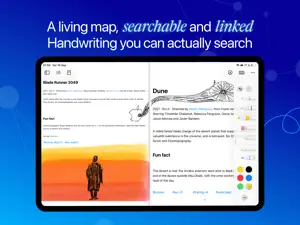


About Zibaldone: Handwriting Notes
Connected thinking on paper-like pages. Zibaldone reads your handwriting, so every page becomes searchable and linkable: find anything you wrote, discover connections you missed, and export your pages to plain Markdown. A notebook for deliberate thinking with Apple Pencil, for students, researchers, Zettelkasten and second-brain practitioners, and anyone who thinks best with a pen. Named after the poet Giacomo Leopardi's notebook of connected thoughts. Write to Think • Your handwriting is searchable: a page you scrawled last month is as easy to find as one you typed. • Teach recognition your own names and jargon with a custom dictionary. • A canvas that blends handwriting and typed Markdown on one page: drop text, images, tags and tasks anywhere. • Scratch over a word to erase it. No mode switch, no hunting for the eraser. • Handwriting tidy-up levels wandering words, and it stays your handwriting, not a font. • Rough lines, arrows, circles and boxes snap into clean shapes as you draw. • Lasso ink, text and images together to move or resize them as one. • Distraction-free Focus mode hides everything but the page. Link to Understand • Knowledge Graph, a living map of your ideas, built from your links, your tags (including hashtags written by hand) and the connections the app finds on its own. • Knowledge Graph Intelligence, powered by on-device Apple Intelligence, surfaces related pages you haven't linked yet and suggests tags you already use. No note content is ever sent anywhere for analysis. • Connect pages with [[wikilinks]] and autocomplete, and backlinks appear automatically. • Link to a page that doesn't exist yet and it waits in your graph as a placeholder. • Filter the graph by notebook or tag when the whole picture is too much. Act on What Matters • A planner where tasks evolve naturally from notes: add a task right on the page and it appears in your lists. • Today, Upcoming and Anytime lists, plus daily, weekly, monthly and yearly plans. • Every task links back to the page it came from. Notebooks That Feel Like Notebooks • Real page turns, double-sided pages, and paper from graph to college ruled to Seyès. • Open two windows side by side: write in one, keep the graph or your tasks in the other. Own Your Notes • Pick a folder once, in iCloud Drive or anywhere else, and the pages you write are exported as plain Markdown as you work. • Point it at your Markdown vault: [[wikilinks]] and typed #tags come through intact, with handwriting embedded as images and YAML frontmatter on every note. • No lock-in: your notes land in a folder you own, in a format that will still open in twenty years. Private by Default, Synced by Choice • No account, no sign-up. Works fully offline, and your notes never reach our servers. • Optional iCloud sync keeps your iPads in step, through your own private iCloud database. • Edit the same page on two iPads and the handwriting merges stroke by stroke. Neither device overwrites the other. Plans Start free, with no ads and no watermark. Upgrade to Pro for unlimited pages and notebooks: pay monthly, yearly with a free trial to start, or once with Lifetime and no subscription. Payment is charged to your Apple Account at confirmation of purchase. Subscriptions renew automatically unless auto-renew is turned off at least 24 hours before the end of the current period, and your account is charged for renewal within 24 hours before the period ends. Any unused portion of a free trial is forfeited when you purchase a subscription. Manage or cancel your subscription in your Apple Account settings after purchase. Apple Pencil recommended. On-device AI features require an iPad that supports Apple Intelligence. Terms of Use: https://zibaldone.ai/p/641a2e88-8569-4922-90f7-19b1b00d0904 Privacy Policy: https://zibaldone.ai/p/3f1752d8-6553-4021-a553-3e833b5ca86d
What’s new
Version 1.0.1 · Updated October 29, 2026
We banished the ghost that was stealing your ink. Really. Short strokes like dots, commas and accents could vanish right after you drew them. Not anymore. • Sidebars no longer reopen by themselves. Weird? Absolutely. Fixed. • Apple Pencil Pro now gives a little haptic tap when a long-press snaps or refines your stroke. • A few minor UI fixes you probably won't even notice.
App privacy
The developer, Sergey Kazakov, reported these privacy practices to Apple.
Data Linked to You
The following data, which may be collected and linked to your identity, may be used for the following purposes:
- Purchases: Purchase History
- Identifiers: User ID
- Usage Data: Product Interaction, Other Usage Data
- User Content: Customer Support
- Diagnostics: Crash Data, Performance Data, Other Diagnostic Data
Used for: Analytics, App Functionality
Alternatives to Zibaldone: Handwriting Notes
Looking for apps like Zibaldone: Handwriting Notes? Here are 6 similar apps on the App Store. The highest rated is Wait Menu (5.0/5), and 5 of the 6 are free to download.
-
 素 - 可写可画 & 无限画布笔记
-
 Acto|Handwritten Planner
-
 PaperNotes: Notebook & OCR
-
 Inkidian
3.0
Inkidian
3.0
-
 Wait Menu
5.0
Wait Menu
5.0
-
 Klad: Git & Markdown Notes
3.5
Klad: Git & Markdown Notes
3.5
| App | Rating | Price | Last updated | Compare |
|---|---|---|---|---|
| Zibaldone: Handwriting Notes | – | Free | October 29, 2026 | |
| 素 - 可写可画 & 无限画布笔记 | – | Free | Oct 13, 2026 | Compare |
| Acto|Handwritten Planner | – | Free | May 22, 2026 | Compare |
| PaperNotes: Notebook & OCR | – | Free | Oct 15, 2026 | Compare |
| Inkidian | 3.0 / 5 (2) | Free | Oct 22, 2026 | Compare |
| Wait Menu | 5.0 / 5 (1) | 1.99 USD | Oct 18, 2026 | Compare |
| Klad: Git & Markdown Notes | 3.5 / 5 (2) | Free | Oct 17, 2026 | Compare |