

Focus Labs: Study Timelapse
Akash Shah Productivity iPhoneiPadiPod touch
Focus Labs: Study Timelapse is a free Productivity app for iPhone and iPad by Akash Shah. Rated 5.0/5 from 5 ratings. Requires iOS 16.4.
- Rating
- 5.0
- 5 ratings
- Price
- Free
- on the App Store
- Size
- 55 MB
- Age 4+
- Updated
- Oct 23
- 2026 · v1.6
Screenshots



About Focus Labs: Study Timelapse
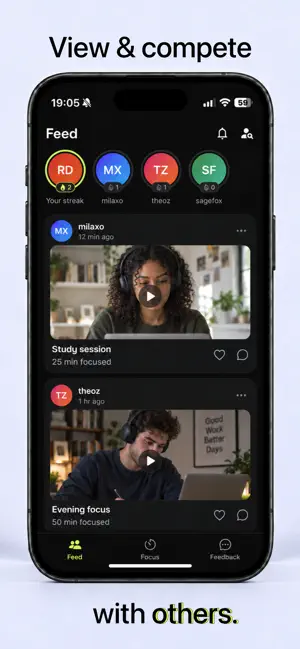
Make your hard work visible. Focus Labs helps you start studying, capture your effort, and see your progress build. Set a focus timer, record an optional timelapse, and create a history of the sessions you showed up for. Whether you’re preparing for an exam, practicing a skill, or working through an assignment, give your next session a clear start. FOCUS YOUR WAY Choose your session length and get started. Use the timer on its own or turn on your camera to capture a timelapse. Optional Pomodoro-style breaks help structure your study time. SEE THE WORK YOU PUT IN Turn a long session into a short video you can look back on. Save your sessions in your personal history and watch your focused hours add up. BUILD YOUR CONSISTENCY Track your streak, review your activity, and earn badges as you reach milestones. Every session adds to your record of showing up. KEEP GOING WITH FRIENDS Follow classmates and study partners, share completed sessions, and encourage each other with reactions. Everyone studies on their own schedule—there’s no live call to join. CHOOSE WHAT YOU SHARE Sessions are private by default. Keep your progress for yourself or share a session with your followers. Timelapse recording is optional, with privacy blur available when you use it. Start a session. See your effort. Keep showing up.
Ratings & reviews
5.0
5 ratings
What’s new
Version 1.6 · Updated October 23, 2026
Faster, cleaner, and more private. - Your sessions now live in a grid on your profile - Share your session as a video, card, or sticker to your story - Private by default — only people you approve can see your sessions - Privacy blur now covers your whole timelapse, not just the preview - Much faster feed with timelapses that play as you scroll - New focus score so you can see how locked in you were - Remove subjects you no longer use - Lots of bug fixes and performance improvements
App privacy
The developer, Akash Shah, reported these privacy practices to Apple.
Data Linked to You
The following data, which may be collected and linked to your identity, may be used for the following purposes:
- Contact Info: Email Address, Name
- User Content: Photos or Videos, Other User Content
- Identifiers: User ID, Device ID
- Usage Data: Product Interaction, Other Usage Data
Used for: App Functionality
Alternatives to Focus Labs: Study Timelapse
Looking for apps like Focus Labs: Study Timelapse? Here are 6 similar apps on the App Store. The highest rated is Chronos: Prove Your Day (5.0/5), and all 6 are free to download.
-
 LockLapse: Study Timelapse
-
 FocusTimer: Pomodoro Focus
-
 Chronos: Prove Your Day
5.0
Chronos: Prove Your Day
5.0
-
 AngryMoti: Timelapse Pomodoro
-
 Study Timer - Shadow Task
5.0
Study Timer - Shadow Task
5.0
-
 Focus Tracker - Study Timer
| App | Rating | Price | Last updated | Compare |
|---|---|---|---|---|
| Focus Labs: Study Timelapse | 5.0 / 5 (5 ratings) | Free | October 23, 2026 | |
| LockLapse: Study Timelapse | – | Free | Aug 22, 2026 | Compare |
| FocusTimer: Pomodoro Focus | – | Free | Aug 24, 2026 | Compare |
| Chronos: Prove Your Day | 5.0 / 5 (4) | Free | Sep 30, 2026 | Compare |
| AngryMoti: Timelapse Pomodoro | – | Free | Sep 15, 2026 | Compare |
| Study Timer - Shadow Task | 5.0 / 5 (3) | Free | Oct 6, 2026 | Compare |
| Focus Tracker - Study Timer | – | Free | Feb 13, 2026 | Compare |