

NanoSnap
恒俭 董 Photo & Video iPhoneiPadiPod touch
NanoSnap is a free Photo & Video app for iPhone and iPad by 恒俭 董. Requires iOS 17.6. Updated July 24, 2026.
- Price
- Free
- on the App Store
- Size
- 6 MB
- Age 4+
- Updated
- Jul 24
- 2026 · v1.0.9
Screenshots
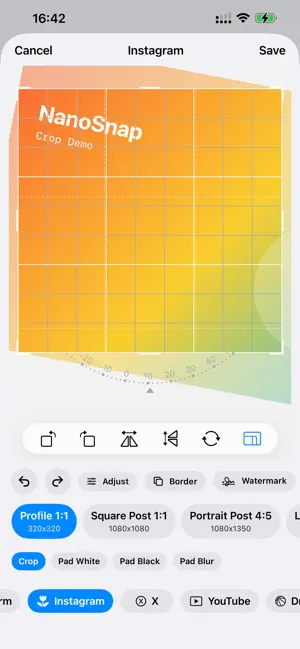
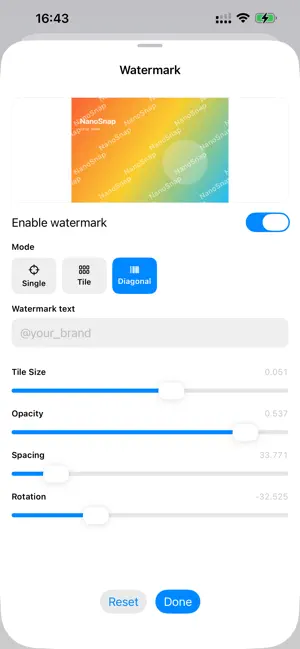


About NanoSnap
NanoSnap is your ultimate lightweight, professional photo cropping and formatting companion. Designed for creators, photographers, and social media enthusiasts who demand absolute precision and aesthetic perfection before hitting "share." Whether you’re formatting for Instagram, TikTok, YouTube, or Pinterest, NanoSnap instantly provides accurate aspect ratios without compromising image quality. Key Features: Social Media Ready: Instant, mathematically accurate presets for IG, YouTube, X, TikTok, Pinterest, and more. Say goodbye to awkward cropping. Pro Watermarking: Complete protection for your work. Add customizable text, adjust opacity, tweak margins, and activate beautiful diagonal/vertical tiled watermark grids. Custom Borders & Frames: Elevate your photos with stunning corner radius adjustments and stroke controls to stand out on any feed. Precision Color Adjustment: Easily tune brightness, contrast, and saturation directly within our sleek, distraction-free dark-mode editor. Uncompromised Quality: Export in massive ultra-HD original sizes, or utilize our smart "Social Network Optimized" compression engine. Intuitive Gestures: Flip, rotate, scale, and pan smoothly via our advanced gesture engine. Download NanoSnap today—Because every pixel of your creativity deserves the perfect frame.
What’s new
Version 1.0.9 · Updated July 24, 2026
New • Recent edits: the last 10 exports are kept on the Home screen. Tap one to return to that session — color, border, watermark, platform preset, export mode and the exact crop area all come back. Remove entries individually or clear them all. • Preview before saving: see the final image with border, watermark and color applied. On iPad's split layout the preview stays live in the sidebar. • PNG export: choose your quality tier first, then JPEG or PNG. • Batch processing now applies watermarks, borders and color adjustments too, using the same pipeline as single-photo editing. • Platform previews rebuilt: profile pages, feed posts, full-screen immersive, masonry and watch layouts now follow each platform's real structure — avatars appear where avatars go. • The Share extension now has a real interface instead of a silent hand-off. • iPad keyboard shortcuts: ⌘S save, ⌘P preview, ⌘Z / ⇧⌘Z undo and redo. • Location data is now removed from exports by default. Full-quality exports keep camera and date info; you can opt in to keeping location, or strip everything (Pro). Improved • iPad layout: the editor now uses a proper split view on wide screens, editing panels lay out in multiple columns, and panels open expanded. • Border corner radius and thickness are now relative to the image, so the same settings look consistent at any resolution — and they're remembered between sessions, like watermarks. • The border panel now has a live preview, matching the watermark panel. • Border, watermark, color and metadata buttons show when they're active, so you can tell at a glance what will appear in the export. • Watermark previews match the exported result. Text size, padding and tile spacing stay consistent for portrait and landscape photos alike. • Exporting watermarked photos is much faster, uses far less memory, and no longer produces unexpectedly enlarged files. • The editor opens faster, and applying color adjustments no longer freezes the interface. • Blurred padding backgrounds are no longer stretched on very wide or very tall canvases. • Brightness and contrast sliders now cover a more usable range, making it easy to return to neutral. • Saving no longer interrupts you with an alert: a brief confirmation appears with a shortcut into Photos. • Batch results now read as "saved / failed / skipped", so the numbers add up to what you selected. Fixed • Importing from the system Share sheet now works reliably, including when NanoSnap is already open. • Picking the same photo twice in a row opens the editor again. • The editor no longer closes from an accidental swipe, so your work isn't lost. • Drag-and-drop imports keep the original photo's metadata. • Photos that fail to load now show a message instead of doing nothing. • "Restore Purchases" on the unlock screen now actually restores. • Batch processing handles large photos without running out of memory, applies the same free-tier limits as the editor, and reports any photos it skipped. • The watermark panel's preview thumbnail no longer goes missing.
App privacy
The developer, 恒俭 董, reported these privacy practices to Apple.
Data Not Collected
The developer does not collect any data from this app.
Alternatives to NanoSnap
Looking for apps like NanoSnap? Here are 6 similar apps on the App Store. The highest rated is Collage Maker-Photo Editor Pic (5.0/5), and all 6 are free to download.
-
 Tabifu - Short Vlog Camera
-
 Collage Maker-Photo Editor Pic
5.0
Collage Maker-Photo Editor Pic
5.0
-
 AI Team Agent
5.0
AI Team Agent
5.0
-
 PicSlicer - Slice your images
5.0
PicSlicer - Slice your images
5.0
-
 LiviGrid - Live Photo & Puzzle
5.0
LiviGrid - Live Photo & Puzzle
5.0
-
 Any Erase Object Eraser
5.0
Any Erase Object Eraser
5.0
| App | Rating | Price | Last updated | Compare |
|---|---|---|---|---|
| NanoSnap | – | Free | July 24, 2026 | |
| Tabifu - Short Vlog Camera | – | Free | Sep 28, 2026 | Compare |
| Collage Maker-Photo Editor Pic | 5.0 / 5 (1) | Free | Oct 17, 2026 | Compare |
| AI Team Agent | 5.0 / 5 (1) | Free | Oct 27, 2026 | Compare |
| PicSlicer - Slice your images | 5.0 / 5 (1) | Free | Aug 13, 2026 | Compare |
| LiviGrid - Live Photo & Puzzle | 5.0 / 5 (3) | Free | Aug 17, 2026 | Compare |
| Any Erase Object Eraser | 5.0 / 5 (2) | Free | Oct 26, 2026 | Compare |
Compare NanoSnap with the top alternatives: ratings, updates, ASO score and keyword gaps →