

PicSlicer - Slice your images
Kuixi Song Photo & Video iPhoneiPadiPod touch
PicSlicer - Slice your images is a free Photo & Video app for iPhone and iPad by Kuixi Song. Rated 5.0/5 from 1 ratings. Requires iOS 17.0.
- Rating
- 5.0
- 1 ratings
- Price
- Free
- on the App Store
- Size
- 3 MB
- Age 4+
- Updated
- Aug 13
- 2026 · v1.0.4
Screenshots


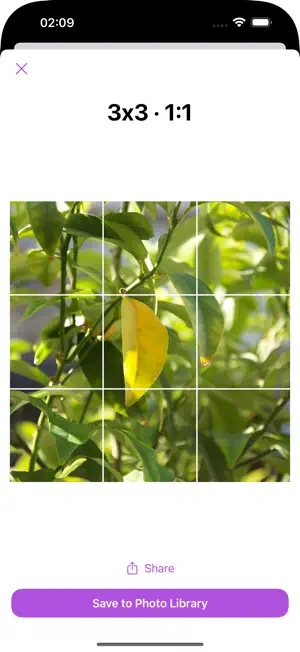
About PicSlicer - Slice your images
Feature List: • Smart Cropping: Supports multiple aspect ratios and custom crop sizes • High-Quality Output: Exports clear, lossless images without compromising quality • Real-Time Preview: Instantly see cropping results—what you see is what you get • One-Tap Save: Automatically saves cropped images to your photo library • Quick Share: Supports system sharing—easily share to other social platforms Use Cases: • Sharing panoramic travel photos • Publishing photography collections • Creating swipeable 3x3 grid photo stories • Displaying product images for businesses
What’s new
Version 1.0.4 · Updated August 13, 2026
Support slicing images for up-to 10 sub-images on horizontal and vertical axes.
App privacy
The developer, Kuixi Song, reported these privacy practices to Apple.
Data Not Collected
The developer does not collect any data from this app.
Alternatives to PicSlicer - Slice your images
Looking for apps like PicSlicer - Slice your images? Here are 6 similar apps on the App Store. The highest rated is PhotoSlicer (5.0/5), and all 6 are free to download.
-
 PhotoSlicer
5.0
-
 Life Moments
5.0
-
 Easy Image Slicer
-
 PanoSlicer
1.0
-
 SplitStudio: Slice Panoramas
3.0
-
 ONANY
5.0
| App | Rating | Price | Last updated | Compare |
|---|---|---|---|---|
| PicSlicer - Slice your images | 5.0 / 5 (1 rating) | Free | August 13, 2026 | |
| PhotoSlicer | 5.0 / 5 (3) | Free | Feb 17, 2026 | Compare |
| Life Moments | 5.0 / 5 (1) | Free | Sep 2, 2026 | Compare |
| Easy Image Slicer | – | Free | Jul 27, 2026 | Compare |
| PanoSlicer | 1.0 / 5 (1) | Free | Sep 14, 2025 | Compare |
| SplitStudio: Slice Panoramas | 3.0 / 5 (4) | Free | Dec 10, 2024 | Compare |
| ONANY | 5.0 / 5 (2) | Free | Sep 7, 2026 | Compare |