

LeFont: Handwriting Font Maker
Kareem Elkwae Graphics & Design iPhoneiPadiPod touch
LeFont: Handwriting Font Maker is a free Graphics & Design app for iPhone and iPad by Kareem Elkwae. Rated 5.0/5 from 1 ratings. Requires iOS 17.0.
- Rating
- 5.0
- 1 ratings
- Price
- Free
- on the App Store
- Size
- 18 MB
- Age 4+
- Updated
- Oct 31
- 2026 · v2.0.4
Screenshots



About LeFont: Handwriting Font Maker
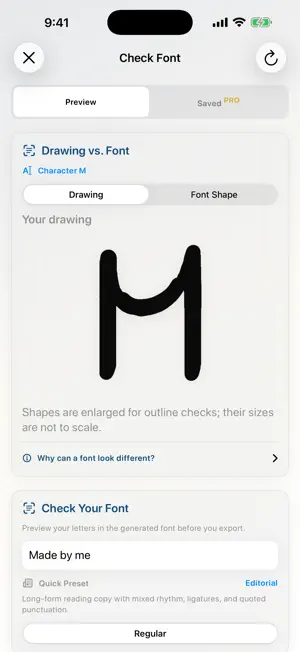
LeFont turns your handwriting into a real font you can install and use in apps that support custom fonts. Draw letters directly, import a writing sheet, refine glyphs, and export on your iPhone or iPad. MAKE A FONT THAT LOOKS LIKE YOU • Follow Guided Capture to draw uppercase, lowercase, numbers, punctuation, and language characters. • Create alternate forms for a glyph and preview the result in real words. • Use LeFont calligraphy tools or Apple Pencil tools on the same canvas. • Import a photo, scan, or completed writing sheet, then review each detected glyph. • Undo, erase, adjust, and approve your shapes before export. • Export a regular TrueType font for free and install it through iOS Settings. LANGUAGE AND SCRIPT PACKS English is included for free. Free projects use one writing system at a time. Nine optional one-time language packs expand the characters you can draw and export: • Latin Family Bundle: Spanish, Portuguese, French, and Italian letter sets, German characters, and extended Latin characters • Arabic • Japanese Hiragana (one Japanese script) • Japanese Katakana (a separate Japanese script) • Greek • Russian Cyrillic • Hebrew • Armenian • Georgian Each purchase unlocks only the listed character set or bundle, not an entire language beyond the characters shown in the app. Active Pro includes every current pack. Lifetime Pro permanently includes the current packs. Packs do not include Pro editing tools. LEFONT PRO Pro adds automation and typography tools to turn one Regular style into a font family: • Generate Auto Bold, Auto Italic, and Bold Italic drafts; redraw only what you want to change. • Smooth curves, refine contours, protect counters, and adjust glyph alignment. • Improve spacing, sidebearings, kerning, and glyph collisions. • Create contextual alternates and OpenType ligatures. • Export OTF, WOFF2 web-font packages, variable fonts, COLR/CPAL color fonts, and editable sources when compatible with the project. • Save proof sets and make specimen PDFs, font health reports, and review kits. Pro Monthly includes every current pack while active. Lifetime Pro includes the same tools and current packs permanently. If a Pro subscription ends, projects containing Pro-only features remain viewable and exportable, but editing is locked. Projects without active Pro-only content stay editable. PRIVATE BY DESIGN Font capture, image interpretation, cleanup, and export run on your device. LeFont does not require an account or cloud upload. Handwriting is never uploaded automatically; sharing a sample requires an explicit export and share action. Privacy Policy: https://elkwai.com/lefont-privacy.html Terms of Use: https://www.apple.com/legal/internet-services/itunes/dev/stdeula/
What’s new
Version 2.0.4 · Updated October 31, 2026
Verified that LeFont and Apple Pencil tools draw on the same canvas. Manual Save and Auto Save both preserve strokes when a project is reopened. Validated continued editing and save/reopen behavior for Spanish characters.
App privacy
The developer, Kareem Elkwae, reported these privacy practices to Apple.
Data Not Collected
The developer does not collect any data from this app.
Alternatives to LeFont: Handwriting Font Maker
Looking for apps like LeFont: Handwriting Font Maker? Here are 6 similar apps on the App Store. The highest rated is FontStudio: Create & Edit Font (5.0/5), and all 6 are free to download.
-
 FontStudio: Create & Edit Font
5.0
FontStudio: Create & Edit Font
5.0
-
 Font Creator Studio
5.0
Font Creator Studio
5.0
-
 GlyphSnap: Photo to Font
5.0
GlyphSnap: Photo to Font
5.0
-
 Scribbles.ink
3.5
Scribbles.ink
3.5
-
 FotoFont - Photo to Font Maker
-
 Font Maker: TypeMine
| App | Rating | Price | Last updated | Compare |
|---|---|---|---|---|
| LeFont: Handwriting Font Maker | 5.0 / 5 (1 rating) | Free | October 31, 2026 | |
| FontStudio: Create & Edit Font | 5.0 / 5 (5) | Free | Aug 26, 2026 | Compare |
| Font Creator Studio | 5.0 / 5 (2) | Free | Sep 22, 2026 | Compare |
| GlyphSnap: Photo to Font | 5.0 / 5 (2) | Free | Oct 18, 2026 | Compare |
| Scribbles.ink | 3.5 / 5 (2) | Free | May 8, 2026 | Compare |
| FotoFont - Photo to Font Maker | – | Free | Apr 7, 2026 | Compare |
| Font Maker: TypeMine | – | Free | Sep 14, 2026 | Compare |