

Shoulder Surf: Meeting AI
WEIRTECH Productivity iPhoneiPadiPod touchApple Watch
Shoulder Surf: Meeting AI is a free Productivity app for iPhone and iPad by WEIRTECH. Rated 5.0/5 from 1 ratings. Requires iOS 26.0.
- Rating
- 5.0
- 1 ratings
- Price
- Free
- on the App Store
- Size
- 168 MB
- Age 12+
- Updated
- Sep 30
- 2026 · v1.18
Screenshots


About Shoulder Surf: Meeting AI
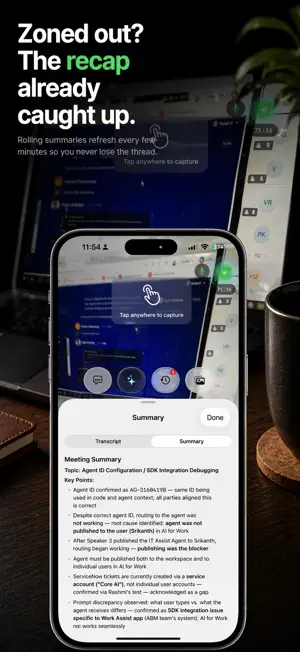
SHOULDER SURF: MEETING & INTERVIEW ASSISTANT You can take notes, or you can be in the meeting. Not both. I built Shoulder Surf because I kept losing the conversation while trying to capture it. Looking down to write something means missing the next thing. Trying to remember everything means listening less. The harder you work to stay on top of a meeting, the less present you actually are. Shoulder Surf takes the tracking off your plate so you can stay where you should be: in the conversation, looking at the person in front of you. STAY PRESENT It listens, transcribes, and quietly keeps a running record of what was said and who said it. Rolling summaries refresh every few minutes, so if your attention drifts you can catch up in seconds without breaking eye contact. ASK WITHOUT INTERRUPTING Tap once to ask anything about what was just said. Pull the action items, get a fact checked, request a suggested response, or ask whatever you want, and the answer lands before the conversation moves on. Read it on screen, or hear it privately through your AirPods. TURN MEETINGS INTO DELIVERABLES This is where Shoulder Surf goes past note taking. Ask it to build something and it does: a real Excel spreadsheet, a project Gantt chart, a summary document, a follow up email. It generates the actual file, right there in the chat, from what was discussed. Hand it a document too, a spec, an agenda, a contract, and it reads that alongside the meeting so its answers are grounded in your real material, not guesswork. CHAT WITH YOUR MEETINGS Every session is saved as a complete record: full transcript, captured insights, photos, and AI responses. Chat with any meeting to surface a decision or pull a detail. Or chat across an entire project, choose how many past meetings to include and what to draw from, and ask questions that span weeks. REMEMBER ACROSS MEETINGS Meeting Memory carries decisions and commitments into the next meeting. Plus brings your recent meetings into every answer. Pro brings all of them. HOW IT WORKS Shoulder Surf runs on your iPhone, beside your meeting. It captures audio through the microphone and transcribes on device in real time. Nothing to install on your computer. No bots joining your calls. Never in a screen share. Works with Zoom, Teams, Google Meet, in person, or anywhere conversations happen. FEATURES • Live transcription with on-device speech recognition • Speaker labels so you know who said what • Quick Prompts: summaries, action items, suggested responses, fact checking, and your own custom prompts • Generate real files: spreadsheets, Gantt charts, documents, and emails from your meeting • Attach documents so the AI answers from your own material • Web search on demand for questions that need current info • Private audio responses through AirPods or Bluetooth headphones • Camera capture: slides, whiteboards, documents • Shareable meeting reports • Save action items straight to Reminders • Apple Watch: trigger queries from your wrist, phone untouched • Dynamic Island and Lock Screen for at a glance status • Available in English, French, Spanish, and Japanese PRIVACY FIRST • On-device transcription means audio never leaves your phone • API keys stored in your iOS Keychain • iCloud sync optional, no account required for on-device features • Your data, your control PLANS • Free: on-device Apple Intelligence AI at no cost, plus a recurring monthly cloud AI budget of about 5 hours a month that renews. Reports, People, monthly searches and files. • Plus: unlimited cloud AI, Memory across recent meetings, document attachments, project chat, more searches and files each month. 7 day free trial. • Pro: everything in Plus, plus full-history Memory and advanced AI for reports and analysis. • Bring Your Own Key: OpenAI, Anthropic, Google, xAI, DeepSeek, OpenRouter, and more. Subscriptions auto renew monthly. Manage or cancel anytime in Settings. Terms of Service: https://shouldersurf.com/terms
What’s new
Version 1.18 · Updated September 30, 2026
LISTEN FROM YOUR MAC Get the free Shoulder Surf Companion at shouldersurf.com/desktop and pick Mac Companion when the app asks how it should listen. Your Mac hears both sides of the call, the other people through its system audio and you through its microphone, and relays them to your iPhone. Devices on the same Apple Account pair on their own. The camera button can watch your Mac's screen instead of the room, and a tap captures it. QUICK PROMPTS FROM YOUR KEYBOARD On the Mac, Control+Option+1 through 9 fire your Quick Prompts in order, and you can change the keys. In the prompt editor, a prompt can now take a picture when asked, of your Mac's screen or through the camera, and send it with the question. On plans that include web search, it can also search the web every time it runs. HOW SHOULD I LISTEN? One menu names each way to listen for the hardware you have: iPhone Mic, Mac Companion, USB-C through a call tap, or Read the screen for captions with no audio. Each one says what you need and tells you before you start if it cannot work. If your phone is on Voice Isolation, the app says so and offers one tap to Wide Spectrum. PLAYBACK THAT SKIPS THE DEAD AIR Playing a meeting back skips long pauses by default, and you pick how long a pause has to be, from three seconds to thirty. Nothing is cut from the recording. Long turns from one speaker break into paragraphs. PAUSE FROM THE ORB Tap the orb to pause or end a session. A bar at the top, the Dynamic Island and the lock screen all show when a meeting is paused. TRANSLATION THAT FOLLOWS YOU A meeting in another language translates to your phone's language on its own: title, summary, report and your questions. A floating pill switches to the original, and you can share a meeting in a third language. SUBSCRIBE WITHOUT AN ACCOUNT Tap a plan and subscribe. No account needed. Sign in with Apple later only if you want your plan on your other devices. Restore Purchases is right on the upgrade screen. YOUR DATA, YOUR CALL Turn off anonymous usage statistics in Settings, Privacy & About. SMALLER THINGS Imported recordings get live speaker labels and sort by their own date. References sync between iPhone and iPad. Chat retries a dropped send on its own and keeps your message. Filter action items by Open, Completed or All. iPhone landscape gets the iPad's layout. Save to Photos confirms it worked. The camera pauses if the phone gets too hot, and says why. FIXES More than a hundred, most of them in the Mac companion, the session screen, translation and the review screens. Ending a meeting no longer restarts your music.
App privacy
The developer, WEIRTECH, reported these privacy practices to Apple.
Data Linked to You
The following data, which may be collected and linked to your identity, may be used for the following purposes:
- Contact Info: Email Address, Name
- Usage Data: Advertising Data, Product Interaction
- Identifiers: Device ID, User ID
- Purchases: Purchase History
- User Content: Photos or Videos, Audio Data, Other User Content
- Diagnostics: Other Diagnostic Data
Used for: Developer’s Advertising or Marketing, Analytics, App Functionality
Alternatives to Shoulder Surf: Meeting AI
Looking for apps like Shoulder Surf: Meeting AI? Here are 6 similar apps on the App Store. The highest rated is Private AI Note Taker: Basil (5.0/5), and 5 of the 6 are free to download.
-
 Aurora AI - Find anything
4.3
Aurora AI - Find anything
4.3
-
 Rosetta: AI Notes, Links, Todo
4.9
Rosetta: AI Notes, Links, Todo
4.9
-
 PDF Max Pro - Edit, Sign PDFs
4.5
PDF Max Pro - Edit, Sign PDFs
4.5
-
 Notes for iPhone - YepNotes
4.0
Notes for iPhone - YepNotes
4.0
-
 Private AI Note Taker: Basil
5.0
Private AI Note Taker: Basil
5.0
-
 Itemia: Home Inventory Boxes
4.9
Itemia: Home Inventory Boxes
4.9
| App | Rating | Price | Last updated | Compare |
|---|---|---|---|---|
| Shoulder Surf: Meeting AI | 5.0 / 5 (1 rating) | Free | September 30, 2026 | |
| Aurora AI - Find anything | 4.3 / 5 (6) | Free | Sep 22, 2026 | Compare |
| Rosetta: AI Notes, Links, Todo | 4.9 / 5 (9) | Free | Sep 20, 2026 | Compare |
| PDF Max Pro - Edit, Sign PDFs | 4.5 / 5 (1,459) | 9.99 USD | Sep 15, 2026 | Compare |
| Notes for iPhone - YepNotes | 4.0 / 5 (71) | Free | Oct 6, 2026 | Compare |
| Private AI Note Taker: Basil | 5.0 / 5 (28) | Free | Oct 2, 2026 | Compare |
| Itemia: Home Inventory Boxes | 4.9 / 5 (7) | Free | Aug 18, 2026 | Compare |