

Rosetta: AI Notes, Links, Todo
Gabriel Langon Maomy Productivity iPhoneiPadiPod touchApple Watch
Rosetta: AI Notes, Links, Todo is a free Productivity app for iPhone and iPad by Gabriel Langon Maomy. Rated 4.9/5 from 9 ratings. Requires iOS 15.0.
- Rating
- 4.9
- 9 ratings
- Price
- Free
- on the App Store
- Size
- 77 MB
- Age 4+
- Updated
- Oct 24
- 2026 · v1.6.1
Screenshots
Save to Pinterest


About Rosetta: AI Notes, Links, Todo
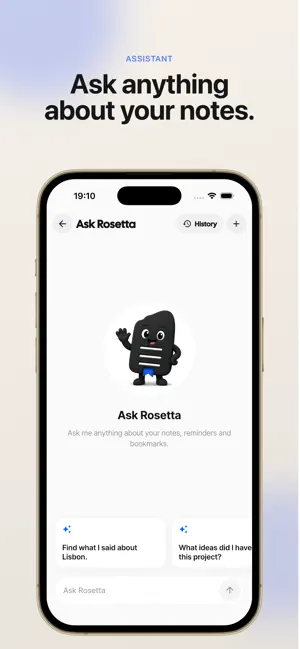
Capture voice notes, write Markdown notes, organize bookmarks and manage to-do lists with habit tracking—all in one place. Ask Rosetta, your built-in AI assistant, to help you find and use what you’ve saved. One personal memory for your AI apps. Keep your notes, bookmarks and reminders connected, and share the context you choose with compatible AI assistants. CAPTURE IDEAS BY VOICE Dictate a thought on your iPhone or Apple Watch, or import audio, and turn it into a structured note or reminder. Keep recording while you use another app, so an idea does not have to wait. WRITE AND CONNECT MARKDOWN NOTES Write and edit Markdown with headings, images and your choice of editor font. Link directly to a note section, connect notes to reminders and saved links, and explore related notes in a visual graph. Reuse note templates with date and time variables. Export notes as Markdown or PDF. YOUR BOOKMARK MANAGER Share a link from your browser to Rosetta to keep it with your notes. Read saved links without distractions, or choose “Import page as a note” to turn a page's main text and images into an editable note. Organize your reading in a list or gallery. TO-DO LISTS AND HABIT TRACKING Create reminders, break them into subtasks and set recurring routines. Use the built-in habit tracker to follow your routines and review completed and missed occurrences in a calendar. Import Apple Reminders and connect Google Calendar or Apple Calendar to keep events alongside your notes. GIVE YOUR AI ASSISTANTS CONTEXT Ask Rosetta, the built-in AI assistant, questions about your notes. Connect compatible AI assistants through MCP (Model Context Protocol) so they can use the personal knowledge you choose to make available. Keep your context together instead of rebuilding it in each conversation. FIND WHAT YOU SAVED Organize notes, reminders and bookmarks with categories and tags. Search across your memory, choose list or gallery views for notes and links, and use Home Screen widgets for quick access. From a spoken idea to a saved article or your next task, Rosetta keeps the things you want to remember connected.
Ratings & reviews
4.9
9 ratings
What’s new
Version 1.6.1 · Updated October 24, 2026
Rosetta now supports iPhone Duo, with layouts and controls that adapt as you open, close and rotate your device.
App privacy
The developer, Gabriel Langon Maomy, reported these privacy practices to Apple.
Data Linked to You
The following data, which may be collected and linked to your identity, may be used for the following purposes:
- Contact Info: Email Address, Name
Used for: App Functionality
Data Not Linked to You
The following data, which may be collected but is not linked to your identity, may be used for the following purposes:
- Location: Coarse Location
- User Content: Other User Content, Audio Data
- Usage Data: Product Interaction, Other Usage Data
- Diagnostics: Crash Data, Other Diagnostic Data
Used for: Analytics, App Functionality
Alternatives to Rosetta: AI Notes, Links, Todo
Looking for apps like Rosetta: AI Notes, Links, Todo? Here are 6 similar apps on the App Store. The highest rated is Ideon: Scroll Your Own Ideas (5.0/5), and all 6 are free to download.
-
 Ideon: Scroll Your Own Ideas
5.0
-
 Clipboard AI - Paste Keyboard
4.8
-
 Prazo: Calendar & To-Do List
5.0
-
 Caliu - Markdown Notes
5.0
-
 YouNotes: Good Notes & Notepad
5.0
-
 Just Did - Task Tracker
4.5
| App | Rating | Price | Last updated | Compare |
|---|---|---|---|---|
| Rosetta: AI Notes, Links, Todo | 4.9 / 5 (9 ratings) | Free | October 24, 2026 | |
| Ideon: Scroll Your Own Ideas | 5.0 / 5 (2) | Free | Nov 19, 2026 | Compare |
| Clipboard AI - Paste Keyboard | 4.8 / 5 (35) | Free | Nov 22, 2026 | Compare |
| Prazo: Calendar & To-Do List | 5.0 / 5 (2) | Free | Nov 22, 2026 | Compare |
| Caliu - Markdown Notes | 5.0 / 5 (6) | Free | Nov 20, 2026 | Compare |
| YouNotes: Good Notes & Notepad | 5.0 / 5 (5) | Free | Nov 13, 2026 | Compare |
| Just Did - Task Tracker | 4.5 / 5 (8) | Free | Sep 20, 2026 | Compare |