

Unlinkd: Screen Time Control
Thalys Viana Productivity iPhoneiPadiPod touch
Unlinkd: Screen Time Control is a free Productivity app for iPhone and iPad by Thalys Viana. Requires iOS 26.0. Updated October 11, 2026.
- Price
- Free
- on the App Store
- Size
- 41 MB
- Age 12+
- Updated
- Oct 11
- 2026 · v1.0.0
Screenshots

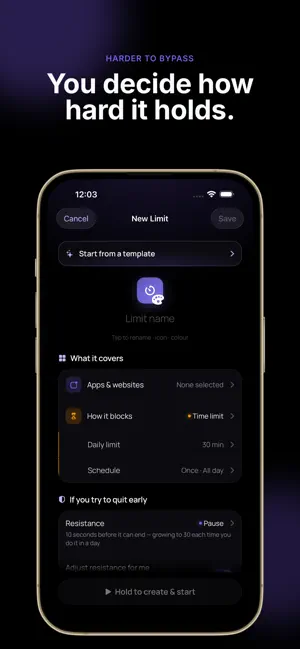


About Unlinkd: Screen Time Control
Take back your time without relying on willpower. Unlinkd helps you spend less time on distracting apps by turning your intentions into limits that actually hold. Block apps when you have used enough, during the hours that matter, or when you arrive somewhere you want to stay focused. Choose how hard each limit should be to bypass, track how your day is going, and make every exception a conscious decision. LESS SCROLLING. MORE CONTROL. Set daily limits or schedules for the apps and categories that take more of your time than you want. Choose the level of resistance that fits the moment: • Open: light friction when you just need a reminder • Pause: makes you stop before continuing • Commit: built for limits you do not want to negotiate with yourself • Locked: when the decision has already been made You choose the rule. Unlinkd helps you keep it. BLOCK BY TIME, USAGE OR LOCATION Different moments need different boundaries. Limit social media after 30 minutes. Block distracting apps during work or study hours. Keep games out of bedtime. Or activate a limit automatically when you arrive at the office, library, gym or anywhere else. Location-based limits are processed on your device. SEE HOW YOUR DAY IS REALLY GOING Your Balance Score turns your screen-time choices into one simple number from 0 to 100. Stay within your limits and your score improves throughout the day. Go beyond them and you immediately see the impact. No complicated dashboards. Just a clear signal of whether your phone is getting more of your day than you intended. MAKE EXCEPTIONS INTENTIONAL Sometimes you genuinely need access. Weekly passes let you temporarily bypass a block when it matters, but add enough friction to stop an automatic impulse from becoming another hour of scrolling. You can even choose your own pass budget with Unlinkd Pro, including zero. START IN MINUTES Use ready-made setups for social media, work, sleep and study, or build your own. Create reusable app groups once and use them across multiple limits. PRIVATE BY DESIGN Unlinkd uses Apple’s Screen Time frameworks. Your app activity and location stay on your device. Unlinkd does not need to know which specific apps you use or how long you spend inside them. Sync keeps your limits and app groups available across your devices without syncing your usage history. START FOR FREE Use Unlinkd for free with: • Up to 3 limits • Up to 2 app groups • Daily limits and schedules • The Unlinkd block screen • Weekly passes • Today’s Balance Score No expiration. UNLOCK UNLINKD PRO Upgrade when you want more control: • Unlimited limits • Unlimited app groups • Commit and Locked resistance levels • Custom weekly pass budget, including zero • Full Balance Score history • 7-day trends • Location-based limits Unlinkd Pro is available monthly or yearly, with a free trial on the yearly plan. Subscriptions renew automatically unless canceled. Terms of Use: https://unlinkd.app/terms Privacy Policy: https://unlinkd.app/privacy
App privacy
The developer, Thalys Viana, reported these privacy practices to Apple.
Data Linked to You
The following data, which may be collected and linked to your identity, may be used for the following purposes:
- Identifiers: User ID, Device ID
- Usage Data: Product Interaction
- Purchases: Purchase History
- Contact Info: Email Address, Name
- User Content: Other User Content
Used for: Analytics, App Functionality
Data Not Linked to You
The following data, which may be collected but is not linked to your identity, may be used for the following purposes:
- Diagnostics: Crash Data, Performance Data, Other Diagnostic Data
Used for: App Functionality
Alternatives to Unlinkd: Screen Time Control
Looking for apps like Unlinkd: Screen Time Control? Here are 6 similar apps on the App Store. The highest rated is Ticking: Screen Time Control (5.0/5), and all 6 are free to download.
-
 PlannerlyApp
-
 QuizQuality
-
 Ticking: Screen Time Control
5.0
Ticking: Screen Time Control
5.0
-
 PDF-AI Document Translator
4.0
PDF-AI Document Translator
4.0
-
 Cephable
5.0
Cephable
5.0
-
 IATEC
5.0
IATEC
5.0
| App | Rating | Price | Last updated | Compare |
|---|---|---|---|---|
| Unlinkd: Screen Time Control | – | Free | October 11, 2026 | |
| PlannerlyApp | – | Free | May 25, 2026 | Compare |
| QuizQuality | – | Free | Oct 21, 2026 | Compare |
| Ticking: Screen Time Control | 5.0 / 5 (2) | Free | Oct 13, 2026 | Compare |
| PDF-AI Document Translator | 4.0 / 5 (1) | Free | Dec 6, 2025 | Compare |
| Cephable | 5.0 / 5 (9) | Free | Jul 22, 2026 | Compare |
| IATEC | 5.0 / 5 (1) | Free | Oct 9, 2026 | Compare |