

Cephable
Enabled Play LLC Productivity iPhoneiPadiPod touch
Cephable is a free Productivity app for iPhone and iPad by Enabled Play LLC. Rated 5.0/5 from 9 ratings. Requires iOS 15.1. Updated July 22, 2026.
- Rating
- 5.0
- 9 ratings
- Price
- Free
- on the App Store
- Size
- 158 MB
- Age 4+
- Updated
- Jul 22
- 2026 · v4.7.0
Screenshots


About Cephable
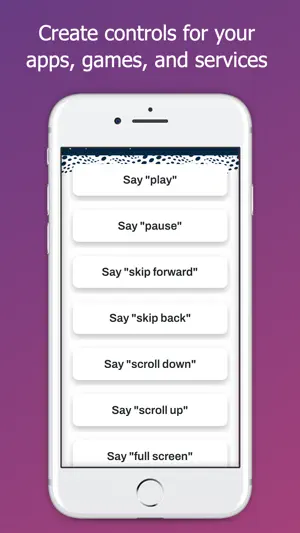
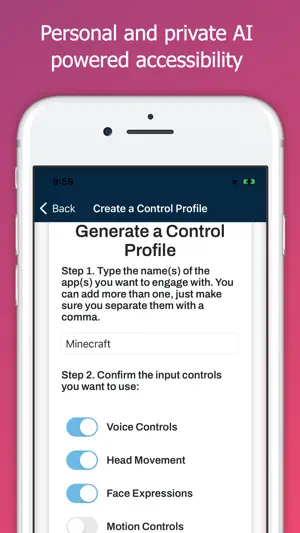
The Cephable Companion App is your personal AI for hands-free control and productivity. Control. Create. Automate. Connect your mobile device to your Mac or Windows computer or console and control your favorite apps using voice commands, dictation, quick actions, and more. Whether you’re multitasking at work, gaming, or creating content, Cephable gives you fast, flexible ways to control your day, across the tools you already use—all with local AI that doesn’t process in the cloud. Boost your productivity Control presentations hands-free- Advance slides, open apps, and stay in command of your meeting without ever touching your computer. Dictate from your phone- Write documents, respond to messages, or update your CRM using only your voice. Use Quick Actions to streamline your tools- Use personalized shortcuts for everyday apps like Notion, Slack, Chrome, or Excel Switch apps with a simple voice command- Jump from tabs to tools, from email to editing, all without breaking your flow. Hands-Free Gameplay Use voice commands, facial expressions, and Quick Actions to play supported games—whether you're using a keyboard, a controller, or going fully hands-free. Cephable adds new ways to play without locking you into one style. Privacy is built in, not bolted on Your voice and video stay local- Cephable never records, streams, or sends your audio or video to the cloud. All inputs are processed on-device—privately and securely. Your data is yours- Cephable doesn’t use your commands or activity to train models for others. Everything stays private—and your app controls move with you across connections. Built to empower, not exploit- Cephable is designed to enhance your control—not monitor it. No invasive tracking. No creepy data collection. Download the Cephable Companion App to add remote dictation and voice input to your setup. Pairs with the Cephable desktop app for Mac and Windows. Learn more at cephable.com
Ratings & reviews
5.0
9 ratings
What’s new
Version 4.7.0 · Updated July 22, 2026
- Ability to start, stop, and continue automations with your desktop app.
App privacy
The developer, Enabled Play LLC, reported these privacy practices to Apple.
Data Linked to You
The following data, which may be collected and linked to your identity, may be used for the following purposes:
- Identifiers: User ID, Device ID
- Contact Info: Name, Email Address
Used for: Analytics, Product Personalization, App Functionality
Data Not Linked to You
The following data, which may be collected but is not linked to your identity, may be used for the following purposes:
- Usage Data: Product Interaction
- Diagnostics: Crash Data, Performance Data
- User Content: Gameplay Content, Other User Content
Used for: Analytics, App Functionality
Alternatives to Cephable
Looking for apps like Cephable? Here are 6 similar apps on the App Store. The highest rated is CanPlan (4.7/5), and all 6 are free to download.
-
 MeMinder 4.0
3.7
MeMinder 4.0
3.7
-
 Athena Eye Control - Reader
4.6
Athena Eye Control - Reader
4.6
-
 QMinder
3.0
QMinder
3.0
-
 CanPlan
4.7
CanPlan
4.7
-
 Permobil QuickConfig
2.2
Permobil QuickConfig
2.2
-
 Thruday: Visual Daily Planner
4.6
Thruday: Visual Daily Planner
4.6
| App | Rating | Price | Last updated | Compare |
|---|---|---|---|---|
| Cephable | 5.0 / 5 (9 ratings) | Free | July 22, 2026 | |
| MeMinder 4.0 | 3.7 / 5 (3) | Free | Sep 20, 2024 | Compare |
| Athena Eye Control - Reader | 4.6 / 5 (12) | Free | Dec 14, 2024 | Compare |
| QMinder | 3.0 / 5 (2) | Free | Jan 25, 2024 | Compare |
| CanPlan | 4.7 / 5 (3) | Free | Feb 24, 2026 | Compare |
| Permobil QuickConfig | 2.2 / 5 (24) | Free | Jul 23, 2026 | Compare |
| Thruday: Visual Daily Planner | 4.6 / 5 (72) | Free | Sep 25, 2026 | Compare |
Compare Cephable with the top alternatives: ratings, updates, ASO score and keyword gaps →