

VNC Pad - Remote Mac Desktop
Chang Hui-tzu Utilities iPad
VNC Pad - Remote Mac Desktop is a paid Utilities app for iPad by Chang Hui-tzu. Requires iOS 17.0. Updated October 18, 2026.
- Price
- 9.99 USD
- on the App Store
- Size
- 3 MB
- Age 4+
- Updated
- Oct 18
- 2026 · v1.1.2
Screenshots


About VNC Pad - Remote Mac Desktop
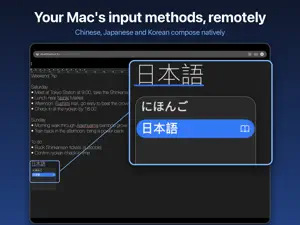
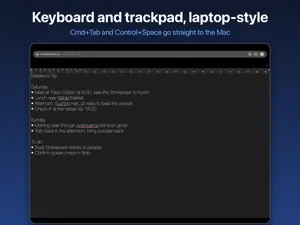
VNC Pad turns an iPad with a Magic Keyboard or trackpad into a real remote terminal for your Mac. Every key works, the trackpad feels native, and, unlike other VNC clients, your Mac's input methods work too. ■ INPUT METHODS THAT ACTUALLY WORK With the free VNC Pad Helper (a small macOS menu bar app), your Mac treats the iPad keyboard as a physical keyboard. Zhuyin, Cangjie, Pinyin, Japanese, Korean and every other macOS input method compose and pick candidates natively, and Control+Space switches between them. ■ BUILT FOR KEYBOARD AND TRACKPAD • 232+ key mappings, including F1–F19 and left/right modifiers • Sends shortcuts iPadOS normally keeps for itself: Cmd+Tab, Cmd+Space, Control+Space • Key repeat for Backspace, arrows and every other key • Pixel-smooth trackpad and two-finger scrolling at the Mac's native speed • Double-click, triple-click, drag and right-click ■ SMOOTH DISPLAY • Metal-accelerated rendering that only redraws what changed • 60fps H.264 streaming when the Helper is installed • Picks a display quality for your network automatically • Pinch to zoom (1x–5x) and pan, kept across reconnects ■ RELIABLE CONNECTION • Finds Macs on your network via Bonjour; tap to connect • Recovers automatically after app switches, Mac sleep or Wi-Fi roaming • Two-way clipboard sync between iPad and Mac ■ PRIVACY FIRST • Connects straight to your Mac, with no cloud servers and no account • No tracking, no analytics, no data collection, no ads • Passwords stored in the iOS Keychain • One-time purchase, no subscription ■ GET STARTED IN THREE STEPS 1. On the Mac: System Settings > General > Sharing > turn on Screen Sharing 2. On the iPad: open VNC Pad; your Mac appears automatically 3. (Recommended) Install the free VNC Pad Helper on the Mac and enter the PIN shown in its menu bar to enable input method support Helper download: https://adriechang.github.io/VNCRemote-Site/helper.html ■ REQUIREMENTS • iPadOS 17 or later; a hardware keyboard and trackpad are recommended • macOS built-in Screen Sharing • The Helper requires macOS 13 or later • iPad and Mac on the same local network, or connected over a VPN Questions or feedback? Reach the developer from the Support page.
What’s new
Version 1.1.2 · Updated October 18, 2026
• Updated App Store description and screenshots that better explain input method support • New App Store pages in Simplified Chinese, Japanese and Korean
App privacy
The developer, Chang Hui-tzu, reported these privacy practices to Apple.
Data Not Linked to You
The following data, which may be collected but is not linked to your identity, may be used for the following purposes:
- Other Data: Other Data Types
Used for: App Functionality
Alternatives to VNC Pad - Remote Mac Desktop
Looking for apps like VNC Pad - Remote Mac Desktop? Here are 6 similar apps on the App Store. The highest rated is Telkino: VNC Remote Desktop (5.0/5), and all 6 are free to download.
-
 Telkino: VNC Remote Desktop
5.0
Telkino: VNC Remote Desktop
5.0
-
 Lynk - Your favorite links
5.0
Lynk - Your favorite links
5.0
-
 Conduit: SSH, RDP, VNC & Web
1.0
Conduit: SSH, RDP, VNC & Web
1.0
-
 Remio - Remote Desktop
4.6
Remio - Remote Desktop
4.6
-
 BLE Radar Ultra
5.0
BLE Radar Ultra
5.0
-
 BT Keys: Keyboard & Trackpad
4.2
BT Keys: Keyboard & Trackpad
4.2
| App | Rating | Price | Last updated | Compare |
|---|---|---|---|---|
| VNC Pad - Remote Mac Desktop | – | 9.99 USD | October 18, 2026 | |
| Telkino: VNC Remote Desktop | 5.0 / 5 (2) | Free | Oct 23, 2026 | Compare |
| Lynk - Your favorite links | 5.0 / 5 (2) | Free | Sep 10, 2026 | Compare |
| Conduit: SSH, RDP, VNC & Web | 1.0 / 5 (1) | Free | Oct 23, 2026 | Compare |
| Remio - Remote Desktop | 4.6 / 5 (9) | Free | Oct 21, 2026 | Compare |
| BLE Radar Ultra | 5.0 / 5 (3) | Free | Aug 20, 2026 | Compare |
| BT Keys: Keyboard & Trackpad | 4.3 / 5 (12) | Free | Oct 22, 2026 | Compare |