

Capture It
adam rogan Productivity iPhoneiPadiPod touchApple Watch
Capture It is a paid Productivity app for iPhone and iPad by adam rogan. Rated 5.0/5 from 1 ratings. Requires iOS 26.0. Updated July 23, 2026.
- Rating
- 5.0
- 1 ratings
- Price
- 1.99 USD
- on the App Store
- Size
- 5 MB
- Age 4+
- Updated
- Jul 23
- 2026 · v1.3
Screenshots


About Capture It
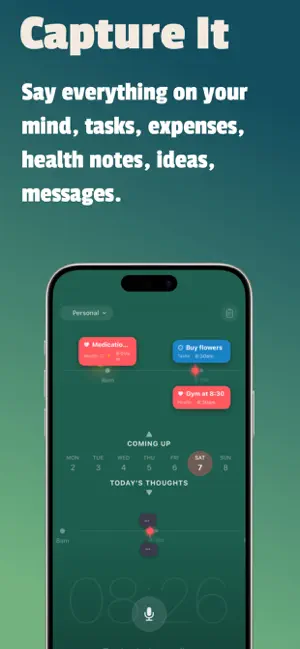
Capture It — Talk to Remember. Ask to Recall. Speak naturally. Say everything on your mind in one breath — tasks, expenses, health notes, ideas, messages. Capture It splits your words into separate entries, categorises each one, and places them on your timeline. Automatically. You never tag, sort, or organise anything. Powered entirely by Apple Intelligence. Everything runs on your device. Nothing is uploaded. Ever. What it does: Voice capture with automatic topic splitting — one recording becomes multiple organised entries Dual timeline — Coming Up for tasks, Capture Stream for thoughts AI classification into Tasks, Money, Health, People, Ideas, and Notes Time-aware — say "tomorrow at 3pm" or "next Friday" and due dates are set automatically People detection — mention someone by name and they're tracked across entries The Vault — every entry filed into categories, searchable, browsable Recall — ask questions about your own life and get instant answers Smart Drafts — say "email Sarah about the project" and get a ready-to-send draft with tone control (Casual, Business, Professional) Pinned Tasks — pin recurring tasks to specific days for routines and habits Shared Rooms — create a room, share a code, capture together with family or teams via iCloud Widget Room Settings — choose which rooms appear in your widget, toggle Work off on weekends Sunday Review — weekly checkpoint with pattern detection and cross-category insights Apple Watch — capture from your wrist, see upcoming tasks, swipe to complete Home Screen and Lock Screen widgets — today's tasks at a glance Siri Shortcuts — fully hands-free capture, works with AirPods Five dynamic themes that shift with time of day Companion Thoughts — related entries link together automatically Morning Briefing — daily summary of what's ahead One-time purchase. No subscription. No ads. Privacy first: All voice transcription, AI classification, and data storage happens on your device. No third-party services, no analytics, no tracking. Shared Rooms sync via your iCloud account only. Requires iOS 26 and Apple Intelligence for full features. Learn more: https://aroganthing.com/capture-it/ How to guide: https://aroganthing.com/capture-it-guide/
What’s new
Version 1.3 · Updated July 23, 2026
just some small maintenance ..
App privacy
The developer, adam rogan, reported these privacy practices to Apple.
Data Not Collected
The developer does not collect any data from this app.
Alternatives to Capture It
Looking for apps like Capture It? Here are 6 similar apps on the App Store. The highest rated is Habit Tracker: Planner Routine (3.7/5), and 4 of the 6 are free to download.
-
 Shelfie
-
 WallDone: Task Sticker Wall
-
 Receipt to PDF: Expense Report
-
 Habit Tracker: Planner Routine
3.7
-
 App Blocker OffKit
-
 ScanTo Pro: Offline PDF & OCR
3.0
| App | Rating | Price | Last updated | Compare |
|---|---|---|---|---|
| Capture It | 5.0 / 5 (1 rating) | 1.99 USD | July 23, 2026 | |
| Shelfie | – | 0.49 USD | Jul 8, 2026 | Compare |
| WallDone: Task Sticker Wall | – | Free | Mar 4, 2026 | Compare |
| Receipt to PDF: Expense Report | – | 3.99 USD | Oct 2, 2026 | Compare |
| Habit Tracker: Planner Routine | 3.7 / 5 (3) | Free | Oct 14, 2026 | Compare |
| App Blocker OffKit | – | Free | Sep 23, 2026 | Compare |
| ScanTo Pro: Offline PDF & OCR | 3.0 / 5 (2) | Free | Oct 9, 2026 | Compare |
Compare Capture It with the top alternatives: ratings, updates, ASO score and keyword gaps →