

EPubMate - Send Book to Device
小玲 王 Book iPhoneiPadiPod touch
EPubMate - Send Book to Device is a free Book app for iPhone and iPad by 小玲 王. Requires iOS 15.0. Updated October 3, 2026.
- Price
- Free
- on the App Store
- Size
- 19 MB
- Age 4+
- Updated
- Oct 3
- 2026 · v1.2.6
Screenshots
About EPubMate - Send Book to Device
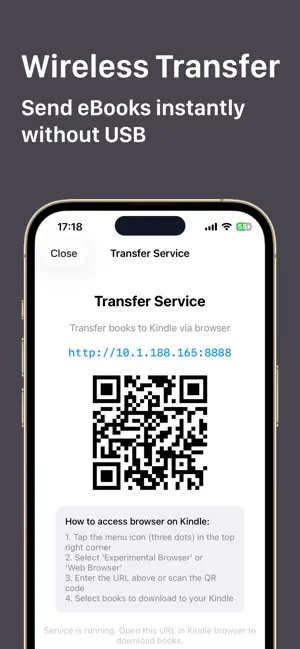
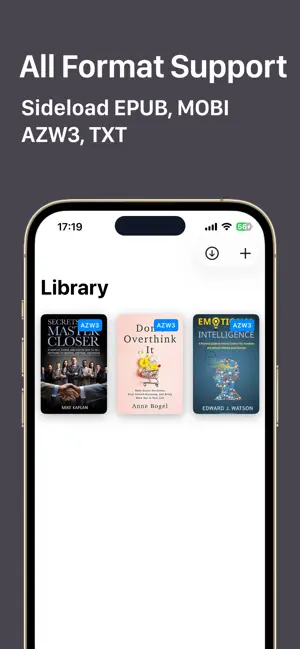
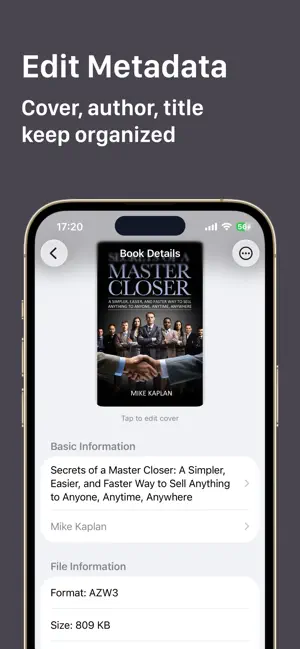
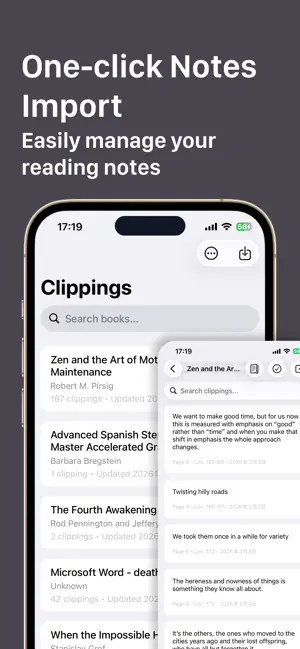
EpubMate is your ultimate companion for managing and transferring eBooks to your Device. Say goodbye to tangled USB cables, complicated email setups, and slow cloud uploads. With EpubMate, you can seamlessly send your favorite reads straight from your iPhone or iPad to your device over your local Wi-Fi. Key Features • Truly Wireless Sideloading: No cables or computer needed. Transfer books quickly and reliably over your local network. Simply open the device web browser, enter the local address, and download your books instantly. • Universal Format Support: Easily import and transfer EPUB, MOBI, AZW3, and TXT files directly to your e-reader. • Edit Metadata & Custom Covers: Perfect for organizing your library! Edit the book title, author name, and swap out the cover image so your device library always looks aesthetic and well-organized. • 100% Private & Secure: Your files never leave your device and are never uploaded to the cloud. Perfect for privacy and DRM-free books. • Minimalist & Fast: A few taps are all it takes. Import your files, start the local server, and grab your books on your device easily. Whether you read classic literature, web novels, or casual fiction, EpubMate makes managing your library easier than ever before. EpubMate Pro Subscriptions You can subscribe for EpubMate Pro Subscriptions to all features and content offered for purchase within the app. EpubMate Pro offers subscriptions. The subscription prices are: (i) Monthly Subscription ($1.99 / Month) (ii) Yearly Subscription ($4.99 / Year) You can subscribe to a Monthly Subscription plan ($1.99 billed once a month) or a Yearly Subscription plan ($4.99 billed once a year). Payment will be charged to iTunes Account at confirmation of purchase. Subscriptions automatically renew unless auto-renew is turned off at least 24-hours before the end of the current period. Account will be charged for renewal within 24-hours prior to the end of the current period, and identify the cost of the renewal. Subscriptions may be managed by the user and auto-renewal may be turned off by going to the user's Account Settings after purchase. The prices are in US dollars. Pricing in other countries may vary and actual charges may be converted to your local currency depending on the country of residence. Any unused portion of a free trial period, if offered, will be forfeited when the user purchases a subscription to that publication, where applicable. Our app is functional without purchasing an Auto-Renewable subscription, and you can use all the unlocked content after the subscription expires. Q: How do I restore the subscriptions on new devices? A: You can tap the 'Restore' button on the subscription page. Privacy Policy: https://www.whalesgrowth.top/pp/ Terms of Service: https://www.whalesgrowth.top/tos/ This app is an independent tool and is not affiliated with Amazon or Kindle.
What’s new
Version 1.2.6 · Updated October 3, 2026
- Bug fixes and improvements.
App privacy
The developer, 小玲 王, reported these privacy practices to Apple.
Data Not Collected
The developer does not collect any data from this app.
Alternatives to EPubMate - Send Book to Device
Looking for apps like EPubMate - Send Book to Device? Here are 6 similar apps on the App Store. The highest rated is Simple Speed Reader (5.0/5), and all 6 are free to download.
-
 Simple Speed Reader
5.0
Simple Speed Reader
5.0
-
 SendMyEbook
5.0
SendMyEbook
5.0
-
 Book Tracker: Bookfy
3.7
Book Tracker: Bookfy
3.7
-
 Moeli 阅读
4.1
Moeli 阅读
4.1
-
 Bookify - Send to Kindle
4.4
Bookify - Send to Kindle
4.4
-
 PagePop - Kindle Companion
4.8
PagePop - Kindle Companion
4.8
| App | Rating | Price | Last updated | Compare |
|---|---|---|---|---|
| EPubMate - Send Book to Device | – | Free | October 3, 2026 | |
| Simple Speed Reader | 5.0 / 5 (2) | Free | Mar 5, 2026 | Compare |
| SendMyEbook | 5.0 / 5 (1) | Free | Sep 17, 2026 | Compare |
| Book Tracker: Bookfy | 3.7 / 5 (9) | Free | Oct 1, 2026 | Compare |
| Moeli 阅读 | 4.1 / 5 (9) | Free | Oct 21, 2026 | Compare |
| Bookify - Send to Kindle | 4.4 / 5 (22) | Free | Oct 25, 2026 | Compare |
| PagePop - Kindle Companion | 4.8 / 5 (90) | Free | Oct 18, 2026 | Compare |