

Kryven Vault - ID & Doc Wallet
Kryven Technologies LLC Productivity iPhoneiPadiPod touchMac
Kryven Vault - ID & Doc Wallet is a free Productivity app for iPhone and iPad by Kryven Technologies LLC. Rated 5.0/5 from 3 ratings. Requires iOS 18.6.
- Rating
- 5.0
- 3 ratings
- Price
- Free
- on the App Store
- Size
- 20 MB
- Age 4+
- Updated
- Sep 7
- 2026 · v1.13.0
Screenshots
About Kryven Vault - ID & Doc Wallet
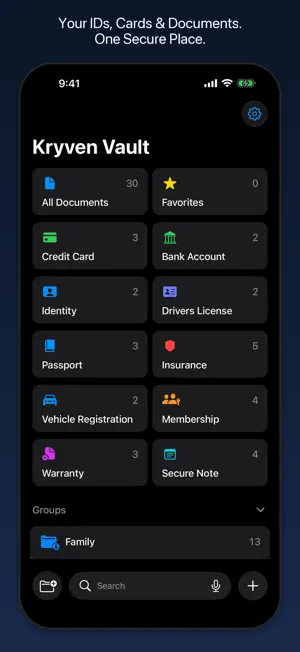
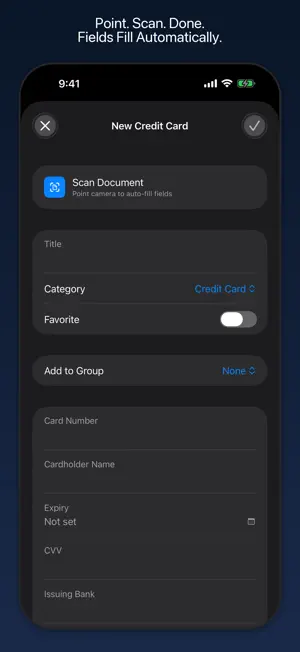
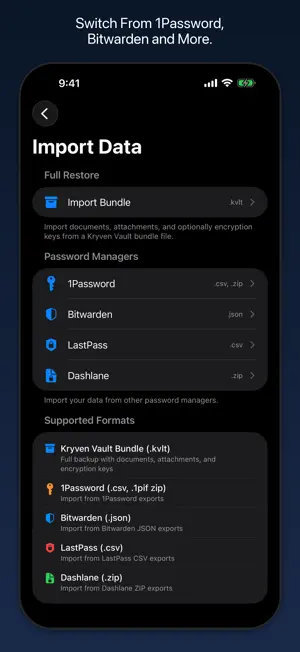
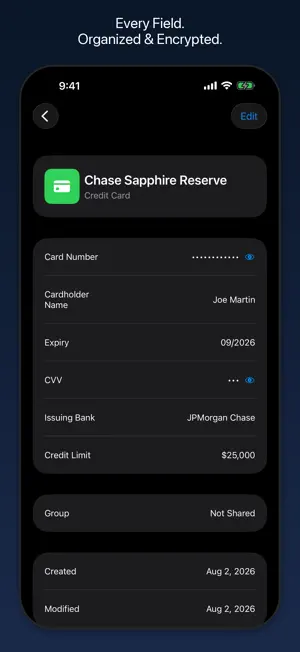
One encrypted place for passports, IDs, credit cards, insurance, and licenses. Scan to add, share with family, get expiry reminders. Zero-knowledge, we never see your data. Kryven Vault stores your sensitive documents with AES-256-GCM encryption on your device — before anything syncs. Your documents are never visible to Apple or anyone else. Start free with 10 documents and 1 shared group. What you can store — 10 categories with fields built for each document type: credit card, bank account, insurance, identity cards, passports, driver's licenses, vehicle registrations, memberships, warranties, and secure notes. Security — Encryption happens on-device before sync. Keys live in Apple's Keychain. The app works independently of Advanced Data Protection — your security doesn't depend on whether you've enabled it. Face ID, Touch ID, or passcode to unlock. Auto-locks in background. No analytics, no tracking, no external servers. Secure sharing — Share with family without giving up security. Each shared group gets its own encryption key. Revoke access anytime — participants lose access immediately. Features — Expiration reminders for passports, licenses, and insurance. Encrypted photo attachments. Automated encrypted backups to iCloud Drive — daily, weekly, or monthly. Password-protected manual export. Import from 1Password, Bitwarden, LastPass, Dashlane (Premium only). Full offline access. Privacy — No personal data collected. No analytics. No third-party sharing. Everything stays in your iCloud account, encrypted. Available on iPhone, iPad, and Mac. One purchase covers all your devices. Requirements — iOS 18.0 or later. iCloud account required for sync and sharing. Privacy Policy and Terms of Use are accessible from the subscription paywall, the Settings screen, and the App Store listing. Privacy Policy: https://vault.kryven.io/privacy.html Terms of Use: https://vault.kryven.io/terms.html
What’s new
Version 1.13.0 · Updated September 7, 2026
Expiration reminders now alert you once when the reminder window opens, instead of every day. Share a photo attachment right from the image viewer. Vault Readiness and Storage Usage are now cleaner, native summaries. Needs Attention is smarter: a document with a scan, or its key field filled in, counts as complete. General performance improvements and fixes.
App privacy
The developer, Kryven Technologies LLC, reported these privacy practices to Apple.
Data Not Collected
The developer does not collect any data from this app.
Alternatives to Kryven Vault - ID & Doc Wallet
Looking for apps like Kryven Vault - ID & Doc Wallet? Here are 6 similar apps on the App Store. The highest rated is Yoku: Photo Reminder Widget (5.0/5), and 5 of the 6 are free to download.
-
 Yoku: Photo Reminder Widget
5.0
Yoku: Photo Reminder Widget
5.0
-
 Triagemail
-
 Norakind
5.0
Norakind
5.0
-
 Pockli Scan: Document Scanner
5.0
Pockli Scan: Document Scanner
5.0
-
 Work Timer: Pomodoro Focus
-
 Airgap AI
| App | Rating | Price | Last updated | Compare |
|---|---|---|---|---|
| Kryven Vault - ID & Doc Wallet | 5.0 / 5 (3 ratings) | Free | September 7, 2026 | |
| Yoku: Photo Reminder Widget | 5.0 / 5 (1) | Free | Aug 22, 2026 | Compare |
| Triagemail | – | 1.99 USD | Sep 13, 2026 | Compare |
| Norakind | 5.0 / 5 (2) | Free | Mar 18, 2026 | Compare |
| Pockli Scan: Document Scanner | 5.0 / 5 (1) | Free | Jul 6, 2026 | Compare |
| Work Timer: Pomodoro Focus | – | Free | Sep 29, 2026 | Compare |
| Airgap AI | – | Free | Apr 27, 2026 | Compare |