

Digital Habits: Blocker
CENTRE FOR DIGITAL HABITS CIC Productivity iPhoneiPadiPod touch
Digital Habits: Blocker is a free Productivity app for iPhone and iPad by CENTRE FOR DIGITAL HABITS CIC. Rated 5.0/5 from 1 ratings. Requires iOS 16.0.
- Rating
- 5.0
- 1 ratings
- Price
- Free
- on the App Store
- Size
- 14 MB
- Age 4+
- Updated
- Oct 18
- 2026 · v3.10.0
Screenshots


About Digital Habits: Blocker
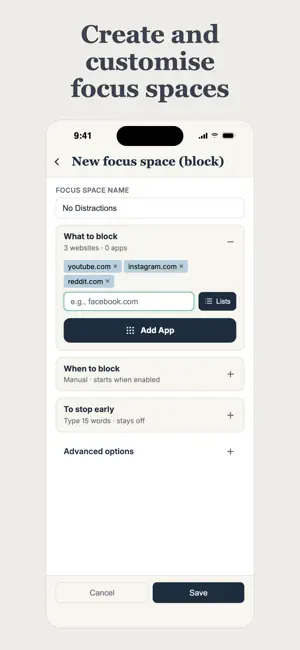
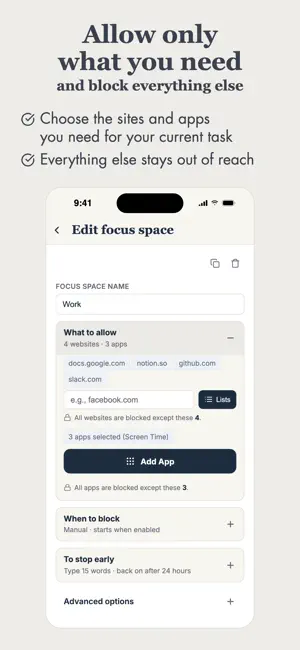
Take back your focus. Digital Habits: Blocker is a powerful, open-source focus tool that helps you block distracting apps and websites — on your terms. Built on more than 10 years of research into digital distraction at the University of Oxford, Digital Habits: Blocker is designed to reduce impulsive screen use without taking control away from you. Create and customise Focus Spaces, choose when they block apps and websites, and hold yourself accountable with your own stop-early challenge. Key features: • Block Websites: Instantly restrict distracting websites across browsers • Block Apps: Restrict distracting apps while a Focus Space is on • Allow only: instead of blocking specific apps / websites, choose what you want to allow and everything else is blocked automatically • Focus Spaces: Create a Focus Space for each context — work, study, evenings, deep focus • Manual, Daily or Weekly: Switch a Focus Space on whenever you need it, or let it run at set times each day or week — until you stop it, or until a date you choose • Week at a Glance: See your schedules on a clear weekly timeline (larger screens only) • Turn Back On After: If you stop a Focus Space early, choose whether it switches itself back on later — from 5 minutes to 24 hours — or stays off • Run Several at Once: Run multiple Focus Spaces at the same time without conflicts • Stop-Early Challenge: Choose how many words you must type to stop early, or write your own text • Always Active: Focus Spaces continue running even if you close the app Digital Habits: Blocker is fully open-source and collects no personal data. It sends at most one anonymous count a day, with an ID that changes every month, so we know how many people use it. You can turn this off in Settings. GitHub: https://github.com/digitalhabits/dh-blocker Cheers, Ulrik, Tiago, and the Centre for Digital Habits Team (digitalhabits.org)
What’s new
Version 3.10.0 · Updated October 18, 2026
Hi folks, This update comes with some useful new features, design improvements, and under-the-hood improvements. Focus Spaces & Blocking - New Focus Spaces now turn back on 10 minutes after you stop them early. You can still choose a different time, or Never, for each Focus Space. - Stop all now switches your schedules off instead of deleting them, so their days and times are still there when you switch them back on. - A Focus Space that is switched off but set to turn back on later can now be deleted. - Tapping a Focus Space's switch again while it is still turning on no longer starts it twice. - You now get a notification 2 minutes before a Focus Space starts or turns back on, so a block no longer catches you by surprise. The app asks for permission to send these during setup. - Scheduled Focus Spaces now start more reliably, including when you open the app just before a schedule begins. If iOS misses a schedule's start, blocking now begins once you use a blocked app. - Schedules set to all day now block all day while the app is closed, and a schedule with no days selected no longer blocks. - Focus Spaces stopped for a set time now turn back on at the right time more reliably. - A Manual Focus Space no longer turns itself back on later after you switch it on early, stop it with Never, or use Stop all. - Stopping a Focus Space for a while no longer leaves its apps and websites allowed by an Allow-only schedule that is running at the same time. - Deleting a Focus Space, Stop all and switching a Focus Space to Manual now take effect straight away, even if you close the app right after. - The stop-early challenge is easier to follow: it shows how many words are left, you type one word at a time, and its buttons stay just above the keyboard. Fixes & Polish - The design of the Settings screen has been improved. - The design of the create / edit Focus Space screen has been improved. - Diagnostics reports now include your app version. - Settings now shows which version of the app you have. - Info buttons in Settings now open and close with a tap. Remember that the app is open source — keep your feedback and suggestions coming at https://github.com/digitalhabits/dh-blocker Cheers, Ulrik & all of us at Centre for Digital Habits
App privacy
The developer, CENTRE FOR DIGITAL HABITS CIC, reported these privacy practices to Apple.
Data Not Linked to You
The following data, which may be collected but is not linked to your identity, may be used for the following purposes:
- Usage Data: Product Interaction
Used for: Analytics
Alternatives to Digital Habits: Blocker
Looking for apps like Digital Habits: Blocker? Here are 6 similar apps on the App Store. The highest rated is Downtime: Focus App Blocker (4.5/5), and 5 of the 6 are free to download.
-
 "No Distractions" for YouTube
4.4
"No Distractions" for YouTube
4.4
-
 FocusTube: No YT Distractions
-
 Downtime: Focus App Blocker
4.5
Downtime: Focus App Blocker
4.5
-
 Doombreak - App Blocker
-
 BrainGate: Focus & Learn
-
 Focus Keeper: Pomodoro Timer
| App | Rating | Price | Last updated | Compare |
|---|---|---|---|---|
| Digital Habits: Blocker | 5.0 / 5 (1 rating) | Free | October 18, 2026 | |
| "No Distractions" for YouTube | 4.4 / 5 (29) | 1.29 USD | Jun 2, 2026 | Compare |
| FocusTube: No YT Distractions | – | Free | Sep 19, 2026 | Compare |
| Downtime: Focus App Blocker | 4.5 / 5 (2) | Free | Oct 16, 2026 | Compare |
| Doombreak - App Blocker | – | Free | Oct 20, 2026 | Compare |
| BrainGate: Focus & Learn | – | Free | Mar 9, 2026 | Compare |
| Focus Keeper: Pomodoro Timer | – | Free | Oct 4, 2026 | Compare |