

Pochade – Reference Photo Prep
John Fowler Graphics & Design iPhoneiPadiPod touch
Pochade – Reference Photo Prep is a free Graphics & Design app for iPhone and iPad by John Fowler. Requires iOS 26.0. Updated October 27, 2026.
- Price
- Free
- on the App Store
- Size
- 24 MB
- Age 4+
- Updated
- Oct 27
- 2026 · v1.2.2
Screenshots



About Pochade – Reference Photo Prep
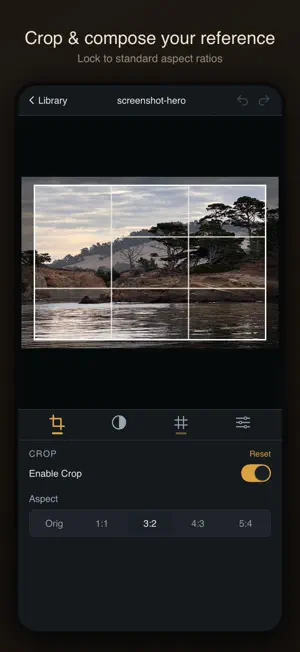
**Pochade is free to try with included sample images. Unlock importing your own photos with a single one-time purchase of $9.99. No subscription, no ads, yours forever.** Pochade is a focused reference prep app for painters. Import a photo, study its values, compose your framing, and plan your grid — all before brush hits canvas. No AI generation. No social features. No clutter. Just the reference tools painters actually need, designed for iPad. STUDY VALUES WITH CLARITY The hardest part of painting from a photo is seeing the value structure. Pochade simplifies your reference into 2–9 tonal steps so you can map out your lights and darks before you start mixing paint. A live luminance histogram shows your overall tonal distribution. Select any value bucket to isolate it with a mask overlay, making it easy to see exactly where each tone falls in your composition. COMPOSE YOUR FRAMING Crop non-destructively with preset aspect ratios (1:1, 3:2, 4:3, 5:4) or use the original framing. Your source image is never altered — adjust your composition as many times as you need. OVERLAY A PLANNING GRID Add a customizable grid overlay to plan your drawing transfer. Choose your row and column count (2–12 each), pick a color that reads well against your image, and adjust line thickness. The grid respects your crop, so what you see is what you'll paint. TOGGLE GRAYSCALE Switch to grayscale to strip away color and focus purely on value relationships — the foundation of every strong painting. BUILT FOR HOW PAINTERS WORK Your sessions save automatically as you adjust tools. Come back tomorrow or next week and pick up right where you left off. Undo and redo are built in, up to 50 steps deep. A session library keeps your references organized with thumbnail previews and tool state badges so you can see at a glance what you've done with each image. Zen mode hides all controls so you can evaluate your reference without distraction. Pan, zoom, and rotate to inspect details. BUILT NATIVELY FOR iPAD AND iPHONE Pochade is built natively for iPad and iPhone. Everything runs on-device. Your photos and sessions stay on your iPad, nothing is uploaded anywhere. Privacy Policy: [link] Terms of Use: [link]
What’s new
Version 1.2.2 · Updated October 27, 2026
Improvements to help us make Pochade better for painters, plus updates for iOS 27.
App privacy
The developer, John Fowler, reported these privacy practices to Apple.
Data Not Linked to You
The following data, which may be collected but is not linked to your identity, may be used for the following purposes:
- Usage Data: Product Interaction
- Diagnostics: Crash Data, Performance Data
Used for: Analytics
Alternatives to Pochade – Reference Photo Prep
Looking for apps like Pochade – Reference Photo Prep? Here are 6 similar apps on the App Store.
-
 Painter's Tools: Value & Color
-
 AtelierKit
-
 Painter's Toolkit: Color Match
-
 Art Reference: Value Study
-
 PaintSteps
-
 Scrolly : Grid View Maker
| App | Rating | Price | Last updated | Compare |
|---|---|---|---|---|
| Pochade – Reference Photo Prep | – | Free | October 27, 2026 | |
| Painter's Tools: Value & Color | – | 4.99 USD | Oct 17, 2026 | Compare |
| AtelierKit | – | Free | Mar 30, 2026 | Compare |
| Painter's Toolkit: Color Match | – | Free | Sep 15, 2026 | Compare |
| Art Reference: Value Study | – | Free | Sep 9, 2026 | Compare |
| PaintSteps | – | Free | Sep 15, 2026 | Compare |
| Scrolly : Grid View Maker | – | Free | Dec 18, 2025 | Compare |