

Shift Helper: Work Scheduler
Federico Gusmeroli Productivity iPhoneiPadiPod touch
Shift Helper: Work Scheduler is a free Productivity app for iPhone and iPad by Federico Gusmeroli. Requires iOS 15.0. Updated October 3, 2026.
- Price
- Free
- on the App Store
- Size
- 31 MB
- Age 4+
- Updated
- Oct 3
- 2026 · v1.0.79
Screenshots

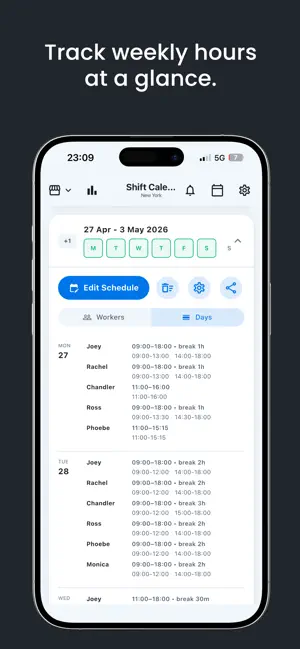


About Shift Helper: Work Scheduler
Shift Helper is the employee scheduling and shift planning app built for managers of small businesses. Create your weekly staff schedule in minutes, avoid common organization mistakes, and share the plan with your team. Designed for shops, bars, restaurants, salons and other small businesses, Shift Helper is the practical tool to organize your employees' shifts — without the complexity of enterprise workforce management software. WHY SHIFT HELPER Planning work shifts shouldn't mean fixing overlaps in a spreadsheet, recalculating hours by hand, or rewriting the schedule every time someone is off. Shift Helper gives you a simple weekly view of your team, flags scheduling problems, and helps you prepare a clear shift schedule faster, ready to share. KEY FEATURES - Staff management: add employees and set a weekly hour limit for each. - Weekly shift scheduling: create and edit work shifts with a few taps. - Overlap prevention: avoid assigning overlapping shifts to the same employee. - Hour-limit alerts: get an alert when planned hours exceed the weekly limit. - Opening hours: set your business hours and organize shifts accordingly. - Holidays and closures: manage public holidays and special closing days. - Time off: track vacation, sick leave and personal leave. - Reusable weeks: save recurring shifts and reuse them whenever you need. - Hours, labor cost and revenue: keep worked hours, overtime and costs in one place. - PDF export: print the shift schedule or share it with your team via email or chat. - Multi-location support: manage several stores from the same app. PERFECT FOR SHIFT MANAGEMENT IN - Independent shops and boutiques - Bars, cafés and pubs - Restaurants, pizzerias and fast food - Hair and beauty salons - Pharmacies and local businesses - Small chains - Store managers and small team leaders PRIVACY FIRST Your data stays on your device. Shift Helper stores staff and scheduling data locally with AES-256 encryption — no mandatory account and no reliance on external servers. SIMPLE, FAST, PRACTICAL Shift Helper works offline and is made for busy managers who need to create and share the weekly shift schedule without wasting time. Download Shift Helper and make employee shift scheduling easier for your team. Terms of Use (EULA): https://www.apple.com/legal/internet-services/itunes/dev/stdeula/
What’s new
Version 1.0.79 · Updated October 3, 2026
Now available in Polish and Dutch. Beta auto-scheduling is now available for managers. From the calendar, generate a weekly schedule, review the proposed shifts and warnings, then apply it. The new tablet layout adds clearer navigation, pinch-to-zoom schedules and drag-and-drop shift editing. On tablets, employees with multiple jobs can see all their shifts in one weekly view. Contract hours and training courses can now be managed for each job. Ultra Smart Hints consider data consistency for more dependable sales and weather-based suggestions. Weekly statistics load faster, with stability improvements for stores with long histories.
App privacy
The developer, Federico Gusmeroli, reported these privacy practices to Apple.
Data Not Collected
The developer does not collect any data from this app.
Alternatives to Shift Helper: Work Scheduler
Looking for apps like Shift Helper: Work Scheduler? Here are 6 similar apps on the App Store.
-
 Sonnical: AI Work Planner
-
 ShiftProCalendar
-
 HyWork
-
 Deposit Shield: Move Out Log
-
 簡単スタッフ管理
-
 People Dept for Staff
| App | Rating | Price | Last updated | Compare |
|---|---|---|---|---|
| Shift Helper: Work Scheduler | – | Free | October 3, 2026 | |
| Sonnical: AI Work Planner | – | Free | Sep 23, 2026 | Compare |
| ShiftProCalendar | – | Free | Sep 15, 2026 | Compare |
| HyWork | – | Free | Oct 19, 2026 | Compare |
| Deposit Shield: Move Out Log | – | Free | Jul 27, 2026 | Compare |
| 簡単スタッフ管理 | – | Free | Jul 6, 2026 | Compare |
| People Dept for Staff | – | Free | Jul 31, 2026 | Compare |