

Kurun: Visual Daily Planner
KYOSUKE WATANABE Productivity iPhoneiPadiPod touch
Kurun: Visual Daily Planner is a free Productivity app for iPhone and iPad by KYOSUKE WATANABE. Requires iOS 15.1. Updated September 29, 2026.
- Price
- Free
- on the App Store
- Size
- 56 MB
- Age 4+
- Updated
- Sep 29
- 2026 · v2.1.3
Screenshots

About Kurun: Visual Daily Planner
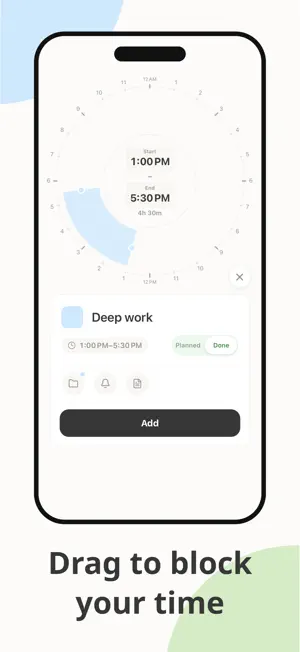
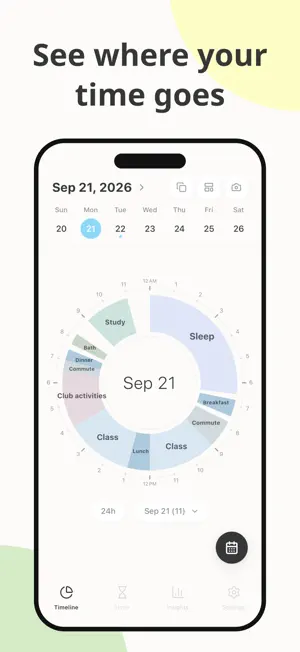
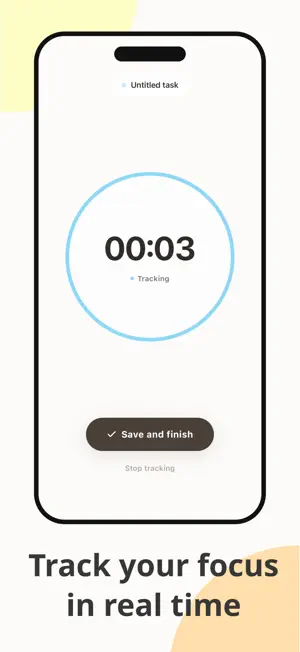
Kurun turns your entire day into a single pie chart — so you can see exactly where your time goes, without scrolling through endless lists. Why a pie chart? Most calendar and to-do apps stack your schedule top to bottom. But a vertical list can't show you the full picture. Kurun fits all 24 hours into one circle. The moment you look at it, you just get it: - That "quick" social media check? It's a surprisingly big slice. - Gaps in your day show up as empty space — no hiding from lost time. - More time resting than working? The imbalance is obvious at a glance. Before you analyze the numbers, you feel the shape of your day. That's the power of the circle. Does this sound familiar? - You were busy all day, but nothing feels done - You can't quite remember how you spent the last 24 hours - You have no idea how much time you lose to scrolling or breaks - You want better balance between work, study, and sleep - You know something's off, but don't know where to start What you can do with Kurun - Visualize your full 24 hours in one pie chart - Color-code activities and tasks for instant clarity - Spot untracked gaps in your day at a glance - Create custom categories — study, work, sleep, anything - Review each day and catch time imbalances early - Organize your tasks with the built-in to-do list - Use the built-in stopwatch and timer to log time directly to your timeline Perfect for - Anyone building better time management habits - Students tracking study sessions and focus time - Professionals looking to improve work-life balance - Fans of time tracking, life logging, or habit journaling - Anyone who prefers visual records over written notes Log it simply. See it clearly. Feel how you spend your time — with Kurun. Some features (To-Do, Pomodoro Timer, and more) are available with a Pro plan (in-app purchase). Terms of Service:https://scented-cross-231.notion.site/Kurun-Terms-of-Use-32b71e35e68d80249cc0c7525119a60e?source=copy_link Privacy Policy:https://scented-cross-231.notion.site/Kurun-Privacy-Policy-32b71e35e68d8071a52dd5e2f4886d64?source=copy_link
What’s new
Version 2.1.3 · Updated September 29, 2026
Fixed several bugs and improved overall performance and stability.
App privacy
The developer, KYOSUKE WATANABE, reported these privacy practices to Apple.
Data Not Linked to You
The following data, which may be collected but is not linked to your identity, may be used for the following purposes:
- Purchases: Purchase History
Used for: Analytics, App Functionality
Alternatives to Kurun: Visual Daily Planner
Looking for apps like Kurun: Visual Daily Planner? Here are 6 similar apps on the App Store. The highest rated is Time Cottage: AI Day Planner (5.0/5), and all 6 are free to download.
-
 Time Cottage: AI Day Planner
5.0
Time Cottage: AI Day Planner
5.0
-
 DayClock - 24h Circle Planner
5.0
DayClock - 24h Circle Planner
5.0
-
 橙子计划:计划清单 自律打卡 todo番茄钟 提醒备忘录
-
 To do Notes list Memos Tasks
-
 Notes - Notepad Free Note App
-
 PiePlan
| App | Rating | Price | Last updated | Compare |
|---|---|---|---|---|
| Kurun: Visual Daily Planner | – | Free | September 29, 2026 | |
| Time Cottage: AI Day Planner | 5.0 / 5 (1) | Free | Sep 20, 2026 | Compare |
| DayClock - 24h Circle Planner | 5.0 / 5 (1) | Free | Sep 8, 2026 | Compare |
| 橙子计划:计划清单 自律打卡 todo番茄钟 提醒备忘录 | – | Free | Oct 23, 2025 | Compare |
| To do Notes list Memos Tasks | – | Free | Sep 11, 2026 | Compare |
| Notes - Notepad Free Note App | – | Free | Oct 6, 2026 | Compare |
| PiePlan | – | Free | Sep 30, 2026 | Compare |