

Export Contacts Pro: Backup
OLEKSANDR VASETSKYI Utilities iPhoneiPadiPod touch
Export Contacts Pro: Backup is a free Utilities app for iPhone and iPad by OLEKSANDR VASETSKYI. Requires iOS 17.0. Updated March 14, 2026.
- Price
- Free
- on the App Store
- Size
- 3 MB
- Age 4+
- Updated
- Mar 14
- 2026 · v1.0
Screenshots


About Export Contacts Pro: Backup
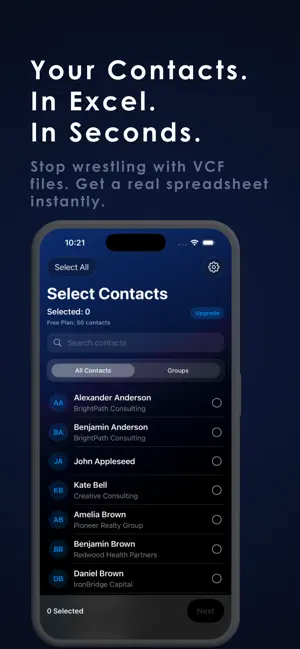
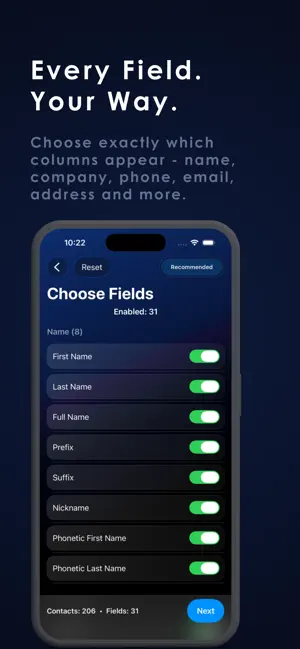
Here's the cleaned version with all trademarks removed: Finally, a contacts export app that does it properly. Your phone gives you a VCF file buried in settings. ContactsExport gives you a clean spreadsheet, a properly formatted CSV, or a vCard file — with every field intact, in seconds. Why people choose ContactsExport: Switching phones, migrating to a new CRM, sending a client list to your team, or simply backing up years of contacts before something goes wrong — ContactsExport handles all of it cleanly. Full field control Choose exactly which columns appear in your export — name, company, phone, email, address, birthday, notes, and more. No missing fields. No surprises. Every contact field on your device is available to export. Three formats, all done right Excel (.xlsx) — opens in any spreadsheet app. CSV — imports directly into any CRM, database, or marketing tool. vCard (.vcf) — the universal format for moving contacts between devices and apps. One-time purchase — no subscription Pay once, export as many times as you want, forever. No weekly billing. No artificial limits after a trial period. No ads. Private by design Your contacts never leave your device. All processing happens locally. Nothing is uploaded, stored, or analyzed on any server. Perfect for: — Switching phones or moving to a new device — Exporting client or sales contacts to a spreadsheet or CRM — Creating a backup before changing accounts — Sharing a contact list with your team — Recovering contacts after an account is deleted or locked How it works: Select all contacts or choose specific groups Pick which fields to include in your export Choose your format — Excel, CSV, or vCard Share via email, cloud storage, or any app Free version exports up to 50 contacts. Unlock unlimited with a one-time purchase. ContactsExport requires access to your contacts to create your export file. This access is used exclusively for export — your data is processed on-device and never transmitted anywhere. Privacy Policy: https://www.notion.so/ContactsExport-Privacy-Policy-31424021e4ad803e9f31c5ba8aa1bd3f Terms of Use: https://www.apple.com/legal/internet-services/itunes/dev/stdeula/
App privacy
The developer, OLEKSANDR VASETSKYI, reported these privacy practices to Apple.
Data Not Collected
The developer does not collect any data from this app.
Alternatives to Export Contacts Pro: Backup
Looking for apps like Export Contacts Pro: Backup? Here are 6 similar apps on the App Store. The highest rated is CKClock (5.0/5), and all 6 are free to download.
-
 Contacts Exporter:vCard, excel
-
 WiggleWormAlert
-
 CKClock
5.0
CKClock
5.0
-
 TalkShift – AI Keyboard
5.0
TalkShift – AI Keyboard
5.0
-
 Lock Screen Text
-
 Export & Backup Contacts
| App | Rating | Price | Last updated | Compare |
|---|---|---|---|---|
| Export Contacts Pro: Backup | – | Free | March 14, 2026 | |
| Contacts Exporter:vCard, excel | – | Free | Sep 4, 2026 | Compare |
| WiggleWormAlert | – | Free | Jul 8, 2026 | Compare |
| CKClock | 5.0 / 5 (1) | Free | Feb 28, 2026 | Compare |
| TalkShift – AI Keyboard | 5.0 / 5 (1) | Free | May 26, 2026 | Compare |
| Lock Screen Text | – | Free | Sep 10, 2026 | Compare |
| Export & Backup Contacts | – | Free | Oct 17, 2026 | Compare |