

Export & Backup Contacts
Renzo Delgado Utilities iPhoneiPadiPod touch
Export & Backup Contacts is a free Utilities app for iPhone and iPad by Renzo Delgado. Requires iOS 16.0. Updated October 17, 2026.
- Price
- Free
- on the App Store
- Size
- 10 MB
- Age 4+
- Updated
- Oct 17
- 2026 · v2.0.3
Screenshots



About Export & Backup Contacts
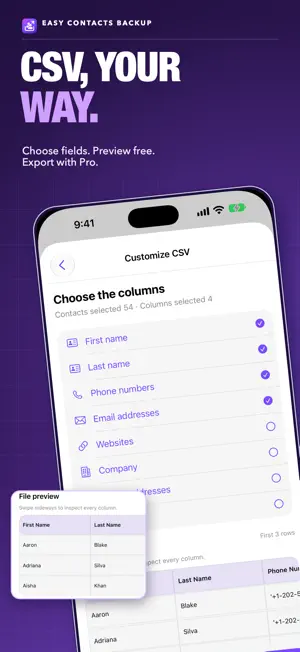
Back up your iPhone contacts before you switch phones, reset your device or clean up your address book. Save them as a vCard (VCF) file, or create a CSV spreadsheet with Pro that is compatible with Excel, Numbers and Google Sheets. BACK UP AND SHARE • Export the contacts you allow the app to access as a VCF (vCard) file. • Save or share the file with the iOS share sheet, including Files, AirDrop, Mail and other compatible apps. • Keep a local history with the date, device and number of contacts in each backup. • Search and review the contacts saved in a backup. CSV YOUR WAY • Choose the contacts and columns to include: name, phone numbers, emails, company, addresses, birthday and URLs. • Preview the first rows for free before you export. • Save column templates to reuse your preferred layout; choose contacts each time. • Exporting the CSV file requires Pro. RESTORE FROM YOUR HISTORY (PRO) Add contacts to your address book from a backup in this app's local history. Restoring adds contacts; it does not delete or replace the contacts already on your iPhone. REVIEW POSSIBLE DUPLICATES (PRO) Find and review contacts that may be duplicates. The app lists them for you to check; it does not merge them automatically. FREE VS PRO Free: up to 70 contacts per file, 3 exports per day, vCard export, CSV preview and your 3 most recent backups. Pro: all accessible contacts in every file, unlimited exports, CSV export, full backup history, restore from history and duplicate review. PRO IS ONE PAYMENT, NO SUBSCRIPTION Pro is a one-time lifetime purchase. Use Restore purchases with the same Apple Account to get Pro back on a new device or after reinstalling the app. KEEP A COPY OUTSIDE THE APP Backup history is stored only on this device and is removed if you delete the app. Before deleting the app or changing phones, save your VCF file to Files or another place you trust. Importing backup files from outside the app and automatically merging duplicates are not included. YOUR PRIVACY Your contacts are processed on your device and are not uploaded to our servers. You choose where to share exported files. The app uses third-party services for purchases, analytics and crash reporting; see our Privacy Policy for details.
What’s new
Version 2.0.3 · Updated October 17, 2026
• Pro is a one-time, lifetime purchase. Restore it on a new device or after reinstalling. • Clearer upgrade options when you reach the free limit. • New Free vs Pro comparison. • The app is now available in French, German, Portuguese and Italian. • Bug fixes and improvements.
App privacy
The developer, Renzo Delgado, reported these privacy practices to Apple.
Data Linked to You
The following data, which may be collected and linked to your identity, may be used for the following purposes:
- Location: Coarse Location
- Usage Data: Product Interaction
Used for: Analytics
Data Not Linked to You
The following data, which may be collected but is not linked to your identity, may be used for the following purposes:
- Purchases: Purchase History
- Identifiers: Device ID
- Diagnostics: Crash Data, Other Diagnostic Data
Used for: Analytics, App Functionality
Alternatives to Export & Backup Contacts
Looking for apps like Export & Backup Contacts? Here are 6 similar apps on the App Store. The highest rated is Export Contacts & Backup (5.0/5), and all 6 are free to download.
-
 Export Contacts & Backup
5.0
Export Contacts & Backup
5.0
-
 Backup Contact
5.0
Backup Contact
5.0
-
 Export Contacts++
-
 Import & Export Contacts Excel
4.0
Import & Export Contacts Excel
4.0
-
 Contact Exporter: Backup Share
4.1
Contact Exporter: Backup Share
4.1
-
 Export Contacts to CSV & Excel
4.7
Export Contacts to CSV & Excel
4.7
| App | Rating | Price | Last updated | Compare |
|---|---|---|---|---|
| Export & Backup Contacts | – | Free | October 17, 2026 | |
| Export Contacts & Backup | 5.0 / 5 (3) | Free | Oct 24, 2026 | Compare |
| Backup Contact | 5.0 / 5 (14) | Free | Apr 23, 2025 | Compare |
| Export Contacts++ | – | Free | Oct 4, 2024 | Compare |
| Import & Export Contacts Excel | 4.0 / 5 (82) | Free | Oct 22, 2026 | Compare |
| Contact Exporter: Backup Share | 4.1 / 5 (24) | Free | Oct 12, 2026 | Compare |
| Export Contacts to CSV & Excel | 4.7 / 5 (23) | Free | Oct 20, 2026 | Compare |