

AirScreen DLNA Receiver
Xu Wang Utilities iPhoneiPadiPod touch
AirScreen DLNA Receiver is a paid Utilities app for iPhone and iPad by Xu Wang. Rated 1.0/5 from 1 ratings. Requires iOS 16.6. Updated October 3, 2026.
- Rating
- 1.0
- 1 ratings
- Price
- 1.99 USD
- on the App Store
- Size
- 35 MB
- Age 4+
- Updated
- Oct 3
- 2026 · v1.1.2
Screenshots

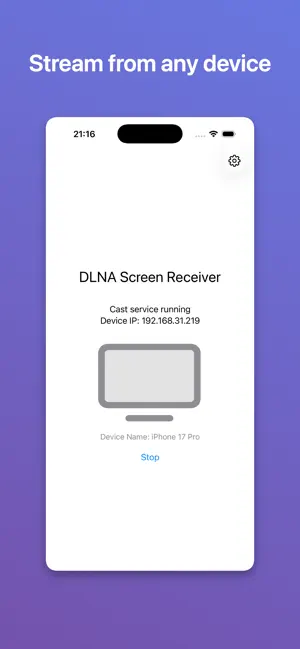
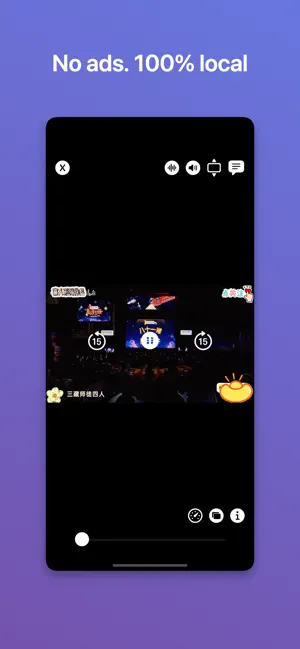

About AirScreen DLNA Receiver
AirScreen turns your iPhone, iPad, or Mac into a DLNA receiver. One app, and it runs on iPhone, iPad, Mac, and Apple TV. With devices on the same Wi-Fi, use any DLNA-capable casting app on your phone, computer, or tablet to send video and music here and play it on this device. What you can do • Start or stop the receiver with one tap, so this device shows up in other devices' cast lists • Receive and play cast video and music, with FFmpeg-based decoding and wide format support • Control playback here: play, pause, seek • Background audio: music keeps playing after you leave the app • Switch subtitles and audio tracks, adjust subtitle delay, search subtitles online • Check playback details: resolution, bitrate, frame rate, dropped frames • Play History: the last 50 items, ready to reopen with one tap • Rename this device in Settings so it's easy to spot when casting How to use 1. Put this device and the sending device on the same Wi-Fi. 2. Open AirScreen, tap Start, and allow Local Network access when prompted. 3. On the other device, open a DLNA casting app, pick this device by name, then choose what to play. Technical note AirScreen uses SSDP and a local HTTP server for DLNA discovery and control. Media streams directly from the URL the sender provides; the app does not store or relay your content. Local Network permission is required for discovery and receiving casts. Privacy and data No account, no sign-in, no data collection. Settings such as the device name are stored only on this device and are never uploaded. No ads, no analytics, no third-party tracking. Questions or feedback? Use Contact Us in the app.
What’s new
Version 1.1.2 · Updated October 3, 2026
• Continuous album playback: the next track starts automatically when one ends, so you no longer need to skip manually with apps like Audirvana • Refined music player layout on iPad • Video titles now update when the sender switches streams • Video settings are now fully localized and show the current playback URL • Better compatibility with more casting sources and more accurate playback state reporting • Bug fixes and playback stability improvements Thanks for using AirScreen!
App privacy
The developer, Xu Wang, reported these privacy practices to Apple.
Data Not Collected
The developer does not collect any data from this app.
Alternatives to AirScreen DLNA Receiver
Looking for apps like AirScreen DLNA Receiver? Here are 6 similar apps on the App Store. The highest rated is AnyDLNA - Any Cast/Chromecast (4.3/5), and 4 of the 6 are free to download.
-
 DLNA Browser
-
 AnyDLNA - Any Cast/Chromecast
4.2
-
 peztia Authenticator
-
 Webpage Summarizer
-
 PassShelf: Wallet Archive
-
 BelleVaria
| App | Rating | Price | Last updated | Compare |
|---|---|---|---|---|
| AirScreen DLNA Receiver | 1.0 / 5 (1 rating) | 1.99 USD | October 3, 2026 | |
| DLNA Browser | – | 3.99 USD | Feb 11, 2025 | Compare |
| AnyDLNA - Any Cast/Chromecast | 4.3 / 5 (4) | Free | Sep 30, 2026 | Compare |
| peztia Authenticator | – | Free | Aug 24, 2026 | Compare |
| Webpage Summarizer | – | 3.99 USD | Jul 1, 2026 | Compare |
| PassShelf: Wallet Archive | – | Free | Sep 2, 2026 | Compare |
| BelleVaria | – | Free | Jan 5, 2026 | Compare |