

DLNA Browser
Csaba Iranyi Utilities iPhoneiPadiPod touch
DLNA Browser is a paid Utilities app for iPhone and iPad by Csaba Iranyi. Requires iOS 13.0. Updated February 11, 2025.
- Price
- 3.99 USD
- on the App Store
- Size
- 5 MB
- Age 4+
- Updated
- Feb 11
- 2025 · v1.14
Screenshots

About DLNA Browser
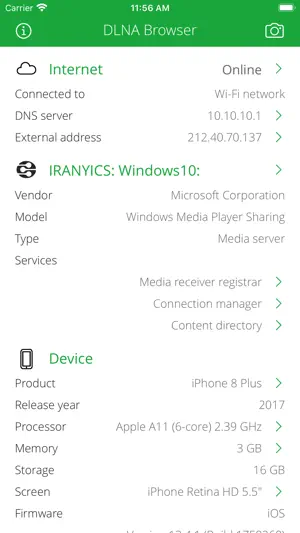
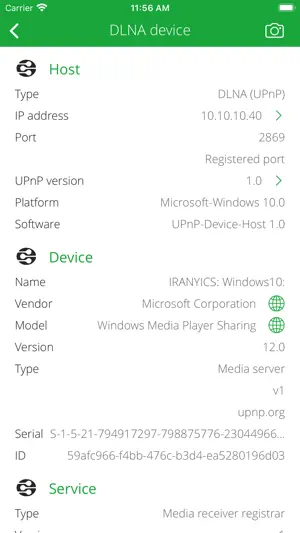
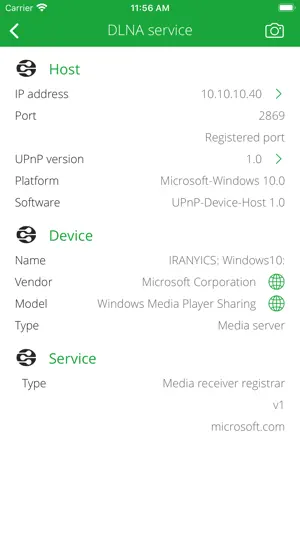
Discover and explore your local network. Search for DLNA compatible devices like media servers, TVs, wireless speakers, printers, security cameras, home sensors, lights, HVAC thermostats, LAN/WAN network devices and so on... DLNA Browser is a very powerful tool for discover the available DLNA (UPnP) capable devices on your home or office local network. ABOUT DLNA Digital Living Network Alliance (DLNA) is a nonprofit collaborative standards organization established by Sony and Intel in June 2003, that is responsible for defining interoperability guidelines to enable sharing of digital media between multimedia devices. DLNA uses Universal Plug and Play (UPnP) for media management, discovery and control. UPnP defines the type of device that DLNA supports ("server", "renderer", "controller") and the mechanisms for accessing media over a network. Typical DLNA (UPnP) devices: • Media servers (PS3, Xbox, Plex, Serviio, Twonky, Mediatomb, WMC, stc.) • Media renderers: TV, display, wireless speaker. • Network device: LAN/WAN router, Wi-Fi access point. • Home automation elements: solar protection blind, light, HVAC thermostat, home sensors. • Printer, scanner, feeder. • Remote access client, server, agent. • Telephony client, server. • BMLinks device (Japanese office devices: printer, scanner). • Personal message receiver. • Media Center. • Quality of Service (QoS) device. SERVICE BROWSING • Search for available and currently running DLNA (UPnP) root and embedded devices and services. • Analyze and describe device name, manufacturer, model, type, version, serial number, UPC code, etc. • Determine operating system/version and UPnP server product and version. • Show DLNA host IP address, port number, UPnP version, local name, domain name, MAC address (with vendor information), PING capability. INTERNET INFO • Show default gateways, IP addresses, networks. • Show DNS servers, search domain names, local MAC addresses, host name resolve. • Depth external address analysis: ISP name, autonomous system name, whois, ping, regional internet registry info. • Full offline MAC vendor database. REACH UI FEATURES • Info menu with feedback and privacy settings • Use the camera icon (upper-right corner) to create and print/send/share a screenshot from the entire page. • Pull down with your finger to refresh the information. • Long press on a cell to copy/print/send/open as/share the cell value. • Shake your device to refresh the information.
What’s new
Version 1.14 · Updated February 11, 2025
BUG FIXES AND STABILITY IMPROVEMENTS
App privacy
The developer, Csaba Iranyi, reported these privacy practices to Apple.
Data Not Collected
The developer does not collect any data from this app.
Alternatives to DLNA Browser
Looking for apps like DLNA Browser? Here are 6 similar apps on the App Store. The highest rated is Omnistat: System Monitor (4.9/5), and 3 of the 6 are free to download.
-
 NetTools Pro
-
 NetAdmin - Network Scanner
1.0
NetAdmin - Network Scanner
1.0
-
 Omnistat: System Monitor
4.9
Omnistat: System Monitor
4.9
-
 LocalSites
1.0
LocalSites
1.0
-
 NetTools - Network Analyzer
-
 iNet Pro - Network Scanner
4.7
iNet Pro - Network Scanner
4.7
| App | Rating | Price | Last updated | Compare |
|---|---|---|---|---|
| DLNA Browser | – | 3.99 USD | February 11, 2025 | |
| NetTools Pro | – | 7.99 USD | Aug 11, 2026 | Compare |
| NetAdmin - Network Scanner | 1.0 / 5 (1) | 29.99 USD | Oct 7, 2026 | Compare |
| Omnistat: System Monitor | 4.9 / 5 (64) | Free | Sep 25, 2026 | Compare |
| LocalSites | 1.0 / 5 (1) | Free | Apr 27, 2025 | Compare |
| NetTools - Network Analyzer | – | Free | Aug 11, 2026 | Compare |
| iNet Pro - Network Scanner | 4.7 / 5 (742) | 9.99 USD | Aug 12, 2026 | Compare |
Compare DLNA Browser with the top alternatives: ratings, updates, ASO score and keyword gaps →