

oConvert: MP4 to MP3 Converter
Shion Washida Utilities iPhoneiPadiPod touch
oConvert: MP4 to MP3 Converter is a free Utilities app for iPhone and iPad by Shion Washida. Requires iOS 15.1. Updated September 29, 2026.
- Price
- Free
- on the App Store
- Size
- 66 MB
- Age 4+
- Updated
- Sep 29
- 2026 · v1.5.0
Screenshots
About oConvert: MP4 to MP3 Converter
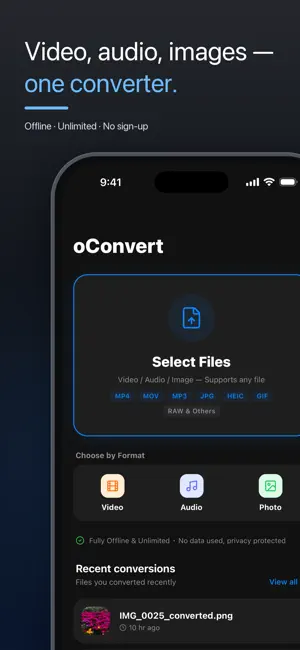
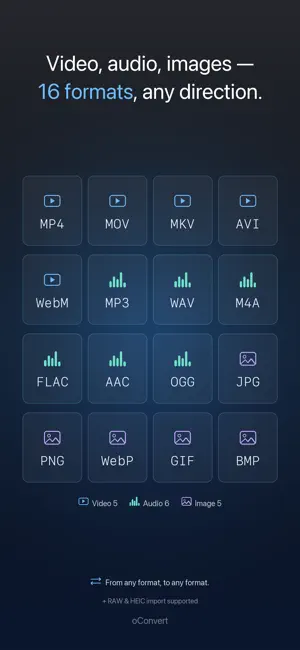
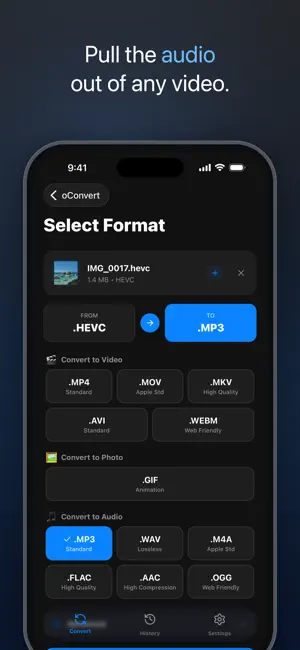
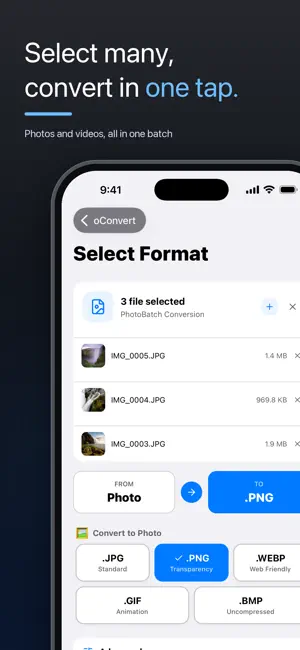
oConvert — Fast, Secure & Unlimited File Conversion "Select, Convert. Done." The simplest file conversion app designed to do one thing perfectly. Forget complex settings or restrictive limits. Convert videos, audio, and images for free, as much as you want, anytime. 【 Key Feature: Offline Processing 】 All conversions are processed directly on your device. ・Fast: No waiting for files to upload or download from a server. ・Secure: Your private data never leaves your device, ensuring total privacy. 【 What You Can Do 】 ・Video to Audio: Extract high-quality audio from your favorite videos into MP3 or WAV. ・Batch Conversion: Convert large groups of files simultaneously with a single tap. ・High Quality: Maintain beautiful visuals and crisp sound with minimal quality loss. ・No Limits: No daily caps or file count restrictions. Use it as much as you need. ・Easy Save & Share: Save results directly to your "Photos" app or share them to social media instantly. 【 Why Choose oConvert? 】 No registration or accounts required. Free to use forever. Saves your mobile data (gigabytes) by processing everything offline. Prefer no ads? Watch a single ad to hide ads for one hour. 【 Supported Formats 】 ・Video MP4 / MOV / MKV / AVI / WebM ・Audio MP3 / WAV / M4A / FLAC / AAC / OGG (Supports extraction from video) ・Images JPG(JPEG) / PNG / WebP / HEIC(HEIF) / GIF / BMP / DNG(ProRAW) 【 oConvert Pro & Remove Ads 】 ・oConvert Pro (subscription): Hides all advertisements and unlocks Pro-only features such as advanced conversion settings. ・Remove Ads (one-time purchase): A single payment removes ads permanently. Subscription details ・The length and price of each subscription are shown on the in-app purchase screen (a free trial may be offered). ・Payment is charged to your Apple ID account once you confirm the purchase. ・The subscription renews automatically unless auto-renew is turned off at least 24 hours before the end of the current period. Your account is charged for renewal within 24 hours prior to the end of the current period. ・You can manage or cancel your subscription anytime in Settings > Apple ID > Subscriptions on your iPhone. ・If you buy Pro while a free trial is still active, the unused portion of the trial is forfeited. ● Terms of Use https://devshion.github.io/oconvert/terms.html ● Privacy Policy https://devshion.github.io/oconvert/privacy.html
What’s new
Version 1.5.0 · Updated September 29, 2026
What's new in v1.5.0 New - Added a yearly subscription plan Improvements - Refreshed the purchase screen design - Made restoring purchases more reliable
App privacy
The developer, Shion Washida, reported these privacy practices to Apple.
Data Used to Track You
The following data may be used to track you across apps and websites owned by other companies:
- Identifiers: Device ID
Data Not Linked to You
The following data, which may be collected but is not linked to your identity, may be used for the following purposes:
- Identifiers: Device ID
- Usage Data: Product Interaction, Advertising Data
Used for: Third-Party Advertising, Analytics
Alternatives to oConvert: MP4 to MP3 Converter
Looking for apps like oConvert: MP4 to MP3 Converter? Here are 6 similar apps on the App Store. The highest rated is File Converter - Video & Audio (5.0/5), and 5 of the 6 are free to download.
-
 File Converter - Video & Audio
5.0
File Converter - Video & Audio
5.0
-
 Image Converter: JPG-PNG-HEIC
-
 Transforma - File Converter
1.0
Transforma - File Converter
1.0
-
 動画変換(広告無し)
-
 IConverter: File Converter
5.0
IConverter: File Converter
5.0
-
 AnyConvert: Offline Converter
1.0
AnyConvert: Offline Converter
1.0
| App | Rating | Price | Last updated | Compare |
|---|---|---|---|---|
| oConvert: MP4 to MP3 Converter | – | Free | September 29, 2026 | |
| File Converter - Video & Audio | 5.0 / 5 (1) | Free | Oct 15, 2026 | Compare |
| Image Converter: JPG-PNG-HEIC | – | Free | Sep 3, 2026 | Compare |
| Transforma - File Converter | 1.0 / 5 (1) | Free | Apr 24, 2026 | Compare |
| 動画変換(広告無し) | – | 2.99 USD | Jan 27, 2026 | Compare |
| IConverter: File Converter | 5.0 / 5 (1) | Free | Sep 21, 2026 | Compare |
| AnyConvert: Offline Converter | 1.0 / 5 (1) | Free | Sep 2, 2026 | Compare |