

ScanLens Security
NOCTIS STUDIOS LIMITED Utilities iPhoneiPadiPod touch
ScanLens Security is a free Utilities app for iPhone and iPad by NOCTIS STUDIOS LIMITED. Requires iOS 16.0. Updated September 13, 2026.
- Price
- Free
- on the App Store
- Size
- 14 MB
- Age 17+
- Updated
- Sep 13
- 2026 · v1.7
Screenshots

About ScanLens Security
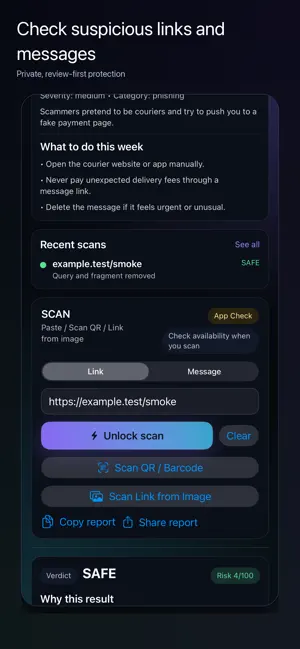
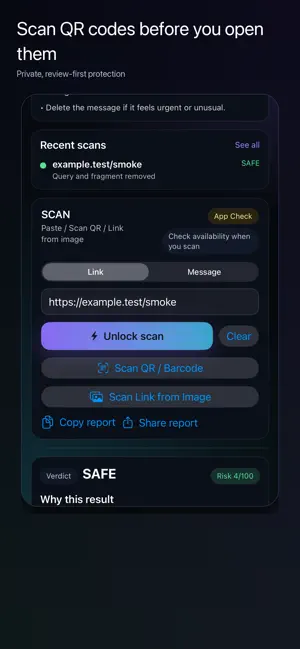
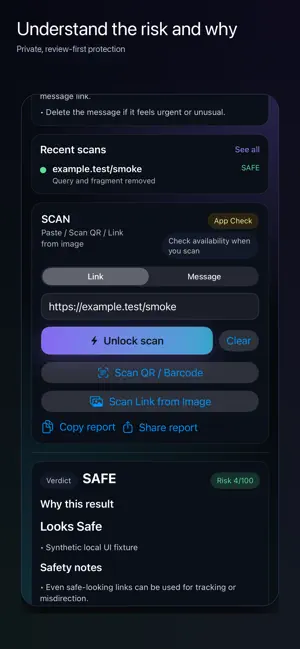
Check suspicious links, QR codes and messages before you act. ScanLens helps you review: • Links and final destinations • SMS, email and chat messages • QR codes and supported barcodes • Links found in screenshots or images How it works 1. Paste or share a link or message, scan a QR code, or choose an image. 2. Review the content before sending it. 3. ScanLens returns a SAFE, SUSPICIOUS or DANGEROUS result with reasons and practical next steps. Built for deliberate checking • No automatic scan when content is shared or extracted from an image • Screenshot OCR runs on your device and stays editable before you submit a link • Local History stores a privacy-minimized record and supports item deletion and Clear History • Share Extension saves content for review; you open ScanLens to continue • Camera recovery and duplicate protection help prevent repeated scans No ads ScanLens 1.7 contains no banner, interstitial or rewarded ads and no advertising consent screen. Lifetime ScanLens Lifetime is a one-time, non-consumable in-app purchase. The current localized price is shown by the App Store. Restore Purchases is available in Settings. Server-authorized starter access and non-ad credits remain separate from Lifetime. Privacy and control ScanLens does not require an account for basic scanning. You decide when to submit content. Links may be requested by the ScanLens service, and redirect destinations may receive the requested URL. Clear History and shared-content controls affect local data only; remote privacy requests are available in Settings. ScanLens provides risk indicators, not a guarantee. When in doubt, use the official website or known contact details before signing in, paying or sharing information.
What’s new
Version 1.7 · Updated September 13, 2026
ScanLens 1.7 is a major privacy, reliability and accessibility update. • Removed ads and advertising consent screens. • Added safer Share Extension review for links and full messages. • Improved QR/barcode camera recovery and duplicate prevention. • Added review-first screenshot OCR with manual correction. • Added privacy-minimized History with item deletion and Clear History. • Improved Lifetime price refresh and Restore status. • Added onboarding and a direct data deletion link. No changes to the Lifetime product or server-enforced scan limits.
App privacy
The developer, NOCTIS STUDIOS LIMITED, reported these privacy practices to Apple.
Data Linked to You
The following data, which may be collected and linked to your identity, may be used for the following purposes:
- Purchases: Purchase History
- User Content: Emails or Text Messages, Other User Content
- Identifiers: User ID, Device ID
- Usage Data: Other Usage Data
- Other Data: Other Data Types
Used for: App Functionality
Data Not Linked to You
The following data, which may be collected but is not linked to your identity, may be used for the following purposes:
- Usage Data: Product Interaction
- Diagnostics: Other Diagnostic Data, Crash Data
Used for: Analytics, App Functionality
Alternatives to ScanLens Security
Looking for apps like ScanLens Security? Here are 6 similar apps on the App Store. The highest rated is MyProtection.AI (5.0/5), and all 6 are free to download.
-
 TrustLens
-
 Photo Cleaner · Clean Storage
-
 DEX Swipe - Crypto Scanner
-
 MyProtection.AI
5.0
MyProtection.AI
5.0
-
 Void: Ad Blocker & Privacy
-
 EDAMAME Security Mobile
5.0
EDAMAME Security Mobile
5.0
| App | Rating | Price | Last updated | Compare |
|---|---|---|---|---|
| ScanLens Security | – | Free | September 13, 2026 | |
| TrustLens | – | Free | Feb 24, 2026 | Compare |
| Photo Cleaner · Clean Storage | – | Free | Jun 15, 2026 | Compare |
| DEX Swipe - Crypto Scanner | – | Free | May 11, 2026 | Compare |
| MyProtection.AI | 5.0 / 5 (29) | Free | Jun 8, 2026 | Compare |
| Void: Ad Blocker & Privacy | – | Free | Oct 3, 2026 | Compare |
| EDAMAME Security Mobile | 5.0 / 5 (1) | Free | Oct 24, 2026 | Compare |
Compare ScanLens Security with the top alternatives: ratings, updates, ASO score and keyword gaps →