

Screen Ink
Mohammed Zackria Dawood Basha Productivity iPadMac
Screen Ink is a paid Productivity app for iPad and Mac by Mohammed Zackria Dawood Basha. Requires iOS 17.0. Updated July 25, 2026.
- Price
- 8.99 USD
- on the App Store
- Size
- 4 MB
- Age 4+
- Updated
- Jul 25
- 2026 · v1.0
Screenshots


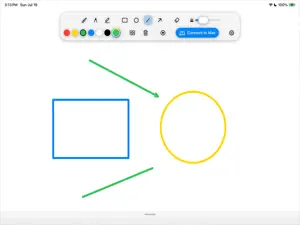
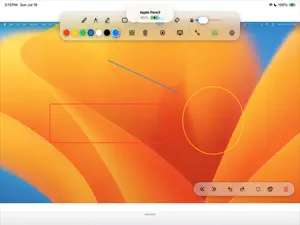
About Screen Ink
Screen Ink turns your iPad into a full-screen whiteboard with Apple Pencil, screen recording, and one-tap sharing -- and turns it into a wireless stylus and remote control the moment you pair it with a Mac. Sketch out an idea on the go, record a narrated walkthrough for your class or team, or step up to present and let your iPad drive everything happening on the big screen. DRAW WITH APPLE PENCIL - Marker, fountain pen, and highlighter, plus shape tools (rectangle, ellipse, line, arrow). - Vector and bitmap eraser modes, with a Pencil double-tap quick-swap to erase. - Adjustable ink color and line width. - Plain, ruled, or grid canvas backgrounds, remembered between sessions. - Wrist guard support so your palm never leaves a stray mark. - A large, scrollable, zoomable canvas with a floating toolbar that adapts to portrait or landscape. RECORD AND SHARE IN ONE TAP - Built-in screen recording captures your whiteboard session with a live elapsed-time indicator. - Optional microphone narration, toggled with a long press on the record button. - When you stop, the share sheet opens instantly: save to your camera roll, save to Files, AirDrop it, or send it anywhere else you share video. PAIR WITH YOUR MAC Turn your iPad into a wireless stylus and remote control for Screen Ink on the Mac: - Scan a QR code or enter a one-time pairing code to connect in seconds; trusted devices reconnect automatically. - Draw with Apple Pencil and see it appear instantly on the shared Mac screen. - Mirror any connected Mac display to your iPad so you can annotate from anywhere in the room. - Control slides, undo/redo, and the laser pointer from your iPad, no clicker required. - Choose which connected Mac display to annotate -- each one keeps its own strokes. BUILT FOR PRIVACY Screen Ink runs entirely on your device and your local network. There's no cloud account, no sign-in, and nothing is uploaded anywhere. Pairing with a Mac happens directly over Wi-Fi between your own devices, and recordings stay on your iPad until you choose to share them. MADE FOR - Students and note-takers who think better with a pencil in hand - Teachers and tutors recording lessons or presenting live - Presenters who want their iPad driving the room from anywhere - Anyone who wants a fast, distraction-free whiteboard Screen Ink keeps the whiteboard simple and the toolkit close by, whether you're sketching solo or driving a live presentation from across the room.
App privacy
The developer, Mohammed Zackria Dawood Basha, reported these privacy practices to Apple.
Data Not Collected
The developer does not collect any data from this app.
Alternatives to Screen Ink
Looking for apps like Screen Ink? Here are 6 similar apps on the App Store. The highest rated is 逸记-日记,便签,记账本,记事本,备忘录 (5.0/5), and all 6 are free to download.
-
 Screen Annotator
-
 Finishwell: Daily Goal Tracker
-
 iFAE-Digital Property Mgmt
2.6
iFAE-Digital Property Mgmt
2.6
-
 Screenink-屏幕翻译
3.0
Screenink-屏幕翻译
3.0
-
 逸记-日记,便签,记账本,记事本,备忘录
5.0
逸记-日记,便签,记账本,记事本,备忘录
5.0
-
 Synology MailPlus
3.8
Synology MailPlus
3.8
| App | Rating | Price | Last updated | Compare |
|---|---|---|---|---|
| Screen Ink | – | 8.99 USD | July 25, 2026 | |
| Screen Annotator | – | Free | Jul 11, 2026 | Compare |
| Finishwell: Daily Goal Tracker | – | Free | Sep 28, 2026 | Compare |
| iFAE-Digital Property Mgmt | 2.6 / 5 (5) | Free | Oct 16, 2026 | Compare |
| Screenink-屏幕翻译 | 3.0 / 5 (14) | Free | Feb 19, 2025 | Compare |
| 逸记-日记,便签,记账本,记事本,备忘录 | 5.0 / 5 (1) | Free | Mar 5, 2026 | Compare |
| Synology MailPlus | 3.8 / 5 (19) | Free | Dec 23, 2025 | Compare |
Compare Screen Ink with the top alternatives: ratings, updates, ASO score and keyword gaps →