

Screen Annotator
Prasanna Kumar Tumula Productivity iPadMac
Screen Annotator is a free Productivity app for iPad and Mac by Prasanna Kumar Tumula. Requires iOS 17.6. Updated July 11, 2026.
- Price
- Free
- on the App Store
- Size
- 4 MB
- Age 4+
- Updated
- Jul 11
- 2026 · v1.1
Screenshots


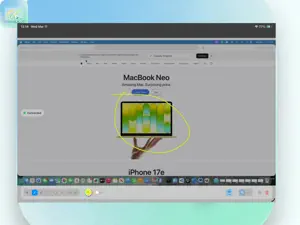

About Screen Annotator
Transform your iPad into the ultimate presentation remote and wireless drawing interface for your Mac. ScreenAnnotator for iPad is the powerful companion app to the popular ScreenAnnotator macOS utility. Stop trying to draw clumsy circles with your mouse during presentations. Instead, beam your Mac’s screen directly to your iPad and use your Apple Pencil to draw, highlight, and annotate with pixel-perfect precision—all in real-time, with zero lag. Whether you are a teacher explaining complex concepts, a designer reviewing UI, or a professional leading a remote meeting, ScreenAnnotator makes your screen your canvas. KEY FEATURES: • Zero-Lag Wireless Sync: Experience ultra-low latency screen sharing. What happens on your Mac happens instantly on your iPad over your local Wi-Fi. • Apple Pencil Precision: Enjoy natural, fluid drawing with full support for Apple Pencil pressure and tilt sensitivity. • Laser Pointer Mode: Direct your audience's attention without leaving permanent marks on your screen. • Pro Toolset: Access a suite of presentation tools including a pen, customizable highlighter, shapes, text, and an eraser. • Custom Palettes: Set your default colors and adjust opacity to match your brand or presentation style. NATURAL TO USE • Draw with Apple Pencil or your finger, with no perceptible delay • Perfect squares, circles, and straight lines — rest a second finger, or just pause, and the shape settles true • Pen, highlighter, shapes, arrows, and text, always within reach • A two-finger tap to undo, three fingers to redo PRIVATE BY DESIGN Your Mac's screen stays on your local network and is only shared while you're connected. No accounts, no tracking, and nothing kept in the cloud. HOW IT WORKS: Open ScreenAnnotator on your Mac. Open ScreenAnnotator on your iPad. Tap "Connect" and your Mac's screen instantly appears on your iPad, ready for your Apple Pencil. UNIVERSAL PURCHASE: ScreenAnnotator offers a free tier to test the waters on your Mac. To unlock the iPad companion app and premium features, upgrade to ScreenAnnotator Pro. Your Pro upgrade is a Universal Purchase, meaning a single subscription or lifetime purchase unlocks everything on both your Mac and iPad! REQUIREMENTS: This app is a companion tool and requires the free "ScreenAnnotator" app installed on a Mac (running macOS 13.0 or later) connected to the same local network. Elevate your presentations and download ScreenAnnotator today!
What’s new
Version 1.1 · Updated July 11, 2026
Crystal clear Mac Screen mirroring, 2 new tools - Laser pointer and disappearing ink. Two video modes to accommodate busy network.
App privacy
The developer, Prasanna Kumar Tumula, reported these privacy practices to Apple.
Data Not Collected
The developer does not collect any data from this app.
Alternatives to Screen Annotator
Looking for apps like Screen Annotator? Here are 6 similar apps on the App Store. The highest rated is Annotate: Screenshot Markup (4.8/5), and 3 of the 6 are free to download.
-
 Web Overlay Canvas for Safari
-
 Annotate: Screenshot Markup
4.8
Annotate: Screenshot Markup
4.8
-
 Screen Ink
-
 Notator | Annotate Documents
2.0
Notator | Annotate Documents
2.0
-
 Pane Canvas
-
 visualOS: Infinite Canvas
4.4
visualOS: Infinite Canvas
4.4
| App | Rating | Price | Last updated | Compare |
|---|---|---|---|---|
| Screen Annotator | – | Free | July 11, 2026 | |
| Web Overlay Canvas for Safari | – | Free | Jul 19, 2026 | Compare |
| Annotate: Screenshot Markup | 4.8 / 5 (8) | Free | Oct 24, 2026 | Compare |
| Screen Ink | – | 8.99 USD | Jul 25, 2026 | Compare |
| Notator | Annotate Documents | 2.0 / 5 (1) | Free | Sep 30, 2026 | Compare |
| Pane Canvas | – | 9.99 USD | May 1, 2026 | Compare |
| visualOS: Infinite Canvas | 4.4 / 5 (5) | 12.99 USD | Oct 26, 2026 | Compare |
Compare Screen Annotator with the top alternatives: ratings, updates, ASO score and keyword gaps →