

Gus: Screen Time & App Blocker
Adonias Micael Productivity iPhoneiPadiPod touch
Gus: Screen Time & App Blocker is a free Productivity app for iPhone and iPad by Adonias Micael. Rated 5.0/5 from 1 ratings. Requires iOS 18.0.
- Rating
- 5.0
- 1 ratings
- Price
- Free
- on the App Store
- Size
- 27 MB
- Age 4+
- Updated
- Oct 21
- 2026 · v2.2.0
Screenshots



About Gus: Screen Time & App Blocker
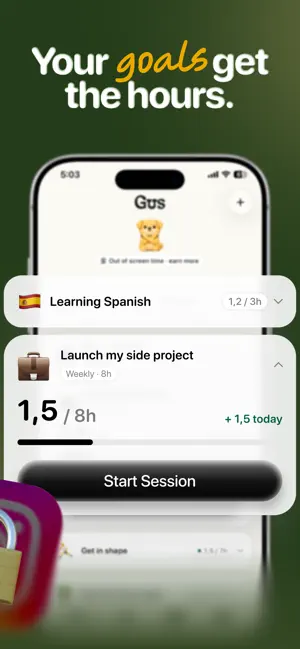
You know the moment. You open one app to check one thing, and forty minutes disappear. And every limit you've ever set, you've swiped away. This one is different, and it fits in one sentence: you set a daily limit, Gus makes it hold, and the time you get back goes to your goals. How it works, in order: 1. You set the limit. Decide how much scrolling a day is fine by you. Your limit, your call. Most people start around two hours. 2. Gus makes it hold. At the limit, the apps you picked lock. Mid-scroll, no countdown, no "ignore limit" button. Want more time today? There is exactly one way: time on one of your goals. Every timed minute opens a minute of your apps, up to half an hour at a time. 3. Your goals get the time. Name what actually matters: the side project, getting in shape, real books. Give each one weekly hours. Sessions are timed, every hour is logged, and the week fills up where you decided it should. Evidence, not vibes. Also in the box: • Protected Sessions: lock your distractions while you work, for exactly as long as you say. Breaking one is a real decision, not a one-tap escape. • Weekly Time Budgets: commit hours to each goal and watch the record build. • Daily Habits: meditate, walk, journal. Small timed habits that replace the scroll instead of becoming another chore. • Weekly Review: an honest weekly bill. Limits held, hours built, nothing hidden and nothing inflated. • A focused AI chat, per goal: it advises. It never touches your data. You decide. And one promise: no shame, no guilt trips, no pressure. A rough day is a rough day, not a failure. The numbers reset and tomorrow starts clean. Gus isn't a coach yelling at you to do better. He's a good dog: calm, direct, quietly glad you showed up. Your time is the evidence of what you actually care about. Gus makes sure the evidence is on your side. SUBSCRIPTION & PRICING Subscription options include Weekly and Yearly plans, and both start with a 7-day free trial. Pricing is shown in the app before purchase and may vary by country. Payment will be charged to your Apple ID account at confirmation of purchase. Subscriptions automatically renew unless canceled at least 24 hours before the end of the current period. You can manage or cancel your subscription in Apple ID settings. Restore Purchases is available in the app. (SUBSCRIPTION REQUIRED: Gus requires an auto-renewable subscription to unlock full access.) Terms of Use: https://www.apple.com/legal/internet-services/itunes/dev/stdeula/ Privacy Policy: https://adomicael.github.io/arc/privacy/
What’s new
Version 2.2.0 · Updated October 21, 2026
New in 2.2: • A shorter first start: you set your limit and your Activities in fewer steps. • Better German and Spanish across the app. • Clearer wording when you unlock your apps early. • Fixes and improvements.
App privacy
The developer, Adonias Micael, reported these privacy practices to Apple.
Data Used to Track You
The following data may be used to track you across apps and websites owned by other companies:
- Purchases: Purchase History
- Identifiers: Device ID
Data Linked to You
The following data, which may be collected and linked to your identity, may be used for the following purposes:
- Purchases: Purchase History
- Identifiers: Device ID, User ID
- User Content: Other User Content
- Usage Data: Product Interaction, Other Usage Data
- Contact Info: Name
- Other Data: Other Data Types
Used for: Third-Party Advertising, Analytics, Product Personalization, App Functionality
Data Not Linked to You
The following data, which may be collected but is not linked to your identity, may be used for the following purposes:
- Diagnostics: Crash Data
Used for: App Functionality
Alternatives to Gus: Screen Time & App Blocker
Looking for apps like Gus: Screen Time & App Blocker? Here are 6 similar apps on the App Store. The highest rated is Ember Arc: Goal Tracker (5.0/5), and all 6 are free to download.
-
 The Life Timeline
-
 Twelve: Quarterly Goal Planner
-
 Ember Arc: Goal Tracker
5.0
Ember Arc: Goal Tracker
5.0
-
 DIBS - Laundry Tracking
-
 Rings AI CRM and XRM
5.0
Rings AI CRM and XRM
5.0
-
 MCP Agent
| App | Rating | Price | Last updated | Compare |
|---|---|---|---|---|
| Gus: Screen Time & App Blocker | 5.0 / 5 (1 rating) | Free | October 21, 2026 | |
| The Life Timeline | – | Free | Oct 25, 2026 | Compare |
| Twelve: Quarterly Goal Planner | – | Free | Feb 20, 2026 | Compare |
| Ember Arc: Goal Tracker | 5.0 / 5 (2) | Free | Feb 26, 2025 | Compare |
| DIBS - Laundry Tracking | – | Free | Aug 22, 2025 | Compare |
| Rings AI CRM and XRM | 5.0 / 5 (1) | Free | Oct 6, 2026 | Compare |
| MCP Agent | – | Free | Oct 11, 2026 | Compare |