

Gastos - Expense Tracker
Refino Kashi Kyle Estudillo Finance iPhoneiPadiPod touch
Gastos - Expense Tracker is a free Finance app for iPhone and iPad by Refino Kashi Kyle Estudillo. Requires iOS 17.0. Updated March 21, 2026.
- Price
- Free
- on the App Store
- Size
- 40 MB
- Age 4+
- Updated
- Mar 21
- 2026 · v1.0.5
Screenshots


About Gastos - Expense Tracker
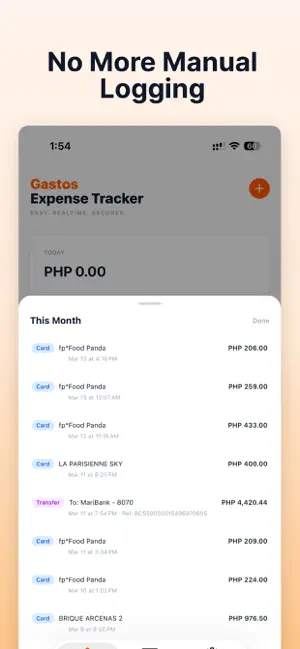
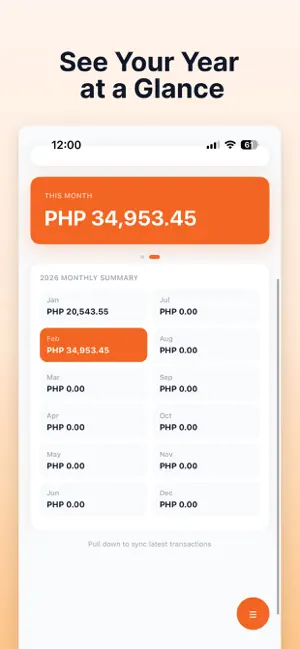
Gastos Expense Tracker requires a subscription to access all features. See plan options upon download. Gastos reads your MariBank and SeaBank transaction email alerts and turns them into a clean spending dashboard automatically. No typing. No spreadsheets. No manual logging. HOW IT WORKS Connect your Gmail account with read-only access. The app finds your MariBank and SeaBank transaction emails and securely extracts your spending information. Card purchases, ATM withdrawals, and fund transfers are organized instantly. SPENDING AT A GLANCE View your total spending for today, this week, and this month in Philippine pesos. A yearly spending heatmap helps you understand your habits over time so you can spot patterns and make better decisions. SWIPE TO VOID Refunded purchase or duplicate charge? Swipe any transaction to mark it as voided so your totals stay accurate. PRIVATE BY DESIGN No backend. No servers. No tracking. All data is stored on your device. Your transaction information never leaves your phone. The app only reads transaction emails and has no access to your bank account or funds. FEATURES - Automatic expense tracking from MariBank and SeaBank email alerts - Support for card purchases, ATM withdrawals, and transfers - Daily, weekly, and monthly spending totals - Yearly spending heatmap - Transaction details and history - Swipe-to-void transactions - Pull-to-refresh email sync - On-device SQLite storage - Google Sign-In with read-only Gmail access SUPPORTED TRANSACTIONS - Card purchases (merchant and amount) - ATM withdrawals - Fund transfers (recipient and reference number) SUBSCRIPTION INFORMATION Gastos requires an active subscription. Payment will be charged to your Apple ID account at confirmation of purchase. Subscription automatically renews unless canceled at least 24 hours before the end of the current period. Your account will be charged for renewal within 24 hours prior to the end of the current period. You can manage and cancel your subscriptions by going to your Account Settings in the App Store after purchase. Disclaimer: This app is not affiliated with or endorsed by MariBank or SeaBank. Terms: https://www.apple.com/legal/internet-services/itunes/dev/stdeula/ Privacy Policy: https://maribank-tracker.kashi.dev/privacy
What’s new
Version 1.0.5 · Updated March 21, 2026
We've updated the app to make sure you get the best experience when you use Gastos Expense Tracker! New Features: - Added Void Transaction in Transactions Page - Added Manual Transaction - Added Bills Payment - Added Shopee Payments - Added Manual Email Syncing
App privacy
The developer, Refino Kashi Kyle Estudillo, reported these privacy practices to Apple.
Data Not Collected
The developer does not collect any data from this app.
Alternatives to Gastos - Expense Tracker
Looking for apps like Gastos - Expense Tracker? Here are 6 similar apps on the App Store. The highest rated is Tipid App (5.0/5), and all 6 are free to download.
-
 Tipid App
5.0
Tipid App
5.0
-
 zero: offline expense tracker
3.8
zero: offline expense tracker
3.8
-
 Boop Budget Tracker
-
 EveryPeso - Money Manager
5.0
EveryPeso - Money Manager
5.0
-
 Hatian
-
 Money Manager-Spending Tracker
4.5
Money Manager-Spending Tracker
4.5
| App | Rating | Price | Last updated | Compare |
|---|---|---|---|---|
| Gastos - Expense Tracker | – | Free | March 21, 2026 | |
| Tipid App | 5.0 / 5 (1) | Free | Sep 26, 2026 | Compare |
| zero: offline expense tracker | 3.8 / 5 (4) | Free | Oct 19, 2026 | Compare |
| Boop Budget Tracker | – | Free | Oct 24, 2026 | Compare |
| EveryPeso - Money Manager | 5.0 / 5 (1) | Free | Oct 5, 2026 | Compare |
| Hatian | – | Free | Aug 24, 2026 | Compare |
| Money Manager-Spending Tracker | 4.5 / 5 (17) | Free | Aug 5, 2026 | Compare |