

ClipCut -Sports Highlight Tool
Aaron Mcdonald Photo & Video iPhoneiPadiPod touchMac
ClipCut -Sports Highlight Tool is a free Photo & Video app for iPhone and iPad by Aaron Mcdonald. Rated 5.0/5 from 1 ratings. Requires iOS 18.6.
- Rating
- 5.0
- 1 ratings
- Price
- Free
- on the App Store
- Size
- 154 MB
- Age 4+
- Updated
- Aug 21
- 2026 · v1.1
Screenshots


About ClipCut -Sports Highlight Tool
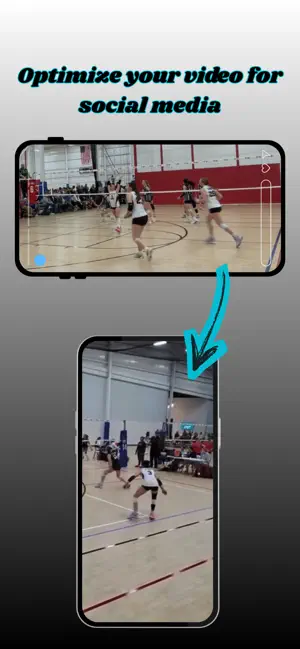
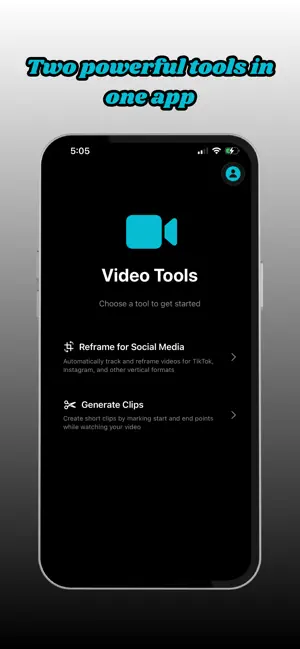
ClipCut makes it effortless to turn full‑length game footage into punchy, portrait‑ready highlights for TikTok, Instagram Reels, and YouTube Shorts. Whether you're a coach, athlete, or creator, ClipCut gives you two powerful tools in one clean workflow. ClipCut: Instant Highlights + Portrait Reframing for Social Media Premium subscription required for access. Feature 1: Clip Grabbing — No More Screen Recording Premium Feature — Requires Subscription Upload a full game or practice video and tap the Star button to instantly save a highlight. No scrubbing, no screen recording — just tap when the moment happens. Grab clips in real time or during playback Saves only the moment you want — no trimming Ideal for fast highlight capture during games or film review Feature 2: Portrait Reframing — Auto‑Follow Your Focus Premium Feature — Requires Subscription Transform any landscape clip into a smooth, vertical video that looks professionally filmed. Just tap the player or action you want to follow — ClipCut tracks it automatically. Works with any landscape video Tap to select your focus point Exports portrait videos with smooth auto‑tracking Ideal for TikTok, Reels, Shorts, and other vertical platforms Your subject stays centered like a dedicated cameraman is following the play. Why Creators Love ClipCut Fast workflow — grab and reframe in seconds No editing skills needed Social‑ready portrait output No screen recording required Built for sports: volleyball, basketball, soccer, and more By using this app, you agree to Apple’s Standard End User License Agreement: https://www.apple.com/legal/internet-services/itunes/dev/stdeula/
What’s new
Version 1.1 · Updated August 21, 2026
added manual reframe tracking. Simply hold down where to reframe and the app will automatically keep your position centered.
App privacy
The developer, Aaron Mcdonald, reported these privacy practices to Apple.
Data Not Collected
The developer does not collect any data from this app.
Alternatives to ClipCut -Sports Highlight Tool
Looking for apps like ClipCut -Sports Highlight Tool? Here are 6 similar apps on the App Store. The highest rated is Image Studio Pro (5.0/5), and 5 of the 6 are free to download.
-
 Player Follow: Basketball
-
 Video Editor - Video Maker,Cut
-
 Image Studio Pro
5.0
Image Studio Pro
5.0
-
 Free Cartoon App - CartosAI
-
 MovHit - AI Sports Highlights
-
 Catchy Cam - Auto Tracking Cam
| App | Rating | Price | Last updated | Compare |
|---|---|---|---|---|
| ClipCut -Sports Highlight Tool | 5.0 / 5 (1 rating) | Free | August 21, 2026 | |
| Player Follow: Basketball | – | Free | Apr 9, 2026 | Compare |
| Video Editor - Video Maker,Cut | – | 17.99 USD | Feb 4, 2026 | Compare |
| Image Studio Pro | 5.0 / 5 (1) | Free | Sep 3, 2026 | Compare |
| Free Cartoon App - CartosAI | – | Free | Sep 19, 2026 | Compare |
| MovHit - AI Sports Highlights | – | Free | May 5, 2026 | Compare |
| Catchy Cam - Auto Tracking Cam | – | Free | Sep 7, 2026 | Compare |