

FocusDo: ADHD To-Do List
Nous Studio Ltd Productivity iPhoneiPadiPod touch
FocusDo: ADHD To-Do List is a free Productivity app for iPhone and iPad by Nous Studio Ltd. Requires iOS 17.6. Updated October 7, 2026.
- Price
- Free
- on the App Store
- Size
- 57 MB
- Age 4+
- Updated
- Oct 7
- 2026 · v1.3.0
Screenshots



About FocusDo: ADHD To-Do List
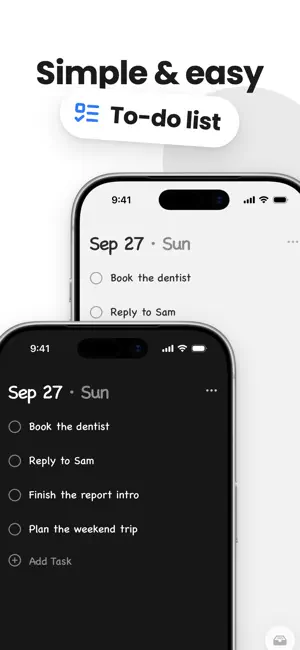
FocusDo is a minimal to-do list with a Focus Mode. Write down what needs doing, enter Focus Mode, and the screen shows only the task in front of you — plus a pair of eyes watching you finish it. Slip off to another app, and the Dynamic Island reminds you to come back. No timers. No streaks. No guilt. Just a short list, one task in front of you, and something quietly keeping you on it. ADHD-friendly by design: built for people who struggle to start, drift off easily, or lose the whole afternoon without knowing where it went. 【Focus Mode: it watches you finish this one】 Swipe into Focus Mode and your list disappears. One task fills the screen — nothing else. Swipe it away when it's done. Turn your phone sideways and prop it on the desk, and it becomes a sticky note with one thing written on it. On the screen is a pair of hand-drawn eyes, watching you the whole time: stall too long and they get sleepy, finish a task and they light up, tap them and they wink back. 【Dynamic Island: it notices when you leave】 Slip out to scroll your phone and FocusDo stays in the Dynamic Island and on your Lock Screen, showing what you were doing and how many tasks are left. It reminds you to come back every so often, and you can turn it off any time. Pro members can set their own reminder interval. Getting distracted isn't failure. Coming back is what counts. 【Auto-archive: only what matters today】 Tasks auto-archive after a day or a week — your choice. Nothing is deleted; it's all one tap away in Archive. Your list only ever shows what's in front of you right now, so it never becomes the thing you avoid. 【Lock Screen To-Do: check things off without opening the app】 Leave the app or lock your phone, and your list stays on the Lock Screen. Finish something and check it off right there. 【Repeating tasks: write it once】 Repeat tasks daily, on weekdays, weekly, monthly, or on custom dates. Set a heading to repeat, and the whole group under it repeats too. 【Minimal: write it down, do it, cross it out】 No folders, no tags, no priority levels, no settings rabbit hole. A black-and-white, hand-drawn notepad. More • Reminders for individual tasks • Section headings with icons: tasks under a heading form a group you can collapse, move as a whole, or focus on • Home Screen and Lock Screen widgets, including the Focus Wheel widget that shows one task at a time • Black and White themes • Hand-drawn or system font, three sizes • iPad supported • iCloud sync across your devices (Pro) • Custom reminder interval (Pro) FocusDo Pro Pro unlocks Lock Screen To-Do, repeating tasks, the Focus Wheel and large list widgets, iCloud sync, custom reminder intervals, and unlimited section headings, plus every premium feature we add in the future. Choose a monthly or yearly subscription, or a one-time lifetime purchase. • Payment is charged to your Apple Account at confirmation of purchase. • Subscriptions renew automatically unless auto-renew is turned off at least 24 hours before the end of the current period. • Manage or cancel any time in Settings → Apple Account → Subscriptions. Terms of Service: https://honeysuckle-botany-fde.notion.site/Terms-of-Service-3120378c2ce281b8ae84df7359a682ed Privacy Policy: https://honeysuckle-botany-fde.notion.site/Privacy-Policy-3120378c2ce2811cb695da3cb649b4c2
What’s new
Version 1.3.0 · Updated October 7, 2026
• Set tasks to repeat daily, on weekdays, weekly, monthly, or on custom dates • Tasks under a heading now form a group you can collapse, move as a whole, or focus on • Set a heading to repeat, and its whole group repeats with it • Improved the colors of the White theme
App privacy
The developer, Nous Studio Ltd, reported these privacy practices to Apple.
Data Not Linked to You
The following data, which may be collected but is not linked to your identity, may be used for the following purposes:
- Identifiers: Device ID
- Usage Data: Product Interaction
Used for: Analytics
Alternatives to FocusDo: ADHD To-Do List
Looking for apps like FocusDo: ADHD To-Do List? Here are 6 similar apps on the App Store. The highest rated is Tilo – Time Log & Focus (5.0/5), and all 6 are free to download.
-
 MOMOTODO - Lock Screen To-Do
-
 Tilo – Time Log & Focus
5.0
-
 ArkNote: ADHD-Friendly Notes
5.0
-
 记个P
-
 慢慢记
5.0
-
 Jotbook: Bullet Journal & Bujo
5.0
| App | Rating | Price | Last updated | Compare |
|---|---|---|---|---|
| FocusDo: ADHD To-Do List | – | Free | October 7, 2026 | |
| MOMOTODO - Lock Screen To-Do | – | Free | Oct 20, 2026 | Compare |
| Tilo – Time Log & Focus | 5.0 / 5 (2) | Free | Oct 23, 2026 | Compare |
| ArkNote: ADHD-Friendly Notes | 5.0 / 5 (2) | Free | Oct 20, 2026 | Compare |
| 记个P | – | Free | Oct 9, 2026 | Compare |
| 慢慢记 | 5.0 / 5 (2) | Free | Oct 16, 2026 | Compare |
| Jotbook: Bullet Journal & Bujo | 5.0 / 5 (1) | Free | Oct 19, 2026 | Compare |