

ZenRinger
Data Management Solutions LLC Productivity iPhoneiPadiPod touch
ZenRinger is a free Productivity app for iPhone and iPad by Data Management Solutions LLC. Rated 5.0/5 from 2 ratings. Requires iOS 18.6.
- Rating
- 5.0
- 2 ratings
- Price
- Free
- on the App Store
- Size
- 17 MB
- Age 4+
- Updated
- Sep 22
- 2026 · v1.2
Screenshots


About ZenRinger
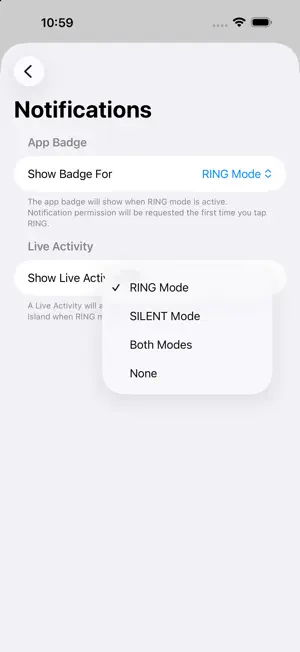
Silence Spam — Answer Calls That Matter Tired of navigating through Settings every time you need to block unknown phone callers? ZenRinger puts Apple’s Unknown Caller blocking at your fingertips with simple one-tap control. Unknown callers are phone numbers not in your Contacts. Full Access is required for app functionality, available as an annual subscription with a free trial or a one-time lifetime purchase. Review Help -> Installation Guide, and app limitations in Help -> Troubleshooting before purchase. MINDFUL CALL MANAGEMENT Take a zen approach to your phone—stay present and focused when you need quiet, or instantly available when you’re expecting calls. HOW IT WORKS • Tap SILENCE to send unknown callers straight to voicemail • Tap RING when expecting calls from new numbers (doctor, plumber, delivery) • Optional app badge and Live Activity keep you informed of your current ringer status • Available widget shows current ringer status STAY IN CONTROL ZenRinger remembers your last setting and reminds you when calls are silenced or ringing (optional app setting), so you won’t miss important calls or get bombarded by spam. PERFECT FOR • Blocking robocalls and scam attempts during normal times • Quickly allowing all calls when expecting important callers not yet in your contacts • Peace of mind knowing your status at a glance SETTINGS NOTES ZenRinger uses Shortcuts to toggle between blocking and allowing unknown callers. Before first use, set Phone > Silence Unknown Callers to either “Never” or “Silence” (not “Ask”), as Shortcuts cannot change from the “Ask” option. If you prefer using the “Ask” option (where iOS prompts you for each unknown call), ZenRinger isn’t designed for your workflow. This app is built for people who want to quickly switch between blocking all unknown callers or letting them all through. ZenRinger tracks settings changed within the app. If you manually adjust Silence Unknown Callers directly in Settings, the app status may be out of sync until you next choose a setting in ZenRinger. SIMPLE SETUP After first launch, ZenRinger will walk you through downloading the Shortcuts needed to control your phone settings. ONE-TIME SETUP, EVERYDAY CONVENIENCE. Take back control of your phone. Download ZenRinger today. Terms of Use & End User License Agreement (EULA): https://zenringer.com/terms-of-service/ Privacy Policy: https://zenringer.com/privacy-policy/
What’s new
Version 1.2 · Updated September 22, 2026
- New annual subscription option for Full Access, with a free trial for new subscribers. - The one-time lifetime purchase is still available.
App privacy
The developer, Data Management Solutions LLC, reported these privacy practices to Apple.
Data Not Collected
The developer does not collect any data from this app.
Alternatives to ZenRinger
Looking for apps like ZenRinger? Here are 6 similar apps on the App Store. The highest rated is Council AI (5.0/5), and 5 of the 6 are free to download.
-
 Perspective Transcribe
4.4
-
 Kan Do: Project Management
4.5
-
 Pagi - Morning Pages & Diary
4.5
-
 Typinator Mobile
2.0
-
 QR Code Maker & Reader
-
 Council AI
5.0
| App | Rating | Price | Last updated | Compare |
|---|---|---|---|---|
| ZenRinger | 5.0 / 5 (2 ratings) | Free | September 22, 2026 | |
| Perspective Transcribe | 4.4 / 5 (9) | Free | Oct 25, 2026 | Compare |
| Kan Do: Project Management | 4.5 / 5 (20) | 2.99 USD | Oct 25, 2026 | Compare |
| Pagi - Morning Pages & Diary | 4.5 / 5 (10) | Free | Jul 18, 2025 | Compare |
| Typinator Mobile | 2.0 / 5 (3) | Free | Jun 3, 2026 | Compare |
| QR Code Maker & Reader | – | Free | Dec 28, 2024 | Compare |
| Council AI | 5.0 / 5 (8) | Free | Oct 9, 2026 | Compare |
Compare ZenRinger with the top alternatives: ratings, updates, ASO score and keyword gaps →