

Visuel
JOSEF MAWAS Productivity iPhoneiPadiPod touch
Visuel is a free Productivity app for iPhone and iPad by JOSEF MAWAS. Requires iOS 26.0. Updated October 24, 2026.
- Price
- Free
- on the App Store
- Size
- 36 MB
- Age 4+
- Updated
- Oct 24
- 2026 · v1.1
Screenshots


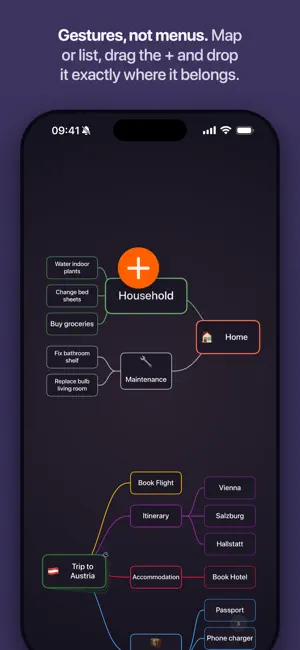
About Visuel
Plan visually. Visuel puts your tasks, projects and notes on a canvas, so you can see how everything fits together. Start with one idea. Branch it into tasks, notes and subprojects. When it’s time to act, open any branch as a list and work through it. PLAN ON A CANVAS Plan a trip, organize your home, map out a project or break down something you’ve been putting off. • Add tasks anywhere on the canvas • Drag nodes into place • Build projects as deep as you need • Use colors and emoji to make important areas easy to spot • Add tasks quickly by dragging the + button exactly where they belong SWITCH FROM PLANNING TO DOING Your canvas gives you the big picture. Lists help you focus on what comes next. Open any branch to see its tasks as a structured list, reorder them, add new ones and check them off. • Schedule tasks for Today, Upcoming or Not Now • Defer tasks until the day you need them • Set deadlines, reminders and repeats • See calendar events alongside your tasks • Use tags to filter what matters • Capture loose tasks in Inbox, find completed work in Logbook KEEP NOTES WHERE THEY BELONG Not everything is a task. Visuel also gives you note nodes for ideas, reference material, plans and anything you want to keep beside the work it relates to. Notes can include rich content such as: • Headings • Checklists • Attachments • Images • Highlights • Link previews Tap any node on the canvas to see its details without losing your place. No account to create, nothing to set up. Open Visuel and start planning. Your data is stored in your own iCloud and syncs across your iPhones signed in to the same Apple Account.
What’s new
Version 1.1 · Updated October 24, 2026
WIDGETS Visuel now has widgets. Put the list you choose on the Home Screen or the Lock Screen. • Check off tasks from a Home Screen widget • Add a task with one tap • Filter a widget by tags NOTES, NOW NATIVE The note editor is now fully native. Writing, selecting and pasting feels faster and smoother • Attach files and scan documents • Edit a project’s note right on its page REPEAT WHAT COMES BACK Set a task or a whole project to repeat, and the next one shows up on its day. • Repeat every day, week, month or year • Repeat after you finish the last one • Pick exact dates on the calendar • Pause, resume or stop any time ALSO NEW • Defer a task in Not Now, simply long press Not Now in the Schedule window and choose Until... • Workspaces now have Tags • New pages for Tags, Deadlines and Repeating • A Search page with every result • Choose the day your week starts Plus many fixes and smoother motion across the whole app.
App privacy
The developer, JOSEF MAWAS, reported these privacy practices to Apple.
Data Not Linked to You
The following data, which may be collected but is not linked to your identity, may be used for the following purposes:
- Diagnostics: Crash Data, Performance Data
Used for: App Functionality
Alternatives to Visuel
Looking for apps like Visuel? Here are 6 similar apps on the App Store. The highest rated is Kivu AI (5.0/5), and all 6 are free to download.
-
 Kivu AI
5.0
Kivu AI
5.0
-
 Ichi: One Task To-Do & Focus
-
 Pit.Kit: Text Your Thoughts
5.0
Pit.Kit: Text Your Thoughts
5.0
-
 Pocket: Mindful Spending
-
 Budgio Money
5.0
Budgio Money
5.0
-
 Scribble Calendar & Planner
5.0
Scribble Calendar & Planner
5.0
| App | Rating | Price | Last updated | Compare |
|---|---|---|---|---|
| Visuel | – | Free | October 24, 2026 | |
| Kivu AI | 5.0 / 5 (1) | Free | Jul 24, 2026 | Compare |
| Ichi: One Task To-Do & Focus | – | Free | Jun 29, 2026 | Compare |
| Pit.Kit: Text Your Thoughts | 5.0 / 5 (1) | Free | Oct 27, 2026 | Compare |
| Pocket: Mindful Spending | – | Free | Jul 21, 2026 | Compare |
| Budgio Money | 5.0 / 5 (1) | Free | Oct 11, 2026 | Compare |
| Scribble Calendar & Planner | 5.0 / 5 (1) | Free | Oct 25, 2026 | Compare |
Compare Visuel with the top alternatives: ratings, updates, ASO score and keyword gaps →