

Blurts: Voice memos to tasks
Aida Issayeva Productivity iPhoneiPadiPod touch
Blurts: Voice memos to tasks is a free Productivity app for iPhone and iPad by Aida Issayeva. Rated 5.0/5 from 2 ratings. Requires iOS 13.0.
- Rating
- 5.0
- 2 ratings
- Price
- Free
- on the App Store
- Size
- 44 MB
- Age 4+
- Updated
- Oct 11
- 2026 · v1.4.2
Screenshots
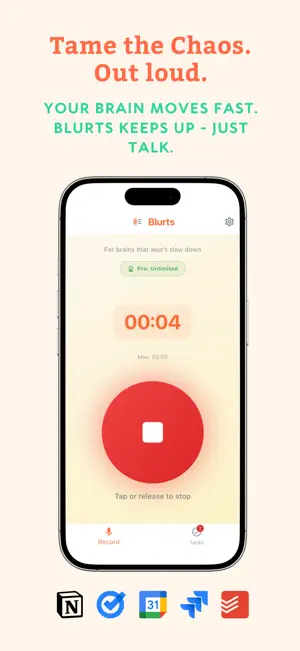
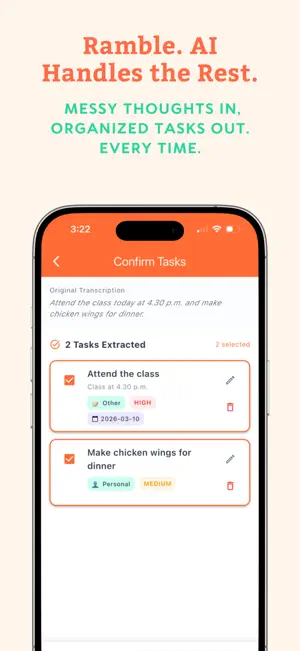


About Blurts: Voice memos to tasks
SAY IT MESSY. GET IT BACK CLEAN. When something you need to do hits you mid-motion, say it exactly as it comes. Blurts turns the ramble into a clear, doable task on the right day-without giving you another system to babysit. YOUR FEW THINGS, NOT ALL THE THINGS Open Blurts and see what needs you today. Overdue work stays in “Still on your list” instead of taking over your day. Appointments appear by time, errands can sit together, and things you’re waiting on stay out of the way until you want them. The result is a task list that helps you move-not a growing inventory of everything you haven’t done. HOW BLURTS WORKS 1. Tap the microphone. 2. Speak naturally-even if the thought is messy or you switch languages. 3. Blurts finds the action, date, area, type, and priority. 4. Review the clean task and get back to what you were doing. LESS ORGANIZING. MORE DONE. Blurts automatically turns voice notes into useful tasks. It can recognize due dates from phrases like “tomorrow afternoon,” separate work from personal commitments, and help surface what matters first. When you need another view, use the Lens to order today’s tasks by importance or time, focus on one area, or include things you’re waiting on. When you don’t need it, it stays out of the way. BUILT FOR LIFE IN MOTION Blurts is for people who think of tasks while walking, commuting, cooking, or moving between meetings - and for anyone who has abandoned a task manager because maintaining it became another task. Use Blurts to capture: • Tasks and follow-ups • Appointments and routines • Errands and shopping reminders • Work and personal commitments • Things you’re waiting on CALM BY DESIGN The warm paper-and-ink interface keeps attention on the next doable thing. Clear hierarchy, restrained color, and automatic organization reduce decisions without hiding your work. YOUR TASKS, WHERE YOU NEED THEM Keep your tasks in Blurts or connect your EXISTING workflows, such as: - Notion Pages/Databases/Second Brain/HQ/Todo - Google Calendar and Keep - Apple Reminders and Calendar - Microsoft Planner Speak your thoughts and see them appear in your workflows! You can review and edit extracted tasks before they are sent. Stop carrying every commitment in your head. Say what’s on your mind and let Blurts hand it back clean. Terms of Use: https://www.apple.com/legal/internet-services/itunes/dev/stdeula/
What’s new
Version 1.4.2 · Updated October 11, 2026
New Screenshots
App privacy
The developer, Aida Issayeva, reported these privacy practices to Apple.
Data Not Linked to You
The following data, which may be collected but is not linked to your identity, may be used for the following purposes:
- Contact Info: Email Address, Name
Used for: App Functionality
Alternatives to Blurts: Voice memos to tasks
Looking for apps like Blurts: Voice memos to tasks? Here are 6 similar apps on the App Store.
-
 Lite Notion
-
 Karl: Voice Meeting Notes Pro
-
 OneTap for Notion
-
 Rently: Property Manager
-
 Inki: Quick Capture for Notion
-
 Memo Bridge
| App | Rating | Price | Last updated | Compare |
|---|---|---|---|---|
| Blurts: Voice memos to tasks | 5.0 / 5 (2 ratings) | Free | October 11, 2026 | |
| Lite Notion | – | Free | Oct 23, 2026 | Compare |
| Karl: Voice Meeting Notes Pro | – | Free | Oct 15, 2026 | Compare |
| OneTap for Notion | – | Free | Sep 24, 2026 | Compare |
| Rently: Property Manager | – | Free | Sep 6, 2026 | Compare |
| Inki: Quick Capture for Notion | – | Free | Sep 16, 2026 | Compare |
| Memo Bridge | – | Free | Mar 13, 2026 | Compare |