

Raster AI Studio
Bertay Eren Photo & Video iPhoneiPadiPod touch
Raster AI Studio is a free Photo & Video app for iPhone and iPad by Bertay Eren. Requires iOS 17.0. Updated March 26, 2026.
- Price
- Free
- on the App Store
- Size
- 1.8 GB
- Age 4+
- Updated
- Mar 26
- 2026 · v1.1
Screenshots

About Raster AI Studio
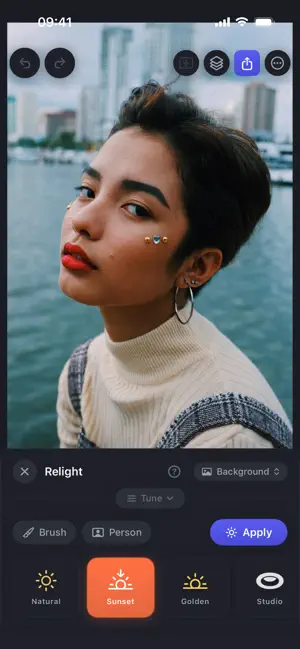
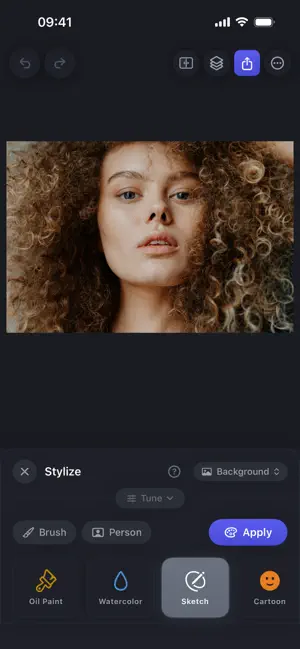
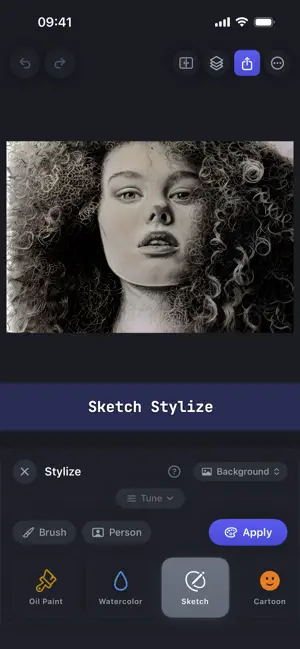
Pro photo editing with AI that never touches the cloud. Every model runs on your iPhone. Your photos never leave your device. AI Erase Paint over anything to remove it. Power lines, photobombers, blemishes. The AI fills in what was behind it seamlessly. Relighting Change the lighting in any photo after it's taken. Golden hour, studio light, neon, moody. Eight presets or describe your own. Brush lighting onto specific areas. Art Styles Transform photos into oil paintings, watercolors, sketches, cinematic film, and more. Fine-tune strength and face protection to get exactly the look you want. AI Fill Paint an area and describe what should appear. The AI creates it, matching the light and color of your photo. Smart Selection Tap or draw around any object to select it. Extract it to a new layer, remove it, or replace the background. All with AI precision. Layers & Adjustments Multiple layers with reorder, merge, and transform. Full adjustment controls. Brightness, contrast, saturation, shadows, highlights, temperature, sharpness. Works Offline No account required. No uploads. No internet needed. Edit on a plane, off-grid, wherever you are. Your photos are yours alone. Try every tool free with 5 AI edits per day. Unlock unlimited with Raster Pro. Terms of Use: https://rastercl.com/raster-ai-studio/terms Privacy Policy: https://rastercl.com/raster-ai-studio/privacy
What’s new
Version 1.1 · Updated March 26, 2026
Improved tutorials, fixed bugs, updated splash screen; made AI model compilations faster on first launch.
App privacy
The developer, Bertay Eren, reported these privacy practices to Apple.
Data Linked to You
The following data, which may be collected and linked to your identity, may be used for the following purposes:
- Location: Coarse Location
- Identifiers: Device ID
- Usage Data: Product Interaction, Advertising Data
Used for: Third-Party Advertising, Analytics
Data Not Linked to You
The following data, which may be collected but is not linked to your identity, may be used for the following purposes:
- Diagnostics: Performance Data, Other Diagnostic Data, Crash Data
Used for: Third-Party Advertising, Analytics
Alternatives to Raster AI Studio
Looking for apps like Raster AI Studio? Here are 6 similar apps on the App Store. The highest rated is Filter It (5.0/5), and 5 of the 6 are free to download.
-
 Imagia - AI Image Styler
-
 AI Upscaling (Offline)
-
 ProVisual: AI Photo & Effects
-
 Rake Plus: Relight & Refocus
-
 Plixar: AI Photo Editor
-
 Filter It
5.0
| App | Rating | Price | Last updated | Compare |
|---|---|---|---|---|
| Raster AI Studio | – | Free | March 26, 2026 | |
| Imagia - AI Image Styler | – | Free | Jul 10, 2025 | Compare |
| AI Upscaling (Offline) | – | 3.99 USD | Jul 13, 2026 | Compare |
| ProVisual: AI Photo & Effects | – | Free | Aug 28, 2026 | Compare |
| Rake Plus: Relight & Refocus | – | Free | Oct 5, 2026 | Compare |
| Plixar: AI Photo Editor | – | Free | Sep 30, 2026 | Compare |
| Filter It | 5.0 / 5 (3) | Free | May 2, 2024 | Compare |
Compare Raster AI Studio with the top alternatives: ratings, updates, ASO score and keyword gaps →