

KeeForge: KeePass Manager
Jia Tan Productivity iPhoneiPadiPod touchMac
KeeForge: KeePass Manager is a free Productivity app for iPhone and iPad by Jia Tan. Rated 4.4/5 from 8 ratings. Requires iOS 18.0. Updated October 13, 2026.
- Rating
- 4.4
- 8 ratings
- Price
- Free
- on the App Store
- Size
- 29 MB
- Age 4+
- Updated
- Oct 13
- 2026 · v1.18.0
Screenshots


About KeeForge: KeePass Manager
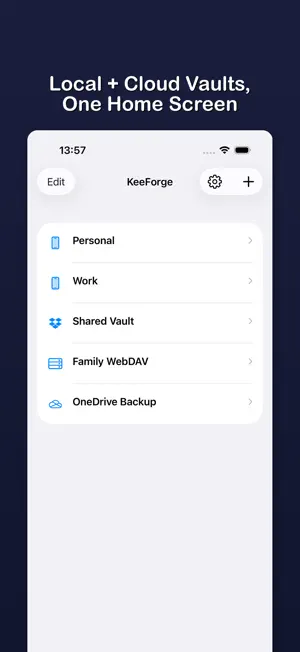
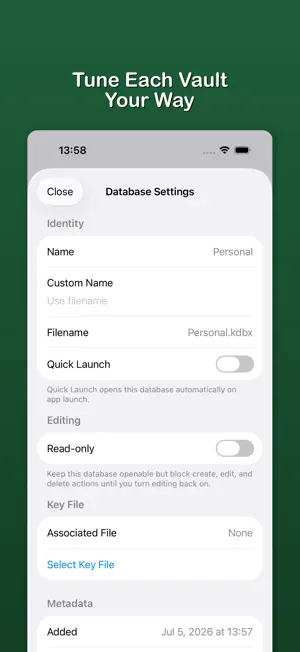
KeeForge is a native iOS password manager for KeePass (.kdbx) databases. Open vaults from iCloud, Dropbox, OneDrive, WebDAV, FTP, or local files. AutoFill passwords, passkeys, and TOTP codes with Face ID. No accounts, no tracking, no subscription — fully open source under GPLv3. Why KeeForge: - Native iOS app, not a port — built in Swift for iPhone, iPad, and Mac - Your vault stays encrypted on your device; we never see it - Zero accounts, zero telemetry, zero ads - Compatible with KeePassXC, KeePass 2.x, KeePassium, and Strongbox Vault Management - Open .kdbx databases from local files, iCloud, Dropbox, OneDrive, WebDAV, FTP, or any Files app provider - Manage multiple databases from a dedicated home screen - Create new KDBX 4.x databases on-device or in Dropbox, OneDrive, WebDAV, FTP - Browse groups and entries with instant search Editing & Saving - Create, edit, and delete entries with built-in password generation - Autosave with timestamped backups and save-conflict detection - Entry history, unknown fields, and third-party extensions preserved — no data loss when round-tripping with KeePassXC or other clients - Read-only mode for shared databases AutoFill - AutoFill passwords, passkeys, and TOTP codes in Safari and apps - QuickType bar suggestions — tap to fill with Face ID - Save new credentials directly from AutoFill, even when offline Security - Face ID / Touch ID unlock with auto-lock inactivity timer - Key file support — all KeePass formats (.key, .keyx, binary, hex) - Screen recording detection blurs vault when capture is active - Exponential lockout after failed unlock attempts - Argon2 KDF, AES-GCM in-memory encryption of secrets - Clipboard stays on-device — no Universal Clipboard sync Open Source - Fully open source under GPLv3 - Source on GitHub: github.com/KeeForge/KeeForge - Independently audited; no network calls except to your own cloud storage and the optional in-app feedback form Tip jar available if you'd like to support development. No subscription, no accounts, no upsell. FTP connections are unencrypted. Use FTP only on networks you trust, and avoid editing the same FTP database from multiple apps or devices at once. FTPS and SFTP are not supported.
Ratings & reviews
4.4
8 ratings
What’s new
Version 1.18.0 · Updated October 13, 2026
IMPORTANT FIX • Saving entry notes is now safe. KeeForge prevents the database corruption that could happen when notes or other text contained unsupported characters. • Updating does not repair files that are already damaged. Restore a readable backup or use the KeeForge KDBX recovery tool: https://github.com/KeeForge/kdbx-recovery WHAT'S NEW • Database views: tap the title to switch between All Entries, Groups, Verification Codes, Tags, and the Recycle Bin. • Import passwords from Apple's Passwords app, with a preview before anything is added. • Entry editor: add and remove attachments, set an expiration date, and see the verification code before you save. • Cloud sync: open a cloud database without syncing first, and merge AutoFill changes when the cloud copy has changed. • Authentication grace period: choose how soon KeeForge asks again before showing or copying a password. • Encryption: change a database's key derivation to AES-KDF. • AutoFill suggestions show an entry's own website, and the user name for verification codes. • Settings and Database Details are easier to scan. • KeeForge is now available in Italian. WHAT'S FIXED • AutoFill suggestions stay up to date on iOS 27. • AutoFill finds credentials that another app or device added to a database opened from Files. • After a cancelled or failed Face ID or Touch ID unlock, you can enter your master password right away. • Notes keep their original line endings, and protected fields from other KeePass apps stay protected when saving. • Retrying a failed save no longer creates duplicate entries. • WebDAV folders with percent sequences such as "%20" in their names open correctly. • Many more fixes for saving, syncing, AutoFill, and translations.
App privacy
The developer, Jia Tan, reported these privacy practices to Apple.
Data Not Collected
The developer does not collect any data from this app.
Alternatives to KeeForge: KeePass Manager
Looking for apps like KeeForge: KeePass Manager? Here are 6 similar apps on the App Store. The highest rated is Bramble: Password Manager (5.0/5), and all 6 are free to download.
-
 Bramble: Password Manager
5.0
-
 OneKeePass - Password Manager
3.9
-
 WhatsPass
5.0
-
 Papyrus: Research Library
5.0
-
 TypeWhisper App
3.0
-
 Maho Notes
5.0
| App | Rating | Price | Last updated | Compare |
|---|---|---|---|---|
| KeeForge: KeePass Manager | 4.4 / 5 (8 ratings) | Free | October 13, 2026 | |
| Bramble: Password Manager | 5.0 / 5 (4) | Free | Oct 13, 2026 | Compare |
| OneKeePass - Password Manager | 3.9 / 5 (13) | Free | Sep 29, 2026 | Compare |
| WhatsPass | 5.0 / 5 (3) | Free | Oct 8, 2026 | Compare |
| Papyrus: Research Library | 5.0 / 5 (2) | Free | Sep 26, 2026 | Compare |
| TypeWhisper App | 3.0 / 5 (2) | Free | Sep 30, 2026 | Compare |
| Maho Notes | 5.0 / 5 (2) | Free | Oct 9, 2026 | Compare |