

SSH Term X
Haga Kunihiko Developer Tools iPhoneiPadiPod touch
SSH Term X is a paid Developer Tools app for iPhone and iPad by Haga Kunihiko. Rated 5.0/5 from 1 ratings. Requires iOS 15.0. Updated October 28, 2026.
- Rating
- 5.0
- 1 ratings
- Price
- 4.99 USD
- on the App Store
- Size
- 84 MB
- Age 4+
- Updated
- Oct 28
- 2026 · v2.67.0
Screenshots



About SSH Term X
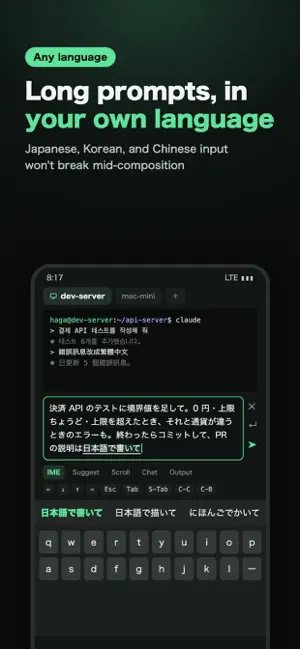
Your phone is the command center for your AI agents. Any harness, any model, any language. Japanese, Korean, and Chinese input won't break. CONNECTING IS NOT ENOUGH Agents run for a long time and stop to wait for approval or input. SSH Term lists the agents of supported harnesses on a card for each saved host, with their state: Working, Waiting for input, or Needs approval. See which one is waiting for what, and answer it on the spot. NOT LOCKED TO A HARNESS OR A MODEL Start any agent that runs in a terminal and give it instructions. Models and providers (API keys, Bedrock, and so on) stay as configured on your host. Agents run on your own host, and their conversations stay there instead of going through a third-party service. SUPPORTED HARNESSES The status list and chat view support Claude Code, Codex, Oh My Pi, Pi, and Copilot CLI. YOUR PHONE IS THE COMMAND CENTER Close the app and your agents keep running on the host (kept shells). Reopen it and the tab comes back with the output you missed. Approval requests, input waits, and finished turns reach you as push notifications through the free ntfy app, even with SSH Term closed (Slack, Discord, and Telegram also work). Send the next instruction to a running agent from the chat view. ANY LANGUAGE Instructions to an agent are prose in your own words. Japanese, Korean, and Chinese text often breaks in SSH apps; in SSH Term's IME mode it doesn't break mid-composition, so you can write long, detailed instructions in your own language. ONE-TIME PURCHASE. FEATURES DON'T DISAPPEAR LATER No account and no license server, so features don't disappear later. Every feature is included in the price; the only in-app purchase is an optional way to support development. No subscription, no ads, no telemetry. Your credentials stay on your device. ---------- AGENT LIST AND CHAT VIEW (BETA) Prepare a host once, and agents of supported harnesses started in a PC terminal show up on your phone too. Read a running conversation as a chat and reply or approve from there; what you send never mixes with text half-typed on the PC. KEPT SHELLS (NO TMUX, NO MOSH NEEDED) When the connection drops, the shell stays on the host. Switching between Wi-Fi and mobile data or locking the screen won't stop your work. On reconnect the tab reattaches by itself and shows what you missed. The host only needs a small helper, stagent, which the app installs to ~/.ssh-term/agent after verifying its sha256 (Linux, macOS, and Windows hosts). AI AGENT SESSIONS Resume conversations of supported harnesses from a list, in a kept shell, tmux, zellij, screen, or herdr. CJK INPUT (IME MODE) Compose text in the input box and send it to the terminal in one go; characters still being composed never leak out as commands. ON THE BIG SCREEN OF AN IPAD OR AN OPEN IPHONE DUO Two tabs side by side, a home screen with each host's agent cards, a sidebar of open tabs with those waiting for approval first, and a two-pane filer. With a hardware keyboard, type just like on a PC. Split View works too. SFTP FILE BROWSER AND PREVIEW Check files an agent created or edited without leaving the terminal. Sort, rename, delete, and bookmark folders per host. Syntax-highlighted preview. AUTO-RECONNECT, MULTI-TAB Reconnects automatically when the network drops (up to 3 attempts). Run several connections side by side in tabs. Works over Tailscale SSH. INPUT ASSIST TOOLBAR One-tap Ctrl+C, Tab, Escape, arrow keys, F1–F12, Home/End/PageUp/PageDown, plus your own custom keys and commands. AUTH, KEYS, THEMES Password, public key, and keyboard-interactive auth. Generate Ed25519 or RSA keys in the app and copy the public key with one tap. Themes such as Dracula, Nord, and Tokyo Night; fonts such as Fira Code and JetBrains Mono, plus CJK fonts. SECURITY - Credentials stored encrypted on the device - Host key verification (pinned on first connection) - Lock the app with a PIN, Face ID, or Touch ID - No cloud sync, no telemetry, no account required
What’s new
Version 2.67.0 · Updated October 28, 2026
• Choose how many lines you can scroll back (1,000–50,000) in Settings › Terminal › Scrollback Lines. The default rises from 4,000 to 10,000. • Output now shows all past output and lets you search it. • Fixed past output sometimes disappearing after reconnecting with "Keep the shell on the host". • Fixed past output sometimes disappearing on Windows hosts after showing or hiding the keyboard. • Fixed the terminal sometimes being left at the top of its log after showing or hiding the keyboard. • Fixed omp's terminal racing from the top to the bottom when reopened or when the keyboard appeared. • Fixed lines sometimes arriving out of order in PowerShell when pasting multiple lines.
App privacy
The developer, Haga Kunihiko, reported these privacy practices to Apple.
Data Not Collected
The developer does not collect any data from this app.
Alternatives to SSH Term X
Looking for apps like SSH Term X? Here are 6 similar apps on the App Store. The highest rated is MTerm - SSH Terminal (5.0/5), and all 6 are free to download.
-
 MT — Mosh Terminal
4.8
MT — Mosh Terminal
4.8
-
 MTerm - SSH Terminal
5.0
MTerm - SSH Terminal
5.0
-
 Shinobi Term
-
 CodexBar Usage Monitor
5.0
CodexBar Usage Monitor
5.0
-
 Mosh Terminal
-
 Whatcode
| App | Rating | Price | Last updated | Compare |
|---|---|---|---|---|
| SSH Term X | 5.0 / 5 (1 rating) | 4.99 USD | October 28, 2026 | |
| MT — Mosh Terminal | 4.8 / 5 (4) | Free | Oct 28, 2026 | Compare |
| MTerm - SSH Terminal | 5.0 / 5 (1) | Free | Jul 20, 2026 | Compare |
| Shinobi Term | – | Free | Feb 24, 2026 | Compare |
| CodexBar Usage Monitor | 5.0 / 5 (3) | Free | Oct 23, 2026 | Compare |
| Mosh Terminal | – | Free | Mar 19, 2026 | Compare |
| Whatcode | – | Free | Oct 13, 2026 | Compare |
Compare SSH Term X with the top alternatives: ratings, updates, ASO score and keyword gaps →