

MT — Mosh Terminal
Jaga Studio Developer Tools iPhoneiPadiPod touch
MT — Mosh Terminal is a free Developer Tools app for iPhone and iPad by Jaga Studio. Rated 4.8/5 from 4 ratings. Requires iOS 18.0. Updated October 29, 2026.
- Rating
- 4.8
- 4 ratings
- Price
- Free
- on the App Store
- Size
- 53 MB
- Age 4+
- Updated
- Oct 29
- 2026 · v1.6.6
Screenshots


About MT — Mosh Terminal
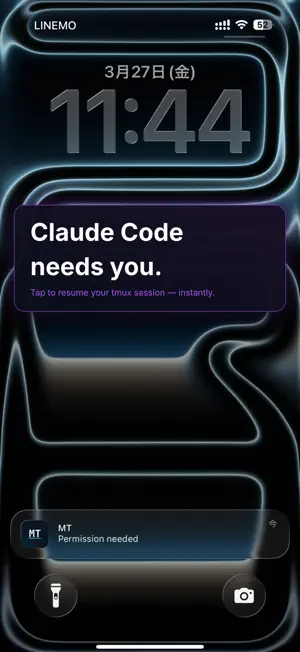
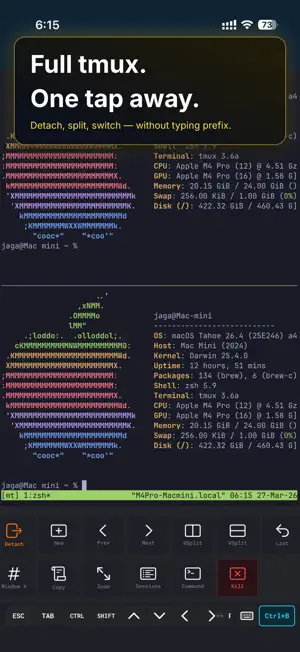
Never miss an AI agent prompt again. Ever stepped away from your Mac, checked your phone, and realized Claude Code had been waiting for you to approve a change for 20 minutes? That's the frustration MT fixes. MT - Mosh Terminal is the mobile companion for AI coding agents such as Claude Code and Codex, running in tmux or Herdr. The moment an agent needs input, a push notification reaches your iPhone. Tap it — MT instantly resumes the exact tmux session over rock-solid Mosh. With Herdr, you can also see every agent at a glance and jump straight to the one that is waiting. Not just SSH — a pro terminal for mobile developers. With an external keyboard, iPad becomes a Mac-level terminal experience. AI AGENT MONITORING • Herdr support: see your agents across Herdr workspaces, which ones are waiting for you, and jump to the right pane • Check button on a waiting agent: peek at what it is asking and answer with arrow keys, Enter, and Esc without leaving your current screen • System-level push notifications via Claude Code and Codex CLI hooks • Task completion and permission requests reach your iPhone and Apple Watch instantly • Tap a notification → MT auto-resumes the exact tmux session (host, user, and session name are matched automatically) • Paste two hook entries and you're done — no CLAUDE.md hacks • Self-hosted push relay supported — no vendor lock-in CONNECT ANYWHERE • SSH — Secure shell connections to any remote server • Mosh — Mobile-optimized sessions that survive network changes, Wi-Fi handoffs, and sleep/wake cycles. Your session stays alive, even on the subway • Automatic SSH fallback when Mosh UDP is blocked • Configurable connection timeout and quick-connect mode POWERFUL ON IPAD • Stage Manager multi-window support — resize and run multiple terminals side by side • External keyboard, mouse, and trackpad support • Multi-pane tmux layouts on the large screen KEYBOARD-FIRST DESIGN • Full keyboard-only operation with Magic Keyboard, split ergonomic boards, or custom ZMK builds • Software key bar auto-minimizes when an external keyboard is detected • Keyboard shortcuts: ⌘1-9 tab switch, ⌘N new connection, ⌘W close, ⌘D split pane • JIS keyboard auto-detection with ¥→\ conversion • Full CJK input: Japanese, Chinese, and Korean IME with inline pre-edit composition ONE-TAP TMUX • Split panes, switch windows, and manage sessions from the bottom action bar • No need to memorize prefix key combos — tmux power, mobile simplicity • Your server's tmux config (prefix key and key bindings) is automatically imported • 15+ built-in actions with customizable ordering and visibility FILE TRANSFER & COMMANDS • SFTP remote browser — walk directories and pick files, no hand-typed paths • SFTP upload and download using the connection profile you are already on • Command Library — save and search frequent commands, insert from the key bar • Custom key bar keys — assign any text or escape sequence you need BEAUTIFUL & CUSTOMIZABLE • Built-in themes: Dracula, Tokyo Night, Gruvbox, Catppuccin, Solarized, and more • Custom fonts: Built-in Menlo, JetBrains Mono. Import your own .ttf/.otf • Pinch-to-zoom font size adjustment SECURE BY DESIGN • SSH keys stored in iOS Keychain, protected by Secure Enclave • Face ID / Touch ID protection for SSH keys • Host key verification (TOFU) with fingerprint display • iCloud Sync with end-to-end encryption (optional, off by default) • No analytics, no tracking, no ads. All data stays on your device GPU-RENDERED • Metal-accelerated terminal rendering powered by Ghostty • Smooth scrolling at 60fps • Touch, trackpad, and mouse scroll support NETWORKING MT connects directly to your servers via SSH (TCP port 22) and Mosh (UDP ports 60000-61000). This app does NOT function as a VPN, proxy, or network tunnel. All connections are direct terminal sessions to servers you configure. Available in English, Japanese, Chinese (Simplified & Traditional), and Korean. Requires iOS 18 or later. iPhone and iPad.
What’s new
Version 1.6.6 · Updated October 29, 2026
External keyboard input is improved. This update improves split layouts on Duo and the connection menus when folded, and includes security fixes.
App privacy
The developer, Jaga Studio, reported these privacy practices to Apple.
Data Not Linked to You
The following data, which may be collected but is not linked to your identity, may be used for the following purposes:
- Purchases: Purchase History
- Identifiers: User ID, Device ID
- Diagnostics: Crash Data, Other Diagnostic Data
Used for: App Functionality
Alternatives to MT — Mosh Terminal
Looking for apps like MT — Mosh Terminal? Here are 6 similar apps on the App Store. The highest rated is MTerm - SSH Terminal (5.0/5), and all 6 are free to download.
-
 Mosh Terminal
-
 MTerm - SSH Terminal
5.0
MTerm - SSH Terminal
5.0
-
 Kex - SSH & Mosh Client
-
 SharkTTY: SSH & Mosh
-
 AgenTTY: SSH Client
4.2
AgenTTY: SSH Client
4.2
-
 Conduit: SSH, Mosh & SFTP
5.0
Conduit: SSH, Mosh & SFTP
5.0
| App | Rating | Price | Last updated | Compare |
|---|---|---|---|---|
| MT — Mosh Terminal | 4.8 / 5 (4 ratings) | Free | October 29, 2026 | |
| Mosh Terminal | – | Free | Mar 19, 2026 | Compare |
| MTerm - SSH Terminal | 5.0 / 5 (1) | Free | Jul 20, 2026 | Compare |
| Kex - SSH & Mosh Client | – | Free | Apr 1, 2026 | Compare |
| SharkTTY: SSH & Mosh | – | Free | Oct 8, 2026 | Compare |
| AgenTTY: SSH Client | 4.3 / 5 (4) | Free | Oct 26, 2026 | Compare |
| Conduit: SSH, Mosh & SFTP | 5.0 / 5 (2) | Free | Jul 6, 2026 | Compare |
Compare MT — Mosh Terminal with the top alternatives: ratings, updates, ASO score and keyword gaps →