

Kora – Shift Planner
francesco giannnini Business iPhoneiPadiPod touch
Kora – Shift Planner is a free Business app for iPhone and iPad by francesco giannnini. Requires iOS 18.6. Updated October 26, 2026.
- Price
- Free
- on the App Store
- Size
- 19 MB
- Age 4+
- Updated
- Oct 26
- 2026 · v1.1.1
Screenshots



About Kora – Shift Planner
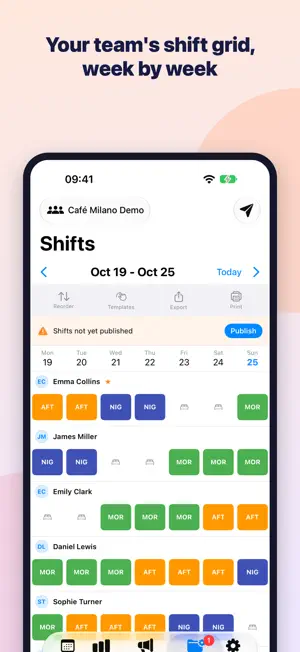
Kora is a shift planner for you and your team: a shift calendar, vacation and time off, shift swaps between coworkers and team announcements, synced with iCloud on iPhone and iPad. Use it on your own as a personal work schedule and hours tracker, or create a team and invite your coworkers with a code. Made for anyone who works shifts: nurses and hospital staff, restaurants, retail, security, manufacturing. YOUR SHIFT CALENDAR • Month, week and day views, with a color for every shift type • Shift templates (morning, evening, night, day off…) set up the way you work • Night shifts shown in full, even when they cross midnight • Vacation, personal time, sick days and overtime right on the calendar • Home Screen widgets: next shift, today's shifts and a countdown to your next day off • Stats on hours worked, night shifts and days off FOR WHOEVER MAKES THE SCHEDULE • A weekly grid to assign shifts to your whole staff in a few taps, then publish to notify everyone • Weekly templates and cycles of up to 6 weeks for rotation schedules • Limits you choose: minimum rest between shifts, maximum hours per day and per week, nights in a row, minimum coverage; Kora warns you or blocks the shift when a limit is exceeded • Daily overview: who's working today, who's off and which requests are waiting • Time off and overtime requests to approve or decline, with each employee's vacation balance • Monthly hours report (regular, night, holiday and overtime hours) and a cost summary, as PDF or CSV for payroll • Team comparison: nights, weekends and holidays shared fairly • Print the week's schedule for the break room FOR EVERYONE ON THE TEAM • Join with your manager's invite code and see your shifts right away • Ask a coworker to swap a shift right from the app • Set the days you prefer to work or can't work • A notification for every new or changed shift; the number on the app icon shows requests waiting for your reply TEAM BOARD • Announcements with priority, polls, checklists and comments • See who has read each announcement ONE APP, SEVERAL ROLES Personal use, manager of one team and employee in another: switch with a single tap. Just want a look around? Try the demo team, with sample coworkers and shifts. YOUR DATA No sign-up: Kora uses your iCloud account. For personal use your shifts stay on your device and in your own iCloud; in a team, shifts, announcements and requests travel through iCloud to reach your coworkers, who join with the manager's invite code. Back up to a file and restore whenever you like (PRO). PLANS The free version includes personal use and one team with up to 2 employees, with ads and a few limits (shift templates, announcements per month, history). Monthly or yearly subscriptions: • Personal PRO: no ads, unlimited templates, announcements and history, advanced stats, shifts in your iPhone Calendar, backup and restore • Team Starter: one team with up to 5 employees, hours report and exports, team comparison, shift limits, custom holidays, advanced vacation balance, smart notifications; employees on the team get Personal PRO • Team Business: up to 3 teams and 10 employees per team, change history and priority support Kora helps you organize shifts and keep track of hours and time off; it doesn't replace your employment contract or your workplace's rules. Terms of Use (EULA): https://www.apple.com/legal/internet-services/itunes/dev/stdeula/ Privacy Policy: https://www.swiftios.it/privacy-policy/
What’s new
Version 1.1.1 · Updated October 26, 2026
• Now available in Portuguese (Brazil), Dutch and Polish, with public holidays for Brazil, the Netherlands and Poland, and a demo team with names from your country. • More reliable team sync: every shift reaches every device, even in teams with lots of shifts. • Manager decisions on time off and shift swaps stay in place and no longer go back to "Pending". • Changes made offline are sent as soon as you're back online; if one can't be saved, Kora lets you know. • Safer teams: approvals, roles and published schedules only count when they come from a team manager. • More accurate totals for night hours, the days the clocks change, and time off that spans two months or two years. • Anyone who joins a team gets the manager's plan right away; on annual plans, the monthly cost is shown in your App Store currency. • Team notifications arrive in each recipient's language. • More complete backups; restoring adds your data without duplicates, and if something goes wrong, nothing changes. • Ready for iPhone Duo and easier to use on iPad; app alerts appear one at a time, so none get lost. • Many other fixes and improvements.
App privacy
The developer, francesco giannnini, reported these privacy practices to Apple.
Data Used to Track You
The following data may be used to track you across apps and websites owned by other companies:
- Identifiers: Device ID
- Usage Data: Advertising Data
Data Not Linked to You
The following data, which may be collected but is not linked to your identity, may be used for the following purposes:
- Contact Info: Name
- User Content: Emails or Text Messages
- Identifiers: Device ID
- Usage Data: Advertising Data
Used for: Third-Party Advertising, Developer’s Advertising or Marketing, Analytics, App Functionality
Alternatives to Kora – Shift Planner
Looking for apps like Kora – Shift Planner? Here are 6 similar apps on the App Store.
-
 TurneX
-
 Shift Planner - Timepio
-
 Ferie e Permessi
-
 Diurna: Staff Scheduling
-
 Papyrus AI
-
 Car Tracker - Manager Auto
| App | Rating | Price | Last updated | Compare |
|---|---|---|---|---|
| Kora – Shift Planner | – | Free | October 26, 2026 | |
| TurneX | – | Free | Apr 30, 2026 | Compare |
| Shift Planner - Timepio | – | Free | May 14, 2026 | Compare |
| Ferie e Permessi | – | Free | Sep 30, 2026 | Compare |
| Diurna: Staff Scheduling | – | Free | Oct 30, 2026 | Compare |
| Papyrus AI | – | Free | Oct 5, 2026 | Compare |
| Car Tracker - Manager Auto | – | Free | May 26, 2026 | Compare |