

Comic Archive to EPUB
OKGONZ Book iPhoneiPadiPod touch
Comic Archive to EPUB is a free Book app for iPhone and iPad by OKGONZ. Requires iOS 16.0. Updated February 21, 2026.
- Price
- Free
- on the App Store
- Size
- 2 MB
- Age 4+
- Updated
- Feb 21
- 2026 · v1.0
Screenshots
About Comic Archive to EPUB
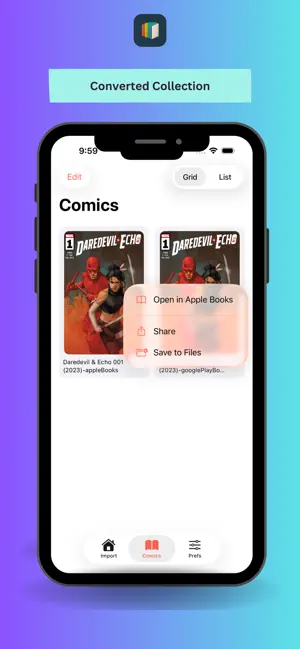
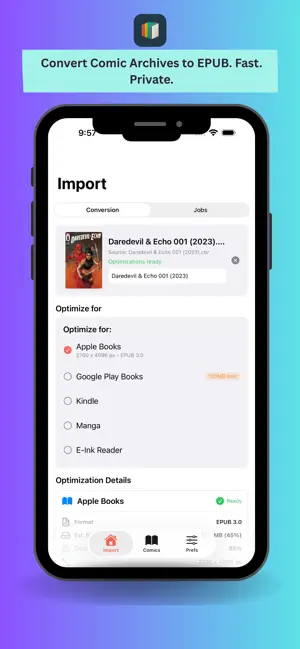
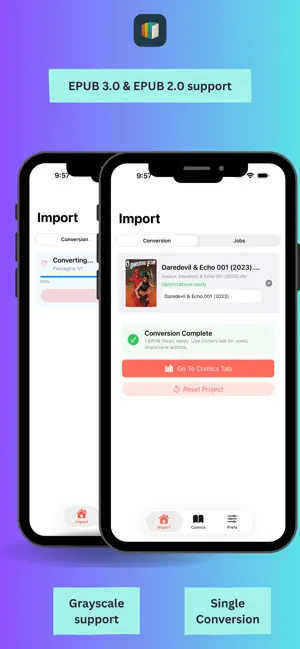
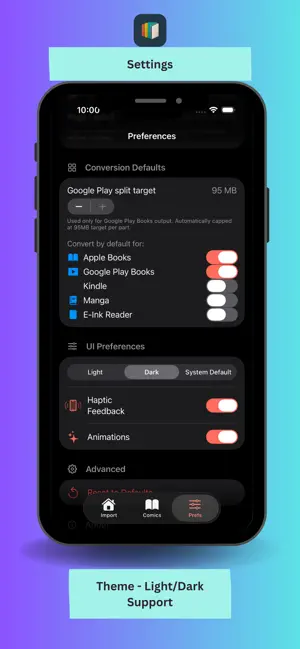
ComicToEPUB Convert your comic book archives into clean, reader-ready EPUB files directly on your iPhone or iPad. ComicToEPUB makes it easy to transform your comic collections into standard EPUB format for reading in Apple Books and other EPUB-compatible readers. Whether your comics are stored as CBZ, CBR, or ZIP archives, ComicToEPUB converts them into properly structured EPUB files optimized for modern reading apps. No accounts. No uploads. Everything happens securely on your device. What You Can Do Import Comic Archives Easily Import your comic files directly from the Files app or supported cloud storage providers. Supported formats: - CBZ - CBR / RAR - ZIP archives The app is designed to prevent common iOS file picker issues where comic files appear “greyed out,” ensuring smooth importing from different providers. Convert to Clean EPUB Format ComicToEPUB extracts your images, structures them correctly, and builds a properly formatted EPUB file that works seamlessly with major reading apps. Your converted EPUB: Preserves page order Is structured for smooth swiping and pagination Is compatible with standard EPUB readers Platform Optimization Profiles Choose a target platform before exporting to ensure optimal output: Optimized for major EPUB reading apps, with Manga mode and e-ink output format support. Each profile adjusts formatting and structure for better compatibility and reading experience on the selected platform. Pro (One-Time Purchase) Upgrade to ComicToEPUB Pro to unlock advanced functionality: Unlock to pro for popular epub optimized apps format along with Manga, and E-Ink platform outputs Remove watermark from exported EPUB files Lifetime purchase — pay once, use forever No subscriptions. No recurring fees. Privacy-First Design ComicToEPUB works entirely on-device. No accounts required No file uploads No cloud processing Your comics never leave your device You stay in full control of your files. Designed for Simplicity Clean, focused interface Straightforward import → convert → export workflow Fast conversion process Built natively for iOS performance If you manage a large comic archive or simply want better flexibility across reading platforms, ComicToEPUB gives you a fast, private, and reliable way to convert your collection into a universal EPUB format. Terms of Use: https://www.apple.com/legal/internet-services/itunes/dev/stdeula/I
App privacy
The developer, OKGONZ, reported these privacy practices to Apple.
Data Not Collected
The developer does not collect any data from this app.
Alternatives to Comic Archive to EPUB
Looking for apps like Comic Archive to EPUB? Here are 6 similar apps on the App Store. The highest rated is EPUB Cover Maker: Book Design (5.0/5), and all 6 are free to download.
-
 Cerberos
-
 EPUB Cover Maker: Book Design
5.0
EPUB Cover Maker: Book Design
5.0
-
 Calibre ebook reader - Pageo
4.8
Calibre ebook reader - Pageo
4.8
-
 Calibre View
5.0
Calibre View
5.0
-
 Comic Reader: Manga, CBZ, CBR
4.6
Comic Reader: Manga, CBZ, CBR
4.6
-
 Comic Book Viewer
3.8
Comic Book Viewer
3.8
| App | Rating | Price | Last updated | Compare |
|---|---|---|---|---|
| Comic Archive to EPUB | – | Free | February 21, 2026 | |
| Cerberos | – | Free | Nov 5, 2025 | Compare |
| EPUB Cover Maker: Book Design | 5.0 / 5 (8) | Free | Aug 6, 2026 | Compare |
| Calibre ebook reader - Pageo | 4.8 / 5 (15) | Free | Oct 25, 2026 | Compare |
| Calibre View | 5.0 / 5 (6) | Free | Oct 23, 2026 | Compare |
| Comic Reader: Manga, CBZ, CBR | 4.6 / 5 (43) | Free | Oct 25, 2026 | Compare |
| Comic Book Viewer | 3.8 / 5 (135) | Free | Dec 23, 2025 | Compare |