

Calibre View
DANIEL EDWARD LAMSON Book iPhoneiPadiPod touch
Calibre View is a free Book app for iPhone and iPad by DANIEL EDWARD LAMSON. Rated 5.0/5 from 4 ratings. Requires iOS 26.1. Updated July 24, 2026.
- Rating
- 5.0
- 4 ratings
- Price
- Free
- on the App Store
- Size
- 38 MB
- Age 4+
- Updated
- Jul 24
- 2026 · v1.2
Screenshots

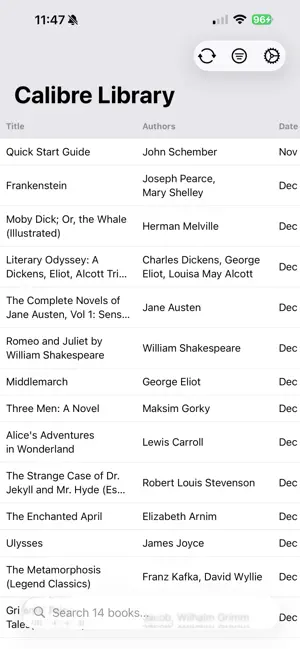
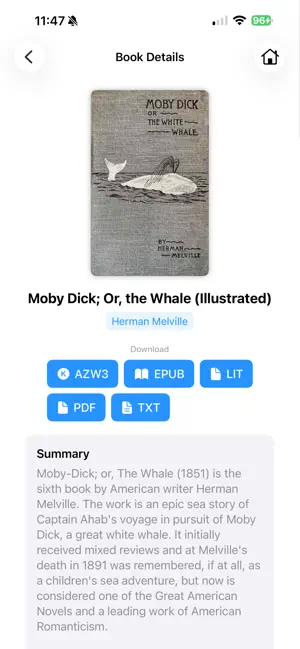

About Calibre View
Calibre View lets you browse and manage your Calibre ebook library on iPhone and iPad using cloud storage or local files on your device. Connect your existing Calibre library and explore your entire collection with fast searching, flexible sorting, and powerful filtering, all in a clean, native iOS and iPadOS interface designed for libraries large and small. (Tested with a 15k book library!) Whether you want to quickly find a specific book or explore your collection by tags, authors, or series, Calibre View is built to stay responsive and organized, even with very large libraries. Key Features • Connect to Calibre libraries stored in Dropbox, Google Drive, OneDrive, WebDAV, iCloud, or the Files app • Optionally upload only your metadata.db file to browse your library without downloading covers or books • Smooth performance with very large libraries, tested with collections of 15,000+ books (slightly longer load times for larger libraries, ~1 second per 1000 books) • Customize which columns appear in the book list, similar to Calibre’s desktop view • Sort by any Calibre column, including custom columns • Filter books instantly using tags, authors, series, and other metadata fields • View detailed book information and customize what appears on the book details screen • Tap a tag or author in detail view to immediately narrow results • Choose a column for Quick Filter to refine search results, authors, or tags • Covers are downloaded on demand only when viewing book details, saving bandwidth and storage • Fast, full-library search with instant results • Download books locally and share or open them in other reading apps in any available format • Support for multiple libraries, with quick switching between them, even across different cloud services • Optimized layouts for both iPhone and iPad, including optional horizontal scrolling for portrait phone use • Works fully offline once a library is downloaded (covers and book downloads require connectivity) • Supports both light mode and dark mode
What’s new
Version 1.2 · Updated July 24, 2026
- Fixed book downloads failing from Dropbox with an "API error" in some libraries - Downloads now recover automatically when a book's folder was moved or renamed - Large file downloads no longer time out on slower connections - Clearer error messages when a book can't be found
App privacy
The developer, DANIEL EDWARD LAMSON, reported these privacy practices to Apple.
Data Linked to You
The following data, which may be collected and linked to your identity, may be used for the following purposes:
- Contact Info: Email Address, Name
- Identifiers: User ID
Used for: App Functionality
Alternatives to Calibre View
Looking for apps like Calibre View? Here are 6 similar apps on the App Store. The highest rated is Calibre ebook - Pageo (4.9/5), and all 6 are free to download.
-
 Calibre ebook - Pageo
4.9
Calibre ebook - Pageo
4.9
-
 Calibre Connector
2.4
Calibre Connector
2.4
-
 CrossPoint Sync
4.4
CrossPoint Sync
4.4
-
 LibriLink for Calibre
3.7
LibriLink for Calibre
3.7
-
 EPUB Reader - JustRead
4.7
EPUB Reader - JustRead
4.7
-
 BookShelves eBook Reader
3.9
BookShelves eBook Reader
3.9
| App | Rating | Price | Last updated | Compare |
|---|---|---|---|---|
| Calibre View | 5.0 / 5 (4 ratings) | Free | July 24, 2026 | |
| Calibre ebook - Pageo | 4.9 / 5 (10) | Free | Sep 26, 2026 | Compare |
| Calibre Connector | 2.4 / 5 (13) | Free | Feb 22, 2024 | Compare |
| CrossPoint Sync | 4.4 / 5 (14) | Free | Jun 10, 2026 | Compare |
| LibriLink for Calibre | 3.7 / 5 (3) | Free | Sep 7, 2026 | Compare |
| EPUB Reader - JustRead | 4.7 / 5 (39) | Free | Sep 25, 2026 | Compare |
| BookShelves eBook Reader | 3.9 / 5 (15) | Free | Sep 26, 2026 | Compare |
Compare Calibre View with the top alternatives: ratings, updates, ASO score and keyword gaps →