

ContextFlow: AI for Safari
Aliaksandr Liubchanka Productivity iPhoneiPadiPod touchMac
ContextFlow: AI for Safari is a free Productivity app for iPhone and iPad by Aliaksandr Liubchanka. Requires iOS 16.6. Updated October 28, 2026.
- Price
- Free
- on the App Store
- Size
- 3 MB
- Age 12+
- Updated
- Oct 28
- 2026 · v2.2.1
Screenshots

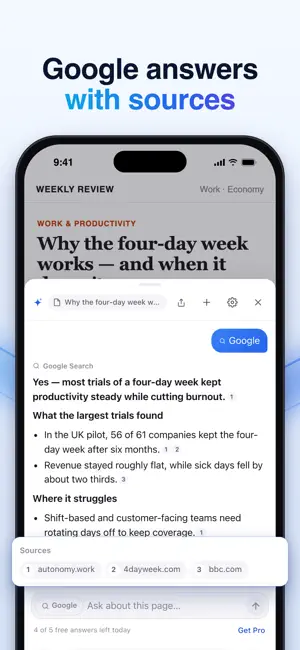


About ContextFlow: AI for Safari
ContextFlow puts an AI assistant right inside Safari. Summarize long articles, pull out the key facts, explain anything in plain words or translate the whole page — without copying, pasting or switching apps. WHAT YOU CAN DO • Summarize any article, report, thread or product page in seconds • Get the key takeaways, numbers and dates at a glance • Ask your own questions: “What's the catch?”, “Is this worth buying?”, “What should I do next?” • Explain jargon and complex topics in simple words • Translate pages into your language • Select text to explain it, improve your writing or draft a reply MADE FOR SAFARI ON IPHONE, IPAD AND MAC • iPhone and iPad: tap the floating ContextFlow button on any page • Mac: a sidebar that opens from the toolbar or with Control-Shift-E • Each page keeps its own conversation, so you can come back later • Light and dark mode, available in 11 languages PRIVATE BY DESIGN • No account, no sign-up, no tracking • A page is read only when you ask about it • Page text is never stored on our servers; your chats stay on your device FREE AND PRO • Free: 5 answers every day • Pro: up to 375 answers a week on all your Apple devices • Own key: unlimited answers with your own OpenAI or Claude API key GET STARTED IN A MINUTE 1. Open the ContextFlow app and follow the steps to turn the extension on in Safari. 2. Open any website and tap the ContextFlow button (on Mac, click the ContextFlow icon in the toolbar). 3. Pick Summarize, Key takeaways, Explain or Translate — or just ask. AI can make mistakes. Check important information. Subscriptions renew automatically unless cancelled at least 24 hours before the end of the current period. Payment is charged to your Apple Account. You can manage or cancel your subscription at any time in your App Store account settings. Terms of Use: https://aisidebar.netlify.app/terms Privacy Policy: https://aisidebar.netlify.app/privacy
What’s new
Version 2.2.1 · Updated October 28, 2026
What's new in ContextFlow 2.2: • One conversation across websites: keep asking as you move between pages, until you tap New chat • Always up to date: ContextFlow re-reads the page each time, so new content is included • Share a whole chat, with a link to the source and to ContextFlow • Settings in the app: change appearance, buttons and more right in the ContextFlow app • The floating ContextFlow button is now on for Mac too • Fixes and improvements
App privacy
The developer, Aliaksandr Liubchanka, reported these privacy practices to Apple.
Data Not Linked to You
The following data, which may be collected but is not linked to your identity, may be used for the following purposes:
- Usage Data: Product Interaction, Advertising Data
- Purchases: Purchase History
- User Content: Other User Content
- Identifiers: Device ID
Used for: Analytics, App Functionality
Alternatives to ContextFlow: AI for Safari
Looking for apps like ContextFlow: AI for Safari? Here are 6 similar apps on the App Store. The highest rated is xgoose (5.0/5), and 5 of the 6 are free to download.
-
 Zeki: AI Sidebar for Safari
-
 xgoose
5.0
-
 Ply - Browse & Synthesize
5.0
-
 Browser Intelligence
5.0
-
 Focus Era - Pomodoro timer
-
 TLDR: Summarize Everything
| App | Rating | Price | Last updated | Compare |
|---|---|---|---|---|
| ContextFlow: AI for Safari | – | Free | October 28, 2026 | |
| Zeki: AI Sidebar for Safari | – | Free | Oct 21, 2026 | Compare |
| xgoose | 5.0 / 5 (1) | Free | Oct 30, 2026 | Compare |
| Ply - Browse & Synthesize | 5.0 / 5 (1) | Free | Oct 7, 2026 | Compare |
| Browser Intelligence | 5.0 / 5 (1) | 2.99 USD | Sep 15, 2024 | Compare |
| Focus Era - Pomodoro timer | – | Free | Jul 10, 2026 | Compare |
| TLDR: Summarize Everything | – | Free | Jan 28, 2026 | Compare |