

Ply - Browse & Synthesize
Andrew Neitsch Productivity iPhoneiPadiPod touch
Ply - Browse & Synthesize is a free Productivity app for iPhone and iPad by Andrew Neitsch. Rated 5.0/5 from 1 ratings. Requires iOS 17.0.
- Rating
- 5.0
- 1 ratings
- Price
- Free
- on the App Store
- Size
- 19 MB
- Age 17+
- Updated
- Oct 7
- 2026 · v1.1.6
Screenshots
About Ply - Browse & Synthesize
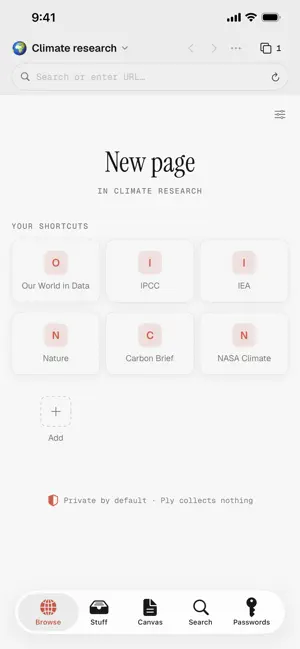
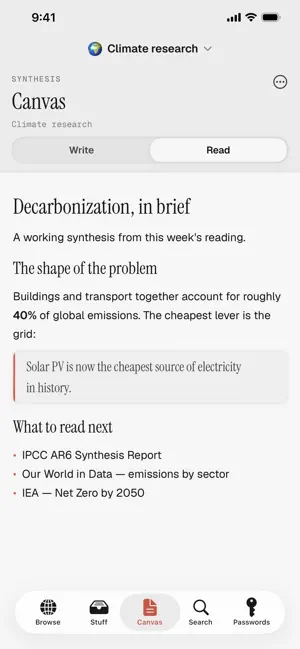
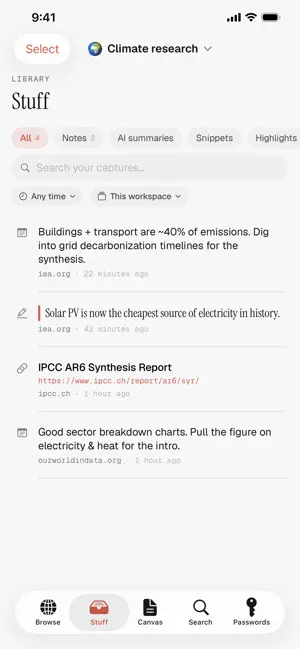
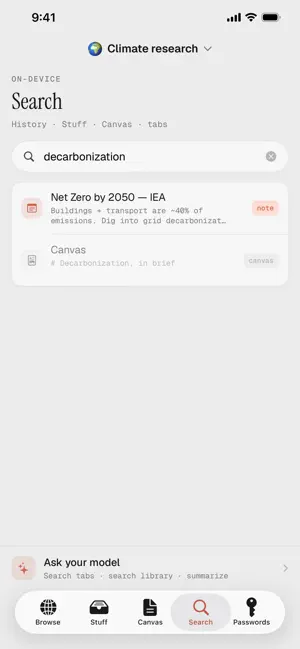
Ply is a quiet, private browser built for reading and thinking, not for being tracked. Everything you do stays on your device. There are no accounts, no telemetry, no third-party connections, and nothing is ever sent to a server. Privacy is not a setting you switch on. It is how Ply is built. PRIVATE BY DEFAULT • No tracking, no ads, no analytics. Ply collects nothing. • A built-in content blocker stops trackers and ads before they load. • Fingerprint protection makes you harder to follow across sites. • A manipulation blocker quietly defuses dark patterns: fake countdowns, guilt-trip buttons, and pre-checked boxes. • Cleaner, more private links: Ply skips AMP wrappers and link-tracking redirectors. READ WITHOUT THE NOISE • Reader mode strips the page down to just the text. • Highlight passages and write margin notes as you read. CAPTURE WHAT MATTERS • Save snips, highlights, notes, and links into one tidy library, organized by workspace. • Each capture remembers the page it came from, so you can always trace it back. • Edit your saved links in place, with item counts for every section. COMPOSE YOUR OWN SYNTHESIS • A built-in Canvas turns your captures into a document you actually write. • Live formatting controls, inline link editing, and drop a saved citation right at the cursor. • Export to Markdown or PDF whenever you want it elsewhere. ENCRYPTED, IF YOU WANT IT • An optional vault encrypts your synthesis data at rest with a password you choose. • Your password is the only key — it is never stored anywhere. Forget it and even Ply cannot open it. • Optional App Lock asks for Face ID, Touch ID or your passcode before Ply opens. It is a screen over the app, not encryption; the vault's password still protects your library. SYNC YOUR OWN DEVICES, DIRECTLY • Plytether syncs directly between your own devices over your local Wi-Fi. No server, no cloud, no relay. Pair once by comparing a six-digit code, then pull whenever you like. • Sync carries snip images, Canvas documents, and whole workspaces, not just history and saved Stuff. End-to-end encrypted, on-device, no account. • A new Inbox lets you review what a pull brings (snip images with a preview, Canvas docs you can append to a workspace, whole workspaces you can add) before anything lands. Your own copies are never overwritten. • Optional post-quantum sync (beta): with it on at both ends, pairing and syncing add ML-KEM-768 to the X25519 key exchange. Works with Ply 1.1.5 for Mac and Windows; needs iOS 26 or later. MAKE IT YOURS • Customize the New Tab page: layout, clock and date, a gradient or your own photo, and tile size. • Pick any accent color and an interface font. • Choose the page actions beside the address bar and where new tabs open. Background tabs can sleep, and every tab keeps its site's icon. BRING YOUR OWN AI (OPTIONAL) • Connect your own local or hosted model to search and summarize. Ply ships no AI of its own and talks only to the endpoint you configure, only when you ask it to. Ply is for people who want a calmer, more private place to read and make sense of the web. Open it, and the only thing watching the page is you.
What’s new
Version 1.1.6 · Updated October 7, 2026
What's new in 1.1.6 -Make Ply your default browser. Links you tap in Mail, Messages, Notes and other apps can now open in Ply instead of Safari. Go to Settings ▸ General ▸ Make Ply your default browser. iOS lets only you make this choice, so Ply takes you to iOS Settings, where you pick Ply as your browser app. You can change it back at any time in iOS Settings ▸ Apps ▸ Default Apps ▸ Browser App. -Links open in a new tab. A link from another app opens in a new tab in the workspace you're in. If App Lock or encryption is on, Ply opens the link once you unlock it.
App privacy
The developer, Andrew Neitsch, reported these privacy practices to Apple.
Data Not Collected
The developer does not collect any data from this app.
Alternatives to Ply - Browse & Synthesize
Looking for apps like Ply - Browse & Synthesize? Here are 6 similar apps on the App Store. The highest rated is Supervoid (5.0/5), and all 6 are free to download.
-
 BeProductive - All in one app
-
 SLC SafeBrowse
-
 Supervoid
5.0
Supervoid
5.0
-
 MoltSearch
-
 Better Keep - Private Notes
-
 Light AI
| App | Rating | Price | Last updated | Compare |
|---|---|---|---|---|
| Ply - Browse & Synthesize | 5.0 / 5 (1 rating) | Free | October 7, 2026 | |
| BeProductive - All in one app | – | Free | Sep 17, 2026 | Compare |
| SLC SafeBrowse | – | Free | Apr 17, 2026 | Compare |
| Supervoid | 5.0 / 5 (1) | Free | Jul 31, 2026 | Compare |
| MoltSearch | – | Free | Aug 22, 2026 | Compare |
| Better Keep - Private Notes | – | Free | Oct 3, 2026 | Compare |
| Light AI | – | Free | Feb 27, 2025 | Compare |