

Vlogger Studio: Live Stream
Hari Krishna Vemula Photo & Video iPhoneiPadiPod touch
Vlogger Studio: Live Stream is a free Photo & Video app for iPhone and iPad by Hari Krishna Vemula. Rated 4.8/5 from 6 ratings. Requires iOS 17.0.
- Rating
- 4.8
- 6 ratings
- Price
- Free
- on the App Store
- Size
- 50 MB
- Age 17+
- Updated
- Sep 10
- 2026 · v2.0.0
Screenshots


About Vlogger Studio: Live Stream
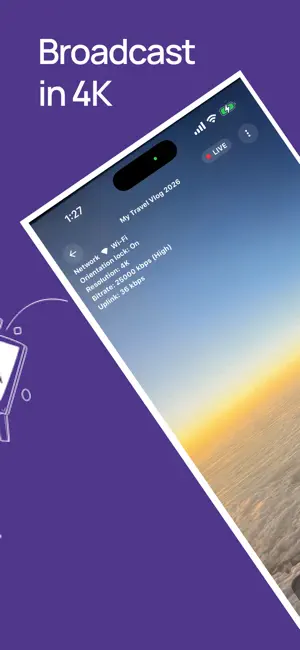
Stop struggling with complex setups. Whether you're a gamer, educator, or outdoor vlogger, our one-tap YouTube linking gets you in front of your audience in seconds—no laptop required. ONE-TAP YOUTUBE LINKING: Securely connect your account and go live with a single tap. (Youtube Channel and Live enablement to be done on Youtube directly). CUSTOM THUMBNAILS: Upload your own art or auto-generate high-impact thumbnails. PROFESSIONAL RTMP: Stream to YouTube with RTMP technology for rock-solid stability with up to 4K resolution. PRIVACY CONTROLS: Easily toggle between Public, Private, or Unlisted streams to suit your audience. Why Vlogger Studio? We’ve stripped away the complexity of mobile broadcasting. Vlogger Studio provides a clean, "Studio-grade" interface that prioritizes low-latency performance and ease of use. No technical expertise required—just your talent and an internet connection. Technical Requirements Requires iOS 17.0 or later. Active YouTube account with Live Streaming enabled. Note: If you are enabling Live Streaming on a new YouTube channel for the first time, it may take up to 24 hours for YouTube to activate the feature. Goto https://studio.youtube.com/ to enable Live. Version 1.0 Welcome to the debut of Vlogger Studio! Initial launch featuring one-tap YouTube account linking. Full RTMP support for professional streaming. Custom and auto-generated thumbnail support. Stream scheduling and privacy management. Optimized for iOS 17+ performance. Version 1.2.1 Major Camera library Upgrade for better performance. You can go live quickly with "Go Live Now" feature. Image Stabilization feature in streaming Default Stream Orientation Settings Minor UI/UX enhancements.
Ratings & reviews
4.8
6 ratings
What’s new
Version 2.0.0 · Updated September 10, 2026
Vlogger Studio 2.0 — What's New This is a major release with a completely new broadcast toolkit on top of your live streaming. Rebuilt on a modernized, faster app foundation for improved reliability and future updates. Build custom on-screen graphics for your stream: text, images, shapes, timers, and lower-thirds. Live scoreboards for soccer, American football, basketball, baseball, cricket, and tennis — with animated score-change effects. Add video clips as overlay layers with playback controls. Custom fonts for your text overlays. Faster, more reliable Google Sign-In with better error messages and recovery options. New tab-based layout for easier access to recording, overlays, and account settings. Expanded analytics so you can see how your streams are performing.
App privacy
The developer, Hari Krishna Vemula, reported these privacy practices to Apple.
Data Not Linked to You
The following data, which may be collected but is not linked to your identity, may be used for the following purposes:
- Usage Data: Product Interaction
- Contact Info: Email Address, Name
- Diagnostics: Crash Data
Used for: Analytics, App Functionality
Alternatives to Vlogger Studio: Live Stream
Looking for apps like Vlogger Studio: Live Stream? Here are 6 similar apps on the App Store. The highest rated is NEBULOCITY.AI (5.0/5), and all 6 are free to download.


| App | Rating | Price | Last updated | Compare |
|---|---|---|---|---|
| Vlogger Studio: Live Stream | 4.8 / 5 (6 ratings) | Free | September 10, 2026 | |
| Broadcast Elements :LiveStream | – | Free | Oct 18, 2026 | Compare |
| SceneMeld | – | Free | Oct 10, 2026 | Compare |
| Mane: Hair Try-On | – | Free | Oct 11, 2026 | Compare |
| NEBULOCITY.AI | 5.0 / 5 (2) | Free | Sep 18, 2026 | Compare |
| T6FV.io | – | Free | Oct 20, 2026 | Compare |
| On Air by T6FV | – | Free | Jun 9, 2026 | Compare |