

Occam SI
Dakota Bullard Productivity iPhoneiPadiPod touchMac
Occam SI is a free Productivity app for iPhone and iPad by Dakota Bullard. Requires iOS 26.0. Updated October 12, 2026.
- Price
- Free
- on the App Store
- Size
- 47 MB
- Age 17+
- Updated
- Oct 12
- 2026 · v1.1
Screenshots


About Occam SI
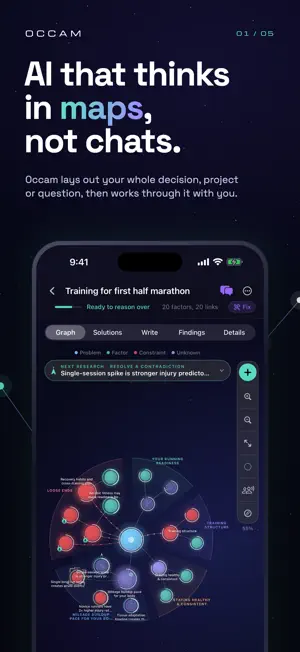
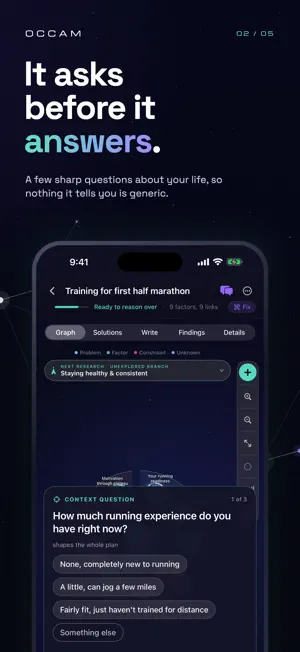
Make sense of a difficult question with Occam's Razor. Build an AI-assisted mind map, examine the assumptions behind it, and decide what to investigate next. Use it to plan a project, compare options, explore a research question, or structure what you are learning. SEE HOW IT WORKS Explore a prepared example before signing in. Tap through the factors behind a release decision, challenge an assumption, and see a practical next step. The example works without a cloud request. MAP YOUR QUESTION Start with a rough sentence. Organize factors, constraints, unknowns, and relationships in a connected graph. Open individual nodes to explore the details or add your own notes. TEST YOUR THINKING Look for weak assumptions, missing information, and cases that could change your conclusion. Import source material and keep track of what has actually been tested. AI suggestions are not verified evidence. ASK ABOUT YOUR STUDY Chat with AI using the context of your map. Review proposed additions before adding them to the graph. TURN INSIGHT INTO ACTION Develop possible solutions, research tests, small experiments, or a written draft. Share your work and keep building on it. START FREE Sign in with Apple or Google to create and back up your studies. Free accounts receive 5 cloud run credits per month. Optional Pro, Advanced, and Commercial subscriptions provide larger allowances and additional cloud reasoning capabilities. Deeper requests can use multiple credits; usage limits apply. Prices appear in the app before purchase. Subscriptions renew monthly until cancelled in your Apple Account settings. Cloud AI sends study context to our service and AI provider. Signed-in study backup uses cloud storage. Privacy: https://agentscix.com/occam/privacy Terms: https://www.apple.com/legal/internet-services/itunes/dev/stdeula/
What’s new
Version 1.1 · Updated October 12, 2026
Occam is now a personal research assistant that works through your question with you. - Your map is organized into clear categories, each in its own slice - Occam works out what each part needs: your input, a decision, or research, and asks you first - Tell Occam what matters, what doesn't, or point its focus by dragging the center of the map - Answer by voice anywhere, and hear Occam in its natural voice. One tap turns all sound off - Findings answers its own questions in place, and the plan writes itself when the map is ready - Light and dark mode, a redesigned New Study screen, and a guided tour - Subscriptions: Pro monthly or yearly, Advanced and Commercial
App privacy
The developer, Dakota Bullard, reported these privacy practices to Apple.
Data Linked to You
The following data, which may be collected and linked to your identity, may be used for the following purposes:
- Contact Info: Email Address, Name, Other User Contact Info
Used for: Other Purposes
Alternatives to Occam SI
Looking for apps like Occam SI? Here are 6 similar apps on the App Store. The highest rated is Fliper: Focus for Productivity (4.7/5), and all 6 are free to download.
-
 Polymath - Think. Plan. Do.
-
 Fliper: Focus for Productivity
4.7
-
 Quantum Programming Compiler
3.4
-
 Berkeley Mobile
4.2
-
 Expense Tracker & Budget App
4.7
-
 Kanban - Doneit
4.5
| App | Rating | Price | Last updated | Compare |
|---|---|---|---|---|
| Occam SI | – | Free | October 12, 2026 | |
| Polymath - Think. Plan. Do. | – | Free | Mar 15, 2026 | Compare |
| Fliper: Focus for Productivity | 4.7 / 5 (3) | Free | Mar 11, 2026 | Compare |
| Quantum Programming Compiler | 3.4 / 5 (8) | Free | Mar 13, 2026 | Compare |
| Berkeley Mobile | 4.2 / 5 (20) | Free | Jun 28, 2026 | Compare |
| Expense Tracker & Budget App | 4.7 / 5 (38) | Free | Oct 7, 2025 | Compare |
| Kanban - Doneit | 4.5 / 5 (280) | Free | Sep 29, 2026 | Compare |
Compare Occam SI with the top alternatives: ratings, updates, ASO score and keyword gaps →