

Meeting Room 365 Display
Meeting Room 365 llc Business iPhoneiPadiPod touch
Meeting Room 365 Display is a free Business app for iPhone and iPad by Meeting Room 365 llc. Rated 5.0/5 from 1 ratings. Requires iOS 17.0.
- Rating
- 5.0
- 1 ratings
- Price
- Free
- on the App Store
- Size
- 20 MB
- Age 4+
- Updated
- Oct 19
- 2026 · v2.0.0
Screenshots


About Meeting Room 365 Display
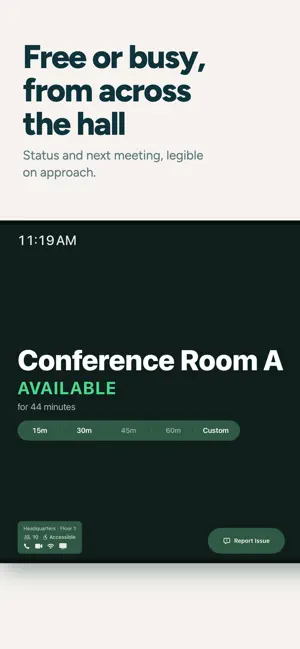
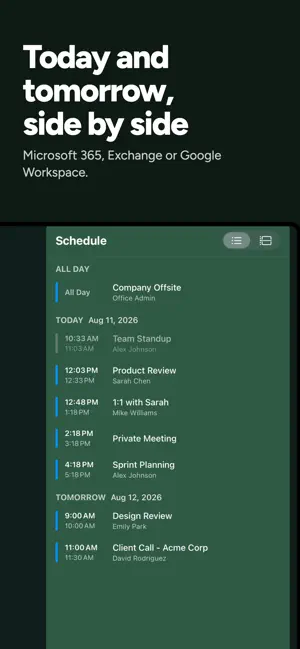
Meeting Room 365 Display is a ground-up native rebuild of the fastest way to add a meeting room display to your office. Same account, same web dashboard, same one-tap booking — rewritten as a fully native app. It launches straight to your schedule, keeps working when the network drops, and holds up under what a room display actually has to do: stay awake on a wall, in front of everyone, for months at a time. Supports Microsoft 365™ (formerly Office 365™), Outlook™, Google Workspace™, and Exchange™. WHAT THE NATIVE APP ADDS • Launches directly to your schedule — no web view, no loading screen • Keeps showing today's meetings when Wi-Fi drops, then reconciles automatically • Sign in with Microsoft Entra ID or Google Workspace directly on the device • Zero-touch deployment through MDM managed app configuration • Booking, check-in, end early, and extend, all handled on-device • Room Finder with live availability across your building • Configurable action bar — choose which controls appear on the display • Guided Access kiosk locking, brightness scheduling, and orientation control EVERYTHING YOU EXPECT FROM MEETING ROOM 365 • Find an available room for a meeting, and book with a single tap • All settings can be managed remotely, with device statuses & reporting • Let users report room issues or make custom requests from the tablet • Connects to IFTTT for presence detection and hardware integration • Complete theming & style customization available online • Automatically cancel meetings if nobody shows up • Automatically prevents double booking • Always in-sync with your calendar system • Create unlimited meeting room displays • Works with your existing email tenant • Works great in Portrait or Landscape • Compatible with most MDM software • Localizable and Translatable • Fast & Easy to setup WHICH APP SHOULD I INSTALL? • New displays on current iPads — this app. • Existing deployments, or older iPads — install Meeting Room 365 Classic. Both apps use the same Meeting Room 365 account and the same web dashboard. Visit our website for more details, and to create a Meeting Room 365 account.
What’s new
Version 2.0.0 · Updated October 19, 2026
Bug fixes and stability improvements.
App privacy
The developer, Meeting Room 365 llc, reported these privacy practices to Apple.
Data Linked to You
The following data, which may be collected and linked to your identity, may be used for the following purposes:
- Location: Coarse Location
- Contact Info: Email Address
- Identifiers: User ID, Device ID
- Usage Data: Product Interaction
Used for: Analytics, App Functionality
Data Not Linked to You
The following data, which may be collected but is not linked to your identity, may be used for the following purposes:
- Diagnostics: Crash Data, Performance Data
Used for: App Functionality
Alternatives to Meeting Room 365 Display
Looking for apps like Meeting Room 365 Display? Here are 6 similar apps on the App Store. The highest rated is The Room Display (5.0/5), and 5 of the 6 are free to download.


| App | Rating | Price | Last updated | Compare |
|---|---|---|---|---|
| Meeting Room 365 Display | 5.0 / 5 (1 rating) | Free | October 19, 2026 | |
| The Room Display | 5.0 / 5 (1) | 99.99 USD | Oct 27, 2026 | Compare |
| RoomSlate | – | Free | Aug 13, 2026 | Compare |
| Holdspace | – | Free | Oct 1, 2026 | Compare |
| Convenie Panel | – | Free | Feb 20, 2026 | Compare |
| Room Booking Panel | – | Free | Apr 6, 2026 | Compare |
| UFP for Business | – | Free | Aug 3, 2026 | Compare |