

Day Blocks: Daily Time Tracker
Emre ALICI Productivity iPhoneiPadiPod touch
Day Blocks: Daily Time Tracker is a free Productivity app for iPhone and iPad by Emre ALICI. Requires iOS 18.4. Updated October 12, 2026.
- Price
- Free
- on the App Store
- Size
- 12 MB
- Age 12+
- Updated
- Oct 12
- 2026 · v2.0.3
Screenshots



About Day Blocks: Daily Time Tracker
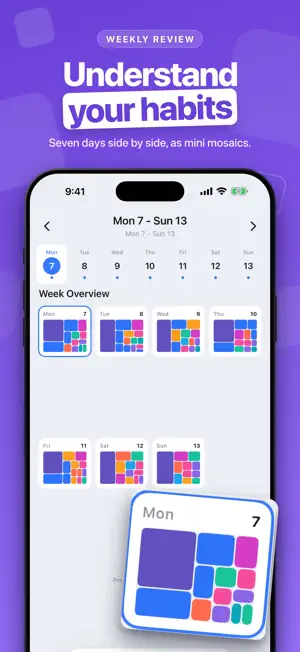
See where your time actually goes. Day Blocks turns every hour into a colored block — the bigger the block, the more of your day it took — so a whole day, or a whole week, reads at a glance. It is a life log, not a timesheet. No clients, no invoices, no timers to babysit. Log what you did in two taps; Health, Calendar, Apple Watch and your Mac fill in the rest. ONE DAY, EVERY DEVICE Your blocks sync over iCloud. An entry made on iPhone, a night recorded by Apple Watch, an hour worked on Mac: all of it lands in the same day, in the right place. Being signed in to iCloud is the only setup. LOG IT IN TWO TAPS Tap +, name it, and pick one of 10 life categories — Mind, Body, Work, Social, Self-Care, Meals, Entertainment, Chores, Commute and Sleep. Each entry becomes a tile sized by how long it took. SEE YOUR BALANCE Work next to sleep next to everything else. The mosaic turns work-life balance into something you can see instead of guess: what grew, what got squeezed, what never happened. Untracked gaps stay visible as gentle reminders, and one tap fills them. YOUR WEEK, SIDE BY SIDE Pinch out to see seven days as mini mosaics. Pinch in to dive into a day. Patterns you would never notice in a list show up as color. IT FILLS ITSELF IN Connect Health for sleep and workouts, Calendar for meetings and events, or Location for place-based logging. Day Blocks keeps your time diary while you live it. ON YOUR MAC A free companion app records what you actually worked on — the project, the site, the hour that ran uninterrupted — and sends it straight into your day. SIRI SHORTCUTS Ten built-in voice commands create blocks, start tracking and read out your daily summary, hands-free. DYNAMIC ISLAND & LIVE ACTIVITY Your current activity, total tracked time and a mini mosaic, right on the Dynamic Island. SHARE YOUR DAY Export an animated video of your blocks building up through the day. PREMIUM - Unlimited blocks per day - All data sources (HealthKit, Calendar, Location) - Week view with pinch-to-zoom - Custom category colors - Export to CSV or JSON - Widgets and Apple Watch app - Advanced insights - Unlimited history YOUR DATA No account, no servers of ours. Your day lives on your device — and, if you want it on more than one, in your own iCloud. Export it or delete it whenever you like. A day is a lifetime. A block is a choice. Terms of Use (EULA): https://www.apple.com/legal/internet-services/itunes/dev/stdeula/
What’s new
Version 2.0.3 · Updated October 12, 2026
A new icon: a clock made of blocks. Korean and Vietnamese. Bug fixes and small improvements.
App privacy
The developer, Emre ALICI, reported these privacy practices to Apple.
Data Not Collected
The developer does not collect any data from this app.
Alternatives to Day Blocks: Daily Time Tracker
Looking for apps like Day Blocks: Daily Time Tracker? Here are 6 similar apps on the App Store. The highest rated is Timetracker - 24h Life Tracker (5.0/5), and 5 of the 6 are free to download.
-
 Calume - Time tracker
-
 Timetracker - 24h Life Tracker
5.0
Timetracker - 24h Life Tracker
5.0
-
 Habit Tracker & ADHD: TrakBit
5.0
Habit Tracker & ADHD: TrakBit
5.0
-
 Daily Planner: Time Blocking
-
 Time Block Planner - DayBlock
-
 Auto Refresh & Clicker
5.0
Auto Refresh & Clicker
5.0
| App | Rating | Price | Last updated | Compare |
|---|---|---|---|---|
| Day Blocks: Daily Time Tracker | – | Free | October 12, 2026 | |
| Calume - Time tracker | – | Free | Oct 23, 2026 | Compare |
| Timetracker - 24h Life Tracker | 5.0 / 5 (1) | Free | Oct 24, 2026 | Compare |
| Habit Tracker & ADHD: TrakBit | 5.0 / 5 (10) | Free | Oct 5, 2026 | Compare |
| Daily Planner: Time Blocking | – | Free | Oct 29, 2026 | Compare |
| Time Block Planner - DayBlock | – | Free | Oct 26, 2026 | Compare |
| Auto Refresh & Clicker | 5.0 / 5 (1) | 2.99 USD | Oct 21, 2026 | Compare |