

Convertify Pro - Converter
An Nguyen Utilities iPhoneiPadiPod touch
Convertify Pro - Converter is a free Utilities app for iPhone and iPad by An Nguyen. Rated 5.0/5 from 1 ratings. Requires iOS 16.0.
- Rating
- 5.0
- 1 ratings
- Price
- Free
- on the App Store
- Size
- 95 MB
- Age 4+
- Updated
- Sep 29
- 2026 · v1.0.2
Screenshots

About Convertify Pro - Converter
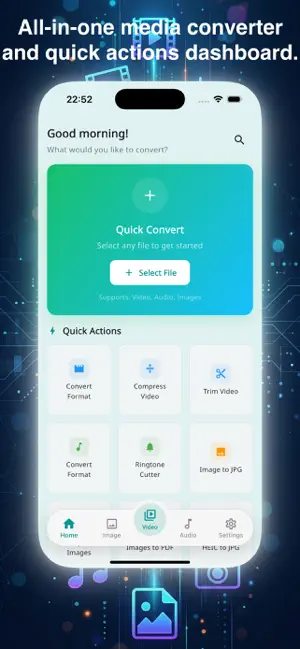
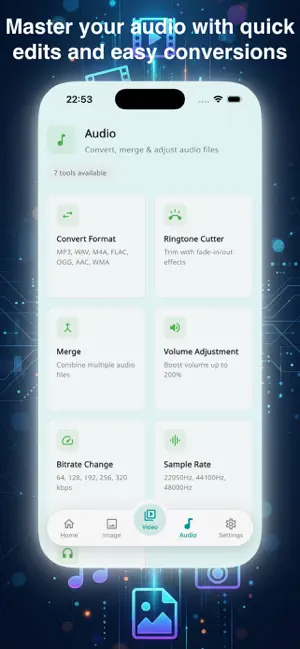
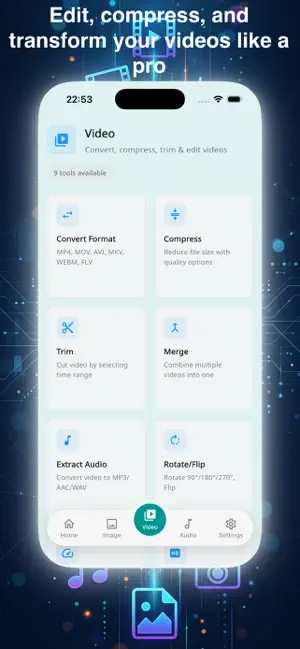
Convertify Pro — All-in-One Media Converter Convert, compress, trim, merge, and edit your videos, audio files, and images — all in one app. Supports 28+ media formats with 24 powerful tools. No internet required, everything runs locally on your device. VIDEO TOOLS (9 tools) • Convert — MP4, MOV, AVI, MKV, WEBM (H.264, H.265, VP9) • Compress — Reduce file size while keeping quality • Trim — Cut video to the exact length you need • Merge — Combine multiple videos into one • Change Resolution — Scale to 4K, 1080p, 720p, or custom size • Change Speed — Slow motion (0.25x) to fast forward (4x) • Rotate — Rotate or flip video orientation • Mute — Remove audio from video • Extract Audio — Save audio track as MP3, AAC, WAV, FLAC, M4A AUDIO TOOLS (7 tools) • Convert — MP3, WAV, M4A, FLAC, OGG, AAC, and more • Create Ringtone — Make ringtones in MP3, M4R, OGG • Merge — Combine multiple audio files • Adjust Volume — Increase or decrease audio volume • Change Bitrate — Optimize audio quality and file size • Change Sample Rate — 44.1 kHz, 48 kHz, and more • Change Channel — Switch between stereo and mono IMAGE TOOLS (8 tools) • Convert — JPG, PNG, WEBP, BMP, GIF, TIFF • Compress — Reduce image file size • Resize — Change image dimensions • Crop — Crop to exact area • Rotate — Rotate or flip images • HEIC to JPG/PNG — Convert iPhone photos easily • Images to PDF — Combine images into a PDF • PDF to Images — Extract images from PDF WHY CONVERTIFY PRO? • 100% offline — No upload, no cloud, your files stay on your device • Background processing — Continue using your phone while converting • Notification on completion — Get notified when conversion finishes • 13 languages supported — English, Japanese, Vietnamese, Chinese, Korean, Spanish, French, German, Portuguese, Hindi, Arabic, Thai, Indonesian • Clean, modern interface — Easy to use for everyone Powered by FFmpeg (GPL). All processing is done locally on your device — your files are never uploaded anywhere. Download Convertify Pro now and handle all your media conversion needs in one app!
What’s new
Version 1.0.2 · Updated September 29, 2026
• Support for iOS 27 • Bug fixes and performance improvements
App privacy
The developer, An Nguyen, reported these privacy practices to Apple.
Data Used to Track You
The following data may be used to track you across apps and websites owned by other companies:
- Location: Precise Location
- Identifiers: User ID, Device ID
- Usage Data: Advertising Data
- Diagnostics: Crash Data
Data Not Linked to You
The following data, which may be collected but is not linked to your identity, may be used for the following purposes:
- Location: Precise Location
- Identifiers: User ID, Device ID
- Usage Data: Advertising Data
- Diagnostics: Crash Data
Used for: Third-Party Advertising, Analytics
Alternatives to Convertify Pro - Converter
Looking for apps like Convertify Pro - Converter? Here are 6 similar apps on the App Store.
-
 Phase Media: Pro Converter
-
 FileKitPro: File Converter
-
 邪恶大鼠标
邪恶大鼠标
-
 LanLens - Network Scanner
-
 叮叮咚咚
叮叮咚咚
-
 Video Lite: Compress & Resize
| App | Rating | Price | Last updated | Compare |
|---|---|---|---|---|
| Convertify Pro - Converter | 5.0 / 5 (1 rating) | Free | September 29, 2026 | |
| Phase Media: Pro Converter | – | Free | Mar 12, 2026 | Compare |
| FileKitPro: File Converter | – | Free | Oct 12, 2026 | Compare |
| 邪恶大鼠标 | – | Free | May 6, 2026 | Compare |
| LanLens - Network Scanner | – | Free | Jul 4, 2026 | Compare |
| 叮叮咚咚 | – | Free | May 26, 2026 | Compare |
| Video Lite: Compress & Resize | – | Free | Jun 24, 2026 | Compare |