

Lumiclipia
CJ Solution UG (haftungsbeschraenkt) Photo & Video iPhoneiPadiPod touchMac
Lumiclipia is a free Photo & Video app for iPhone and iPad by CJ Solution UG (haftungsbeschraenkt). Requires iOS 17.0. Updated October 11, 2026.
- Price
- Free
- on the App Store
- Size
- 14 MB
- Age 4+
- Updated
- Oct 11
- 2026 · v3.4
Screenshots

About Lumiclipia
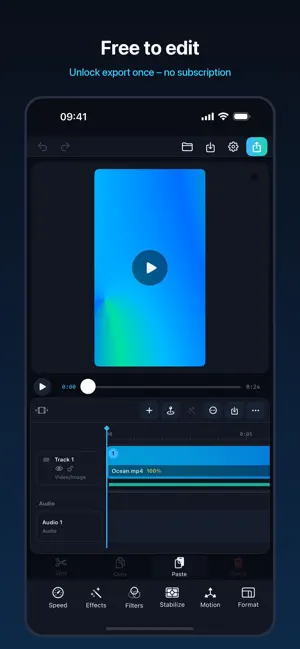
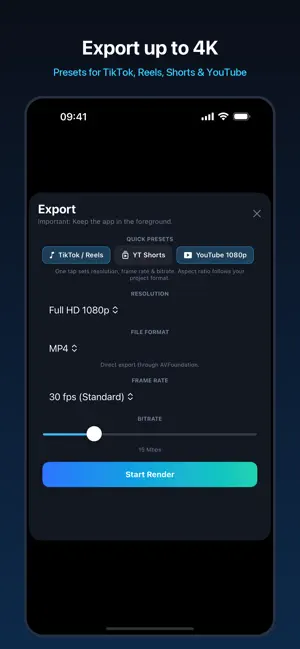
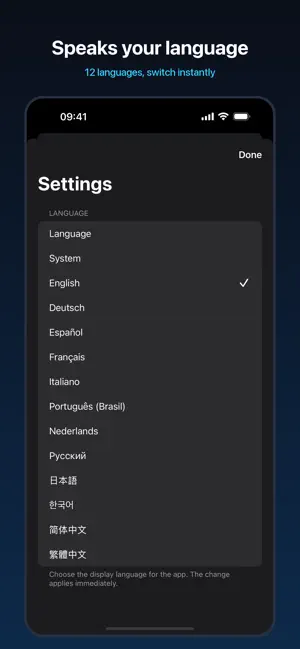
Lumiclipia is free to download – edit videos on iPhone, iPad and Mac. Exporting finished videos requires a single one-time in-app purchase (no subscription). Customers who bought an earlier paid version keep export for free. Whether you're cutting a travel recap, a social post, a family memory, or a product video: Lumiclipia keeps you in flow. No clutter. No confusing steps. Just a powerful timeline, a crisp live preview, and features that make your edits look instantly more polished. Why you'll love Lumiclipia • Smooth Live View playback while you edit, with a clean, focused workspace • Export in 720p, 1080p, and stunning 4K for sharp, high-quality results • Stabilization that transforms shaky handheld footage into smoother clips • Professional transitions, including Crossfade, for seamless storytelling • Precise trimming and clip arrangement on an intuitive multi-track timeline • Multiple audio tracks with waveform display for perfect timing and control • Audio fades & volume control so your mix feels intentional—not accidental • Markers to plan beats, cuts, and key moments like a pro • Batch editing: select multiple clips and apply changes in one step • Effects & looks to enhance mood and style—fast, consistent, and editable • Logo/Watermark overlay: add branding and position it directly in the preview • Flexible aspect ratios & social formats so your project fits the platform Made for iPhone, too Lumiclipia now comes with a dedicated iPhone editor: portrait, touch-first, with a large preview, timeline, and a bottom toolbar for editing, effects, filters, stabilization, motion and format. On iPad and Mac you get the full desktop-class workspace. Built-in Merger (fast and simple) Need to combine clips quickly? Lumiclipia includes an integrated Merger that lets you join videos in just a few steps—perfect for stitching together takes, creating quick highlights, or assembling a clean sequence without friction. Speaks your language Choose from 12 app languages and switch instantly in Settings—no restart needed. Made for creators who value quality Lumiclipia is for anyone who wants their videos to look better—with less effort. The interface is inspired by professional workflows, but streamlined so it feels intuitive from the first launch. Every tool is there for a reason. Every action stays responsive. From first cut to final render, Lumiclipia gives you the speed of a lightweight editor and the control of a serious timeline—so you can create videos you're proud to share.
What’s new
Version 3.4 · Updated October 11, 2026
Lumiclipia 3.4 • Bug fixes for an even more reliable editing experience. • Performance optimizations for smoother editing and faster export. Good to know: downloading and editing are free. Video export and the Merger are unlocked once with an in-app purchase – no subscription. Already bought Lumiclipia earlier? Export stays unlocked for you – just choose "Restore Purchases" in the export dialog if needed.
App privacy
The developer, CJ Solution UG (haftungsbeschraenkt), reported these privacy practices to Apple.
Data Not Collected
The developer does not collect any data from this app.
Alternatives to Lumiclipia
Looking for apps like Lumiclipia? Here are 6 similar apps on the App Store. The highest rated is Cambler (5.0/5), and 5 of the 6 are free to download.
-
 Cadence Video Player
-
 Cambler
5.0
Cambler
5.0
-
 StraightPic: Straighten Photos
-
 Editioz: Video Editor
-
 Stills – Video to Photo 4K HD
4.8
Stills – Video to Photo 4K HD
4.8
-
 MemoMark
4.0
MemoMark
4.0
| App | Rating | Price | Last updated | Compare |
|---|---|---|---|---|
| Lumiclipia | – | Free | October 11, 2026 | |
| Cadence Video Player | – | Free | Oct 14, 2026 | Compare |
| Cambler | 5.0 / 5 (2) | Free | Oct 13, 2026 | Compare |
| StraightPic: Straighten Photos | – | Free | Oct 14, 2026 | Compare |
| Editioz: Video Editor | – | Free | Oct 4, 2026 | Compare |
| Stills – Video to Photo 4K HD | 4.8 / 5 (42) | Free | Oct 14, 2026 | Compare |
| MemoMark | 4.0 / 5 (8) | 9.99 USD | Oct 8, 2026 | Compare |
Compare Lumiclipia with the top alternatives: ratings, updates, ASO score and keyword gaps →