

PDF Editor: Edit, Sign & Scan
LOOP MOBILE FZCO Utilities iPhoneiPadiPod touchMac
PDF Editor: Edit, Sign & Scan is a free Utilities app for iPhone and iPad by LOOP MOBILE FZCO. Rated 4.5/5 from 15 ratings. Requires iOS 16.6.
- Rating
- 4.5
- 15 ratings
- Price
- Free
- on the App Store
- Size
- 47 MB
- Age 4+
- Updated
- Oct 22
- 2026 · v1.0.7
Screenshots


About PDF Editor: Edit, Sign & Scan
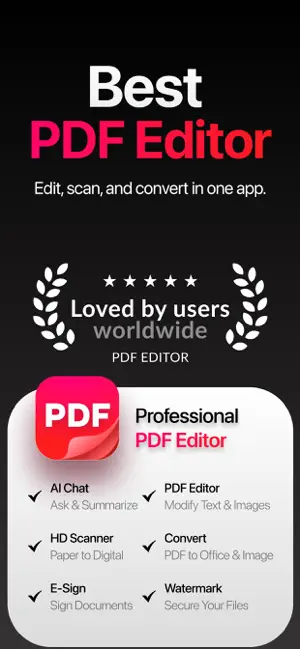
PDF Editor — All-in-One PDF Converter, Scanner, Editor & Signer. Meet PDF Editor, the ultimate all-in-one PDF toolkit built for speed, simplicity, and serious productivity. Scan, read, convert, edit, organize, protect, and sign your documents in seconds — everything you need to work with PDFs, all in one powerful app. Phone Scanner: • iPhone and iPad Scanner: Scan documents, notes, receipts, IDs or anything and save as high-quality PDF. Multi-page PDF supported. • Text recognition (OCR): Convert scanned text and images into searchable, editable PDFs with high accuracy. • Photo to PDF: Turn your camera photos into professional PDF documents instantly. PDF Converter: • JPG / PNG to PDF: Convert images into single or multi-page PDFs. • Office to PDF: Convert Word, Excel, PowerPoint files into PDF format. • PDF to Office: Turn PDFs into editable Word, Excel, and PowerPoint files. • Extract images from PDF: Export high-quality images from any PDF file PDF Editor: • Annotate PDF: Highlight text, add notes, comments, drawings or images to your PDF. • Fill and sign forms: Complete PDF forms and add your e-signature with ease. • PDF Reader: View, edit and manage PDFs stored on your device or in the cloud anytime ORGANIZE, OPTIMIZE AND PROTECT DOCUMENTS: • Compress PDF: Reduce file size while preserving quality. • Merge PDF: Combine multiple documents into one PDF file. • Split PDF: Split pages or extract specific pages into new PDFs. • Rotate PDF: Adjust and rotate pages as needed. • PDF Protection: Add or remove password protection. • Add page numbers: Customize position, size and style of page numbers. • Watermark PDF: Add text or image watermark with full control over placement and transparency. CLOUD INTEGRATION: • Connect iCloud, Google Drive and Dropbox. • Open, edit, save and share documents directly from the cloud Upgrade to PDF Genie Premium and unlock the full power of this all-in-one PDF scanner, converter, editor and signer with an auto-renewable subscription. Subscriptions renew automatically unless cancelled at least 24 hours before the end of the current period. You can manage or cancel anytime in your App Store account settings. More Subscription Information: - Weekly plan, annual plan and lifetime are available. - Payment will be charged to your Apple ID account at confirmation of purchase. - Subscription automatically renews unless auto-renew is turned off at least 24 hours before the end of the current period. - Within 24-hours prior to the end of the current period, the account will be charged for the renewal of the subscription, indicating the cost of the renewal. - You can manage subscriptions and turn off auto-renewal after purchase by going to your App Store account settings. - Any unused portion of a free trial period, if offered, will be forfeited when purchasing a subscription. Privacy Policy: https://loopmobile.io/privacy.html Terms of Use: https://loopmobile.io/tos.html
Ratings & reviews
4.5
15 ratings
What’s new
Version 1.0.7 · Updated October 22, 2026
Bug fixes and performance improvements.
App privacy
The developer, LOOP MOBILE FZCO, reported these privacy practices to Apple.
Data Used to Track You
The following data may be used to track you across apps and websites owned by other companies:
- Purchases: Purchase History
- Contact Info: Email Address, Name
- Identifiers: User ID, Device ID
Data Linked to You
The following data, which may be collected and linked to your identity, may be used for the following purposes:
- Identifiers: User ID, Device ID
- Purchases: Purchase History
- Contact Info: Email Address, Name
Used for: Third-Party Advertising, Developer’s Advertising or Marketing, Analytics, Product Personalization, App Functionality
Data Not Linked to You
The following data, which may be collected but is not linked to your identity, may be used for the following purposes:
- Usage Data: Advertising Data, Product Interaction
- Diagnostics: Crash Data, Performance Data
Used for: Third-Party Advertising, Developer’s Advertising or Marketing, Analytics, Product Personalization, App Functionality
Alternatives to PDF Editor: Edit, Sign & Scan
Looking for apps like PDF Editor: Edit, Sign & Scan? Here are 6 similar apps on the App Store. The highest rated is PDFly - PDF Editor & Scanner (5.0/5), and all 6 are free to download.
-
 PDFly - PDF Editor & Scanner
5.0
PDFly - PDF Editor & Scanner
5.0
-
 AI Cleaner: Clean Up Now
4.4
AI Cleaner: Clean Up Now
4.4
-
 Cleanse: Storage & Photo Clean
5.0
Cleanse: Storage & Photo Clean
5.0
-
 PDF Converter – Scan & Edit
5.0
PDF Converter – Scan & Edit
5.0
-
 Clean Master: Storage Saver
4.4
Clean Master: Storage Saver
4.4
-
 CleanPlus Master
| App | Rating | Price | Last updated | Compare |
|---|---|---|---|---|
| PDF Editor: Edit, Sign & Scan | 4.5 / 5 (15 ratings) | Free | October 22, 2026 | |
| PDFly - PDF Editor & Scanner | 5.0 / 5 (2) | Free | Apr 16, 2026 | Compare |
| AI Cleaner: Clean Up Now | 4.4 / 5 (13) | Free | Sep 11, 2025 | Compare |
| Cleanse: Storage & Photo Clean | 5.0 / 5 (1) | Free | Apr 22, 2026 | Compare |
| PDF Converter – Scan & Edit | 5.0 / 5 (3) | Free | Jan 7, 2026 | Compare |
| Clean Master: Storage Saver | 4.4 / 5 (77) | Free | Oct 14, 2026 | Compare |
| CleanPlus Master | – | Free | Sep 16, 2026 | Compare |