

Work Hours Calc
Laurent ABITBOL Productivity iPhoneiPadiPod touch
Work Hours Calc is a free Productivity app for iPhone and iPad by Laurent ABITBOL. Requires iOS 18.6. Updated September 14, 2026.
- Price
- Free
- on the App Store
- Size
- 5 MB
- Age 4+
- Updated
- Sep 14
- 2026 · v1.4
Screenshots


About Work Hours Calc
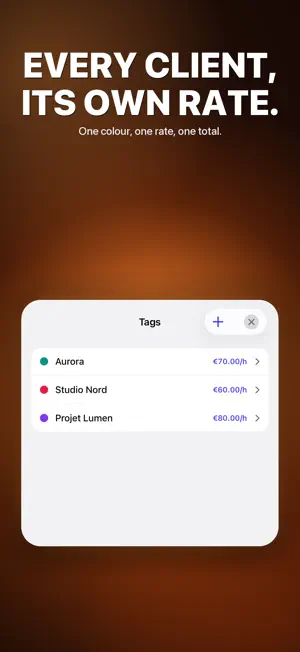
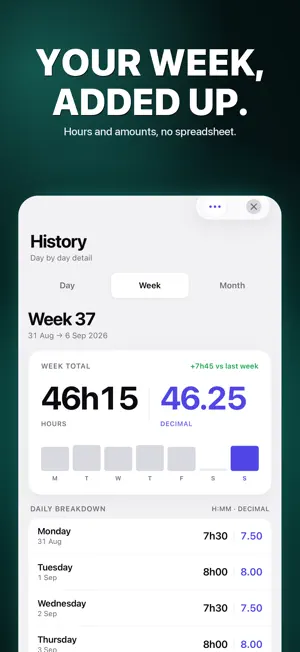
Turn your hours into income. Work Hours Calculator is the fastest way for freelancers and consultants to track time, bill by client, and hand each client a clean statement of hours — with no ads, ever. TRACK IN SECONDS • Add a time range in two taps — it is saved the moment you close it. • Shifts that cross midnight are detected automatically. • Optional auto-break deduction and rounding (5, 10, 15 or 30 min). • Prefer to clock in and out? Switch on live tracking and run a shift from your Lock Screen, a widget, or Siri. SEE YOUR MONEY • Set an hourly rate and your billable total appears on the home screen straight away. • Every total shown in HH:MM and decimal, side by side. • A different rate per client, for when one pays more than another. ORGANIZE BY CLIENT • Tag each entry with a colour-coded client or project. • Per-client breakdown of hours and amounts, with a total to invoice. WEEK & MONTH AT A GLANCE — FREE • Weekly and monthly recaps with charts, totals and an end-of-month projection. • Free, with no limit on clients or entries. CLIENT STATEMENT (PRO) • A PDF for one client at a time: your details, theirs, the period, every day worked, the rate and the amount. • Nothing about your other clients ever appears on it, so you can send it as it is. • It is a statement of hours worked, not an invoice — attach it to the invoice you raise elsewhere, or send it to clients who pay on a statement. • CSV export too, for your accountant or your spreadsheet. PRO • Unlimited history, client statements, CSV and PDF export, and iCloud sync. • Monthly or yearly subscription with a free trial, or unlock everything forever with a one-time Lifetime purchase. • Free covers tracking, clients, amounts and recaps, and keeps the current and previous month of history. PRIVATE BY DESIGN • No ads. No tracking. No analytics of any kind. Your data stays on your device, with optional iCloud sync. Fully translated into English, French, German, Spanish, Italian, Dutch, Polish and Portuguese. Works on iPhone and iPad. ——— Terms of Use (EULA): https://www.apple.com/legal/internet-services/itunes/dev/stdeula/ Privacy Policy: https://waikuu.com/work-hours-calculator-privacy-policy/
What’s new
Version 1.4 · Updated September 14, 2026
Your hours, wherever you start them. • Shifts started with Siri, the widget or the Live Activity are now billed to the selected client, with your own rounding and auto-pause. • The Live Activity really stops when you stop it. • A day you already recorded keeps the rounding it was billed with, so changing the setting no longer rewrites a statement you have already sent. • iCloud sync no longer drops ranges added on another device. • An invalid hourly rate now tells you, instead of vanishing in silence. • VoiceOver announces the selected option in every setting, and the home card no longer shows French in other languages.
App privacy
The developer, Laurent ABITBOL, reported these privacy practices to Apple.
Data Not Collected
The developer does not collect any data from this app.
Alternatives to Work Hours Calc
Looking for apps like Work Hours Calc? Here are 6 similar apps on the App Store.
-
 MoneyModeAI
-
 Work Time Track
-
 WorkTracker: Shift & Pay
-
 TimePay: Work Hours & Pay
-
 Domilien : suivi CESU
-
 Shift Calendar – Shift Cycle
| App | Rating | Price | Last updated | Compare |
|---|---|---|---|---|
| Work Hours Calc | – | Free | September 14, 2026 | |
| MoneyModeAI | – | Free | Mar 25, 2026 | Compare |
| Work Time Track | – | Free | Jun 27, 2026 | Compare |
| WorkTracker: Shift & Pay | – | Free | Oct 22, 2026 | Compare |
| TimePay: Work Hours & Pay | – | Free | Sep 28, 2026 | Compare |
| Domilien : suivi CESU | – | Free | Oct 19, 2026 | Compare |
| Shift Calendar – Shift Cycle | – | Free | Sep 27, 2026 | Compare |
Compare Work Hours Calc with the top alternatives: ratings, updates, ASO score and keyword gaps →