

WorkTracker: Shift & Pay
Oleksandr Shevchenko Productivity iPhoneiPadiPod touch
WorkTracker: Shift & Pay is a free Productivity app for iPhone and iPad by Oleksandr Shevchenko. Requires iOS 17.0. Updated October 22, 2026.
- Price
- Free
- on the App Store
- Size
- 4 MB
- Age 4+
- Updated
- Oct 22
- 2026 · v1.0.38
Screenshots


About WorkTracker: Shift & Pay
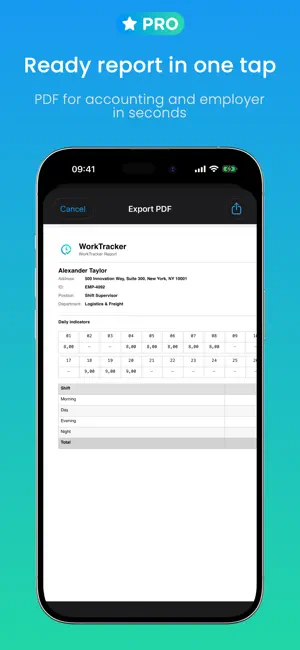
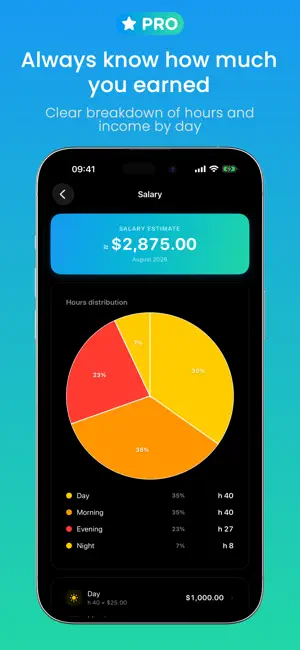
WorkTracker is built for shift workers who want to know exactly how many hours they have worked and how much they have earned - no notebooks, no spreadsheets, no guesswork. Log a shift in one tap and WorkTracker takes care of the rest: hours, breaks, and pay, all tracked in a clean shift calendar and ready to export whenever you need it. SHIFT TRACKING Log your workday in one tap - from the app or straight from the home screen widget Up to 6 shift types at once: morning, day, evening, night, and extra - each with its own start time, end time, and break A clear monthly calendar showing every shift and total hours worked Add notes and a job site address if you work at different locations PAY AND STATS Set your hourly rate and WorkTracker calculates your earnings for the day, month, and year automatically Overtime tracking with its own pay multiplier A breakdown by shift type - see exactly how many hours and how much each one brought in Support for major currencies, formatted correctly for your region AUTOMATIC LOCATION TRACKING Shifts get logged automatically when you are at work - nothing to tap, nothing to remember Runs quietly in the background and goes easy on your battery PDF REPORTS A clean monthly report: a calendar grid with hours plus a full breakdown of every shift Choose exactly what is included - locations, weekday, shift type, notes, breaks Export a ready-to-send file for your accountant, employer, or your own records HOME SCREEN WIDGET Log a shift without opening the app, and keep your shift count and hours for the month in view at all times. Built for delivery drivers, retail staff, security guards, healthcare workers, anyone on a rotating roster, and every shift worker who wants their hours and pay tracked properly - no spreadsheets required. WorkTracker is free to download. Some features - including pay and stats calculations, automatic location tracking, and PDF export - require a WorkTracker Pro subscription. Terms of Use (EULA): https://www.apple.com/legal/internet-services/itunes/dev/stdeula/
What’s new
Version 1.0.38 · Updated October 22, 2026
• Smarter automatic shift tracking by location • Shifts now appear instantly in the calendar and widget • New welcome screens for a quick start • Bug fixes and improvements
App privacy
The developer, Oleksandr Shevchenko, reported these privacy practices to Apple.
Data Not Linked to You
The following data, which may be collected but is not linked to your identity, may be used for the following purposes:
- Purchases: Purchase History
- Usage Data: Product Interaction
- User Content: Customer Support
Used for: Analytics, App Functionality
Alternatives to WorkTracker: Shift & Pay
Looking for apps like WorkTracker: Shift & Pay? Here are 6 similar apps on the App Store. The highest rated is RotaCell: Shift Planner (5.0/5), and all 6 are free to download.
-
 euvra: worktime tracker
-
 RotaCell: Shift Planner
5.0
-
 TrackYourLife - Zeiterfassung
-
 Stash: Save & Reuse
-
 BeeWork
-
 Meine Stunden: Timesheet
| App | Rating | Price | Last updated | Compare |
|---|---|---|---|---|
| WorkTracker: Shift & Pay | – | Free | October 22, 2026 | |
| euvra: worktime tracker | – | Free | Sep 22, 2026 | Compare |
| RotaCell: Shift Planner | 5.0 / 5 (4) | Free | Oct 22, 2026 | Compare |
| TrackYourLife - Zeiterfassung | – | Free | Jun 7, 2026 | Compare |
| Stash: Save & Reuse | – | Free | Oct 1, 2026 | Compare |
| BeeWork | – | Free | Sep 25, 2026 | Compare |
| Meine Stunden: Timesheet | – | Free | Oct 6, 2026 | Compare |